Putting It All Together

PSY 410: Data Science for Psychology

Dr. Sara Weston

2026-06-03

Looking back

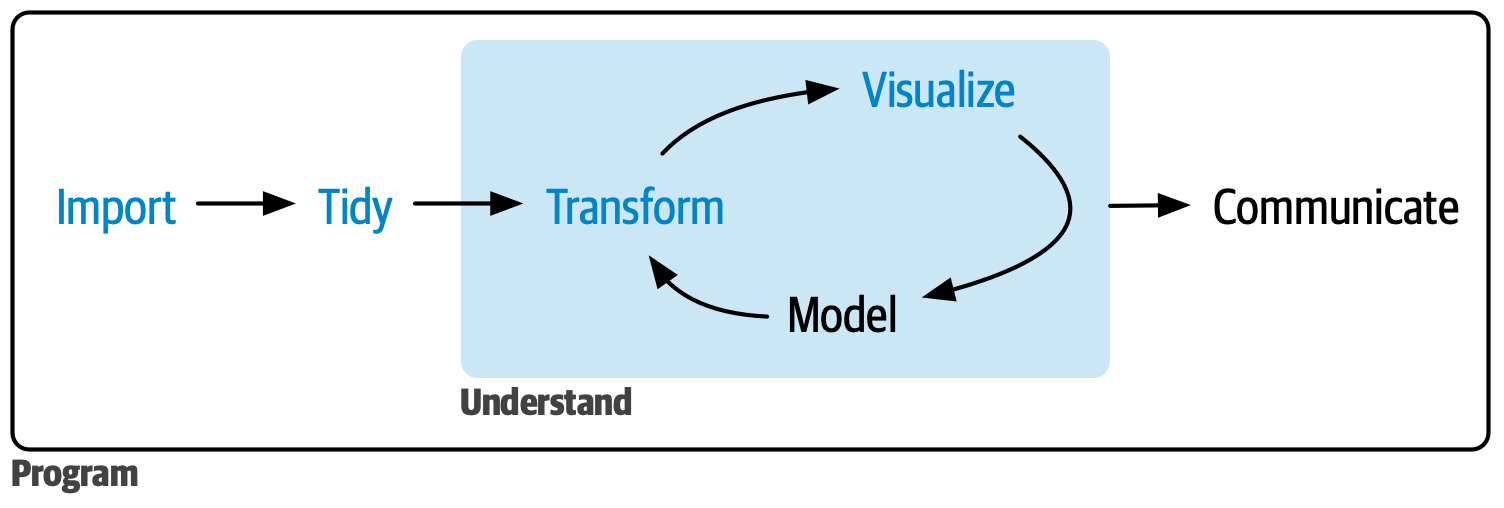
The data science workflow

R4DS data science workflow diagram showing the cycle: Import, Tidy, Transform, Visualize, Model, Communicate

Ten weeks ago, you couldn’t do any of this. Now you can do all of it.

Live demonstration

A real analysis: Start to finish

Let’s analyze a complete psychology dataset together.

Research question: Does social media use predict anxiety in college students?

I’ll demonstrate the full workflow:

  1. Import messy data
  2. Clean and tidy
  3. Explore with visualizations
  4. Create publication-ready figures
  5. Build a Quarto report

The dataset

# Simulated college student survey data
set.seed(2026)
social_media <- tibble(
  id = 1:200,
  age = sample(18:24, 200, replace = TRUE),
  gender = sample(c("Male", "Female", "Non-binary", "Prefer not to say"),
                  200, replace = TRUE),
  hours_social_media = rnorm(200, 4, 2),
  gad7_total = rnorm(200, 8, 5),  # Generalized Anxiety Disorder scale
  phq9_total = rnorm(200, 10, 6),  # Depression scale
  academic_year = sample(c("Freshman", "Sophomore", "Junior", "Senior"),
                        200, replace = TRUE)
) |>
  mutate(
    # Make anxiety correlate with social media use
    gad7_total = gad7_total + hours_social_media * 0.8,
    # Add some missing data
    hours_social_media = if_else(runif(200) < 0.05, NA_real_, hours_social_media),
    gad7_total = if_else(runif(200) < 0.08, NA_real_, gad7_total)
  )

Step 1: Explore the data

glimpse(social_media)
Rows: 200
Columns: 7
$ id                 <int> 1, 2, 3, 4, 5, 6, 7, 8, 9, 10, 11, 12, 13, 14, 15, …
$ age                <int> 22, 18, 18, 23, 22, 24, 20, 21, 21, 22, 24, 21, 19,…
$ gender             <chr> "Non-binary", "Prefer not to say", "Female", "Prefe…
$ hours_social_media <dbl> 3.3448174, 3.2895680, 5.5618681, 5.2173403, 6.15235…
$ gad7_total         <dbl> NA, 11.577943, 12.102962, 17.555169, 18.276343, 15.…
$ phq9_total         <dbl> 8.50042866, 8.19341562, 1.00400734, 10.20523209, 4.…
$ academic_year      <chr> "Junior", "Freshman", "Sophomore", "Freshman", "Jun…
# Check for missing data
social_media |>
  summarize(across(everything(), ~sum(is.na(.x))))
# A tibble: 1 × 7
     id   age gender hours_social_media gad7_total phq9_total academic_year
  <int> <int>  <int>              <int>      <int>      <int>         <int>
1     0     0      0                  6         13          0             0

Step 2: Clean the data

social_media_clean <- social_media |>
  # Remove rows with missing outcome
  drop_na(gad7_total) |>
  # Create anxiety categories
  mutate(
    anxiety_category = case_when(
      gad7_total < 5 ~ "Minimal",
      gad7_total < 10 ~ "Mild",
      gad7_total < 15 ~ "Moderate",
      gad7_total >= 15 ~ "Severe"
    ),
    anxiety_category = factor(anxiety_category,
                              levels = c("Minimal", "Mild", "Moderate", "Severe")),
    # Reorder academic year
    academic_year = factor(academic_year,
                          levels = c("Freshman", "Sophomore", "Junior", "Senior"))
  )

Step 3: Descriptive statistics

social_media_clean |>
  summarize(
    n = n(),
    mean_age = mean(age),
    mean_hours = mean(hours_social_media, na.rm = TRUE),
    sd_hours = sd(hours_social_media, na.rm = TRUE),
    mean_anxiety = mean(gad7_total),
    sd_anxiety = sd(gad7_total)
  )
# A tibble: 1 × 6
      n mean_age mean_hours sd_hours mean_anxiety sd_anxiety
  <int>    <dbl>      <dbl>    <dbl>        <dbl>      <dbl>
1   187     21.0       3.97     1.93         11.9       5.42

Step 4: Initial visualization

ggplot(social_media_clean, aes(x = hours_social_media, y = gad7_total)) +
  geom_point(alpha = 0.5) +
  geom_smooth(method = "lm", color = "steelblue") +
  labs(
    title = "Social media use predicts higher anxiety",
    subtitle = "Self-reported daily hours and GAD-7 scores",
    x = "Daily social media use (hours)",
    y = "Anxiety score (GAD-7)"
  ) +
  theme_minimal()

Step 4: Initial visualization

Scatterplot with a linear trend line showing that higher daily social media use is associated with higher GAD-7 anxiety scores among college students.

Step 5: Compute correlation

# Clean data for correlation (remove NAs)
correlation_data <- social_media_clean |>
  drop_na(hours_social_media, gad7_total)

cor_value <- cor(correlation_data$hours_social_media,
                 correlation_data$gad7_total)

cor_value
[1] 0.3388387

Finding: Moderate positive correlation (r = 0.34)

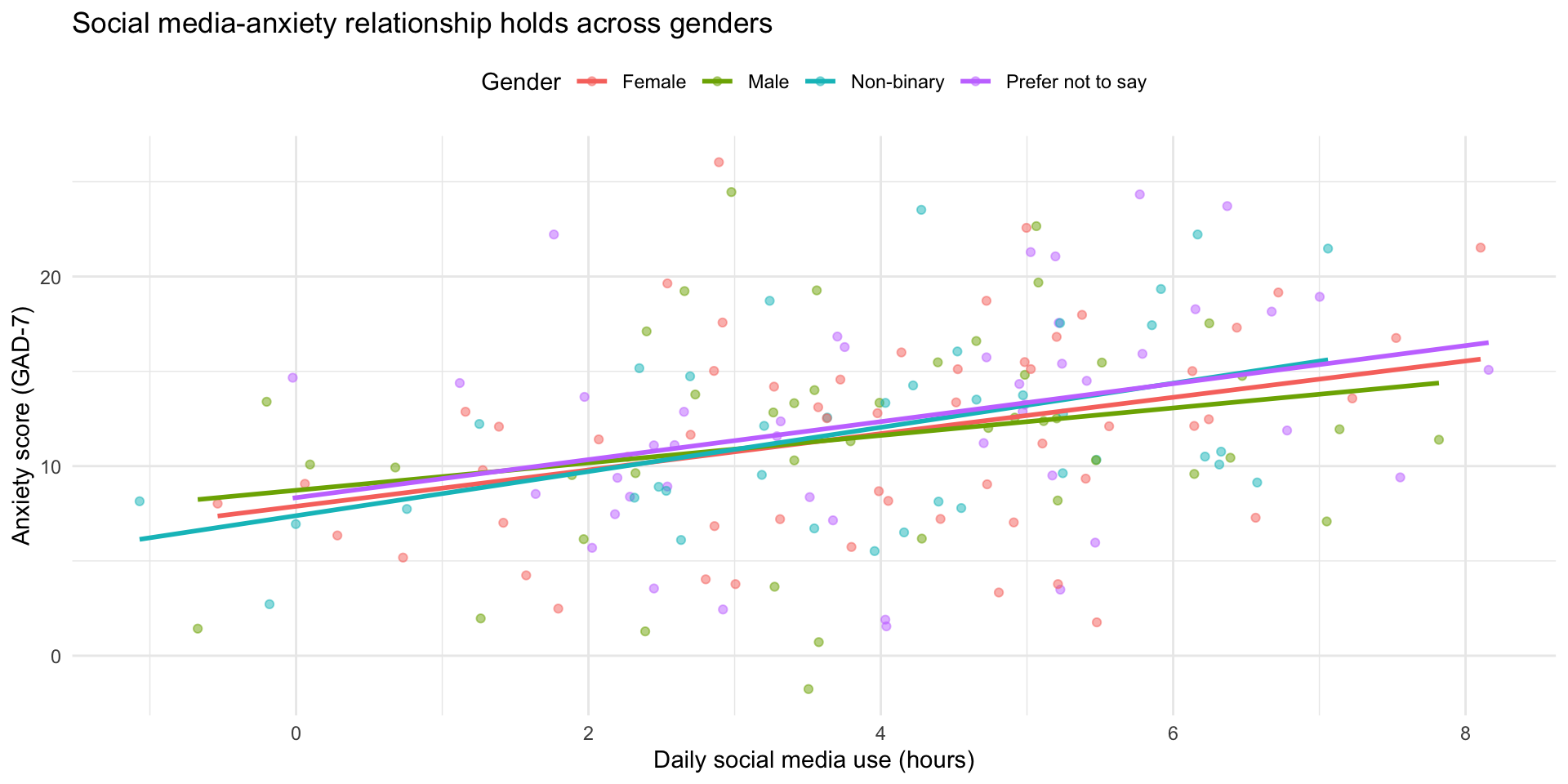
Step 6: Explore by gender

ggplot(social_media_clean, aes(x = hours_social_media, y = gad7_total, color = gender)) +
  geom_point(alpha = 0.5) +
  geom_smooth(method = "lm", se = FALSE) +
  labs(
    title = "Social media-anxiety relationship holds across genders",
    x = "Daily social media use (hours)",
    y = "Anxiety score (GAD-7)",
    color = "Gender"
  ) +
  theme_minimal() +
  theme(legend.position = "top")

Step 6: Explore by gender

Scatterplot with separate colored trend lines for each gender, showing the positive relationship between social media use and anxiety holds across all gender groups.

Step 7: Anxiety categories

social_media_clean |>
  count(anxiety_category) |>
  mutate(anxiety_category = fct_rev(anxiety_category)) |>
  ggplot(aes(x = n, y = anxiety_category, fill = anxiety_category)) +
  geom_col() +
  scale_fill_manual(values = c(
    "Minimal" = "#2ecc71",
    "Mild" = "#f39c12",
    "Moderate" = "#e67e22",
    "Severe" = "#e74c3c"
  )) +
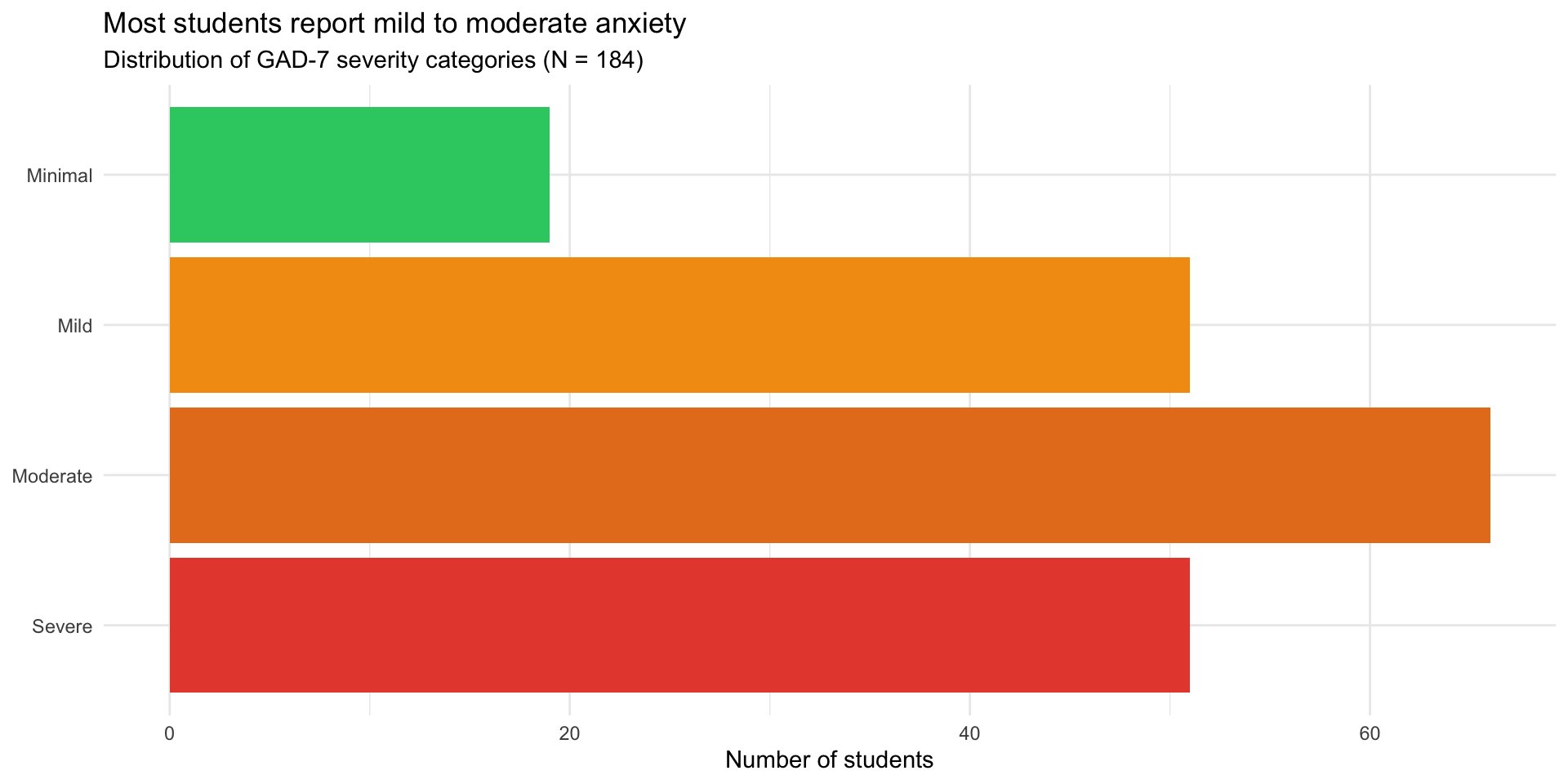
  labs(
    title = "Most students report mild to moderate anxiety",
    subtitle = "Distribution of GAD-7 severity categories (N = 184)",
    x = "Number of students",
    y = NULL
  ) +
  theme_minimal() +
  theme(legend.position = "none")

Step 7: Anxiety categories

Horizontal bar chart showing the distribution of anxiety severity categories, with most students falling in the mild to moderate range and fewer in the minimal or severe categories.

Step 8: Create summary table

summary_table <- social_media_clean |>
  group_by(anxiety_category) |>
  summarize(
    N = n(),
    Mean_Hours = mean(hours_social_media, na.rm = TRUE),
    SD_Hours = sd(hours_social_media, na.rm = TRUE),
    Mean_Age = mean(age),
    .groups = "drop"
  )

knitr::kable(summary_table, digits = 1,
             col.names = c("Anxiety Category", "N", "M Hours", "SD Hours", "M Age"))
Anxiety Category N M Hours SD Hours M Age
Minimal 19 3.0 1.7 21.2
Mild 51 3.2 2.0 20.9
Moderate 66 4.1 1.8 20.7
Severe 51 5.0 1.5 21.2

Step 9: Write it up in Quarto

## Results

We analyzed data from 187 college students
(M age = 21 years).
Students reported using social media an average of
4
hours per day (SD = 1.9).

Social media use was positively correlated with anxiety scores
(r = 0.34, p < .001), such that students who
used social media more reported higher anxiety levels.

```{r}
#| echo: false
#| fig-cap: "Relationship between social media use and anxiety"
# [Insert scatterplot code]
```

What this demonstrates

Complete workflow — import to interpretation ✅ Data cleaning — handling missing data, creating factors ✅ Multiple visualizations — exploring from different angles ✅ Summary statistics — both numerical and tabular ✅ Inline reporting — no hard-coded numbers ✅ Clear narrative — telling the story

When things break

The 6 errors you’ll see most often

Error What it means Fix
object 'x' not found Typo, wrong capitalization, or object not created yet Check spelling; run the code that creates it
could not find function Typo in function name or package not loaded Check spelling; run library()
unexpected symbol Missing |>, +, comma, or parenthesis Check the line before the error
non-numeric argument Math on text — variable is character, not numeric Check type with class() or glimpse()
did you mean '=='? Used = (assignment) instead of == (comparison) in filter() Change = to ==
ggplot + error Missing + between ggplot layers Every line except the last needs +

A 5-step debugging strategy

  1. Read the error message — actually read it. It tells you where and what.
  1. Check the basics — package loaded? Object created? Spelling correct?
  1. Run line by line — pipe chains: run from the top, adding one line at a time. Which line breaks?
  1. Simplify — make a tiny test dataset (tibble(x = 1:3)) and try the same operation.
  1. Google it — include “R”, the package name, and the exact error message.

When you ask for help: make a reprex

Reprex = reproducible example — the smallest code that recreates your error.

Bad: “My code doesn’t work. Help!”

Good:

“I’m trying to filter my data but getting ‘object not found’:

library(tidyverse)
data <- tibble(x = 1:3, y = c("a", "b", "c"))
filter(data, x > 1)
# Error: object 'data' not found

I expected rows where x > 1.”

Tip: Use dput() to share a small slice of your real data so others can recreate it exactly.

Where to get help after this course

Before posting: search first, be specific, show what you tried, and include a reprex.

Pair coding break

Your turn: Debug this code

This code has several errors. Find and fix them all:

library(tidyverse)

# Load data
Study_data <- tibble(
  id = 1:5,
  Score = c(10, 15, 12, 18, 14),
  Group = c("A", "B", "A", "B", "A")
)

# Analyze
study_data |>
  filter(Group = "A") |>
  summarize(
    mean_score = mean(score)
    sd_score = sd(score)
  )

Time: 10 minutes

Tip

There are at least 4 bugs. Read each line carefully and check: names, operators, punctuation.

Before we move on

Upload your code to Canvas for participation credit. Paste what you have into today’s in-class submission — it doesn’t need to work perfectly.

Where to go from here

You have the foundation

This course covered data wrangling and visualization — the foundation of data science.

What’s next?

  • Statistics in R — inference, hypothesis testing
  • Advanced R programming — functions, iteration
  • Version control — Git and GitHub
  • Interactive tools — Shiny dashboards
  • Machine learning — tidymodels framework

Statistics in R

You can now learn inferential statistics:

# t-test
t.test(gad7_total ~ gender, data = social_media_clean)

# ANOVA
aov(gad7_total ~ academic_year, data = social_media_clean)

# Regression
lm(gad7_total ~ hours_social_media + age, data = social_media_clean)

Courses to consider:

Writing functions

Automate repetitive tasks:

# Instead of copying this code multiple times...
compute_scale_score <- function(data, items) {
  data |>
    rowwise() |>
    mutate(score = mean(c_across(all_of(items)), na.rm = TRUE)) |>
    ungroup()
}

# Use it anywhere
phq9_scored <- compute_scale_score(my_data, c("phq1", "phq2", "phq3"))

Version control with Git

Track changes to your code over time:

  • Never lose work — full history of changes
  • Collaborate easily — merge changes from multiple people
  • Professional standard — expected in industry and academia

Interactive visualizations with Shiny

Create web apps for your data:

library(shiny)

ui <- fluidPage(
  selectInput("condition", "Choose condition:", choices = c("CBT", "Control")),
  plotOutput("plot")
)

server <- function(input, output) {
  output$plot <- renderPlot({
    data |> filter(condition == input$condition) |> ggplot(...)
  })
}

shinyApp(ui, server)

Machine learning with tidymodels

Predictive modeling with tidy syntax:

library(tidymodels)

# Split data
data_split <- initial_split(social_media_clean)
train_data <- training(data_split)
test_data <- testing(data_split)

# Fit model
lm_fit <- linear_reg() |>
  fit(gad7_total ~ hours_social_media + age, data = train_data)

# Make predictions
predict(lm_fit, test_data)

Learning resources

Free online resources

Books:

Interactive learning:

Community resources

Weekly challenges:

Communities:

Keep practicing

The only way to maintain skills: use them

Ideas:

  • Analyze data from your own research
  • Replicate figures from published papers
  • Join #TidyTuesday
  • Help friends/labmates with their data
  • Create a personal website with Quarto
  • Build a data visualization portfolio

Tip

Aim for 1 hour per week — consistency matters more than intensity

Final reflections

What makes a good data scientist?

It’s not about knowing every function or memorizing syntax.

Good data scientists:

  1. Ask good questions — what story is the data telling?
  2. Stay curious — always learning new tools and techniques
  3. Communicate clearly — make complex findings accessible
  4. Work reproducibly — others can verify and build on your work
  5. Think critically — question assumptions, check for bias
  6. Persist through errors — debugging is part of the job

You’ve developed all of these skills this quarter.

The growth mindset

Ten weeks ago, many of you had never written a line of code.

Now you can:

  • Import and clean messy data
  • Create publication-quality visualizations
  • Wrangle complex datasets with joins and pivots
  • Handle missing data appropriately
  • Build reproducible reports

That’s incredible growth.

Errors are part of the process

Remember:

  • Everyone gets errors — even experienced programmers
  • Errors mean you’re learning
  • Each error you solve makes you better
  • The frustration is temporary; the skills are permanent

Important

If you take one thing from this course: You can learn hard things.

Thank you

Thank you for:

  • Showing up and participating
  • Helping each other
  • Asking questions
  • Persisting through challenges
  • Trusting the process

You’ve been a great class. I’m excited to see what you do with these skills.

Final project presentations

Presentation guidelines

Format: 5 minutes per person

What to include:

  1. Research question (1 min)
  2. Dataset description (1 min)
  3. Key finding with visualization (2 min)
  4. Implications/what you learned (1 min)

Tips:

  • Show 1-2 of your best figures
  • Focus on the story, not technical details
  • Practice timing!

Presentation order

We’ll go alphabetically by last name.

Remember:

  • This is a supportive environment
  • Everyone is nervous — that’s normal
  • We want to hear about your work
  • Questions are signs of interest, not criticism

Course evaluations

Please fill out course evaluations

Your feedback helps me improve the course for future students.

What’s helpful:

  • Specific examples (this assignment, that lecture)
  • Constructive suggestions
  • What worked well (so I keep doing it)
  • What didn’t work (so I can change it)

I read every evaluation carefully.

Final words

Keep learning

The field of data science is constantly evolving:

  • New packages are released every day
  • Best practices change
  • Tools improve

Stay curious. Stay connected. Keep coding.

You’re now a data scientist

You have the skills to:

  • Answer questions with data
  • Create compelling visualizations
  • Conduct reproducible research
  • Teach yourself new tools

Use them.

Make psychology more reproducible, transparent, and data-driven.

Final final words

A smooth logarithmic curve labeled 'Your learning journey continues' showing rapid early growth in skills over time that gradually levels off, representing the learning curve.

Thank you!

Good luck with your final projects and future data science adventures!

Stay in touch:

  • ?var:instructor.email
  • Office hours (through finals week)

Now let’s see your final projects! 🎉