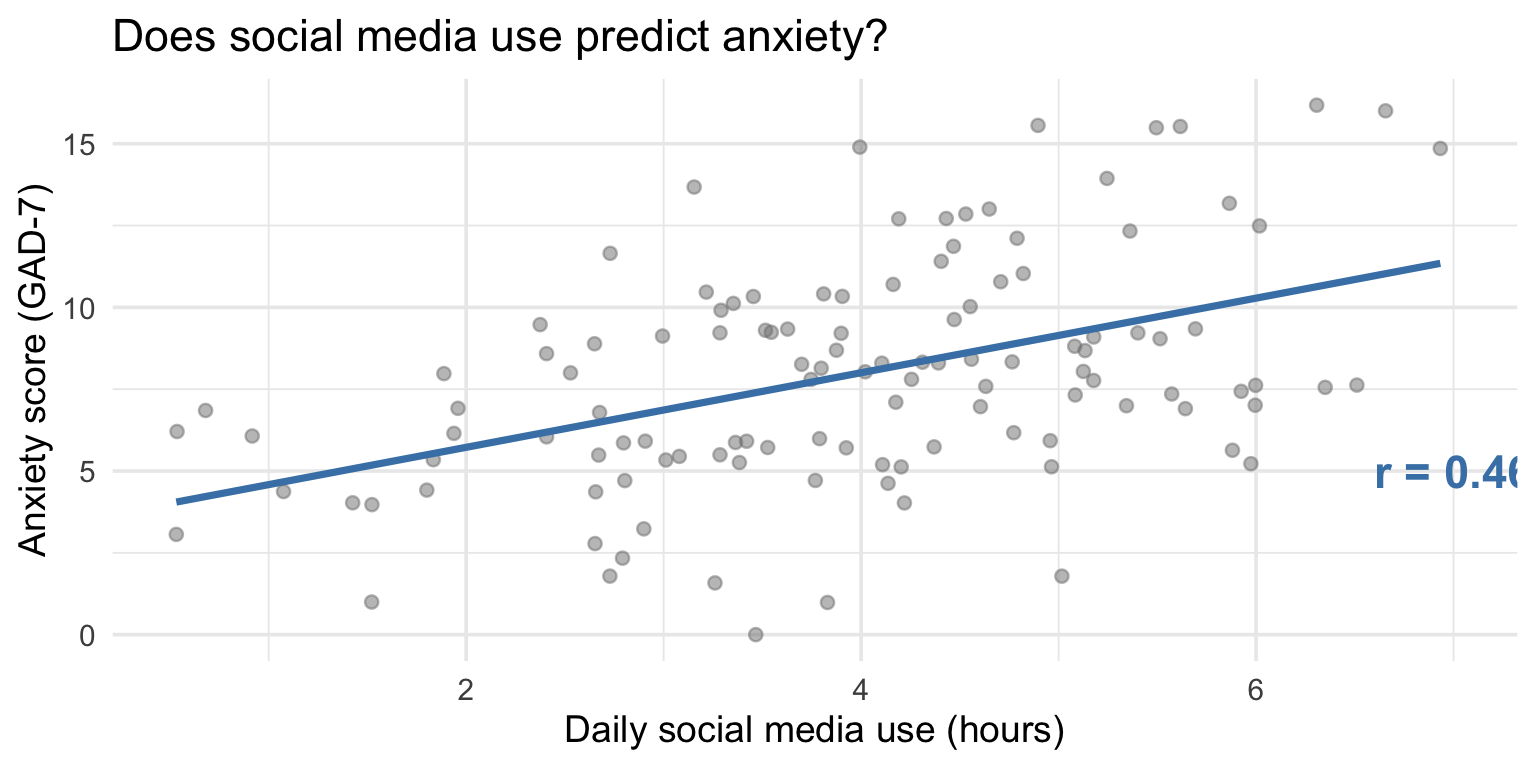
cor(study_data$hours_social_media, study_data$gad7_total)[1] 0.4613455PSY 410: Data Science for Psychology
2026-06-01
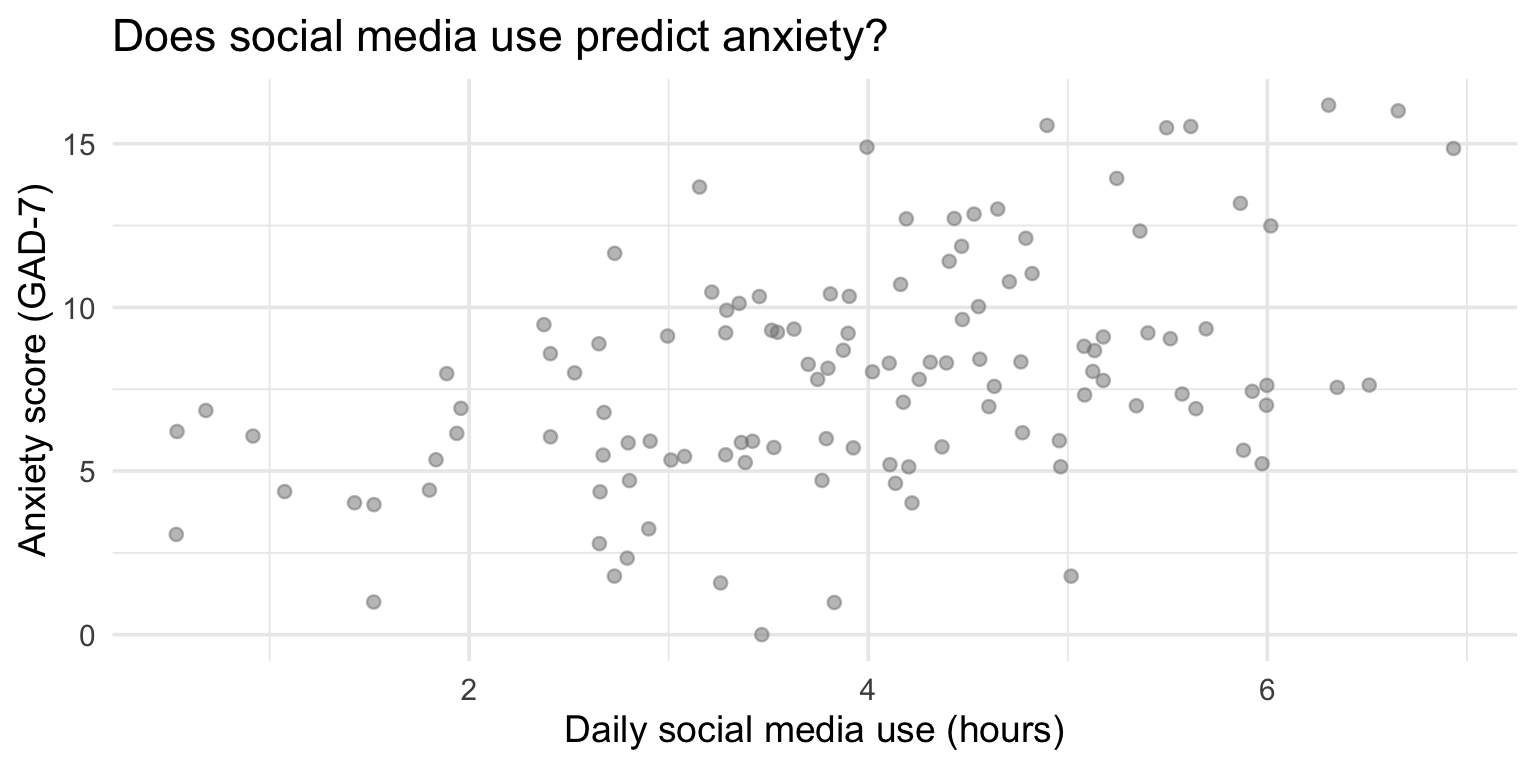
Today you learn to put a number on that pattern.
Correlation measures the strength and direction. Regression draws the line.
Correlation (r) quantifies the linear relationship between two variables.
| Value of r | Interpretation |
|---|---|
| r = 1.0 | Perfect positive |
| r = 0.7 | Strong positive |
| r = 0.3 | Weak positive |
| r = 0.0 | No linear relationship |
| r = -0.3 | Weak negative |
| r = -0.7 | Strong negative |
| r = -1.0 | Perfect negative |
Key: r tells you direction and strength, not causation.
That’s it. One function, two variables, one number.
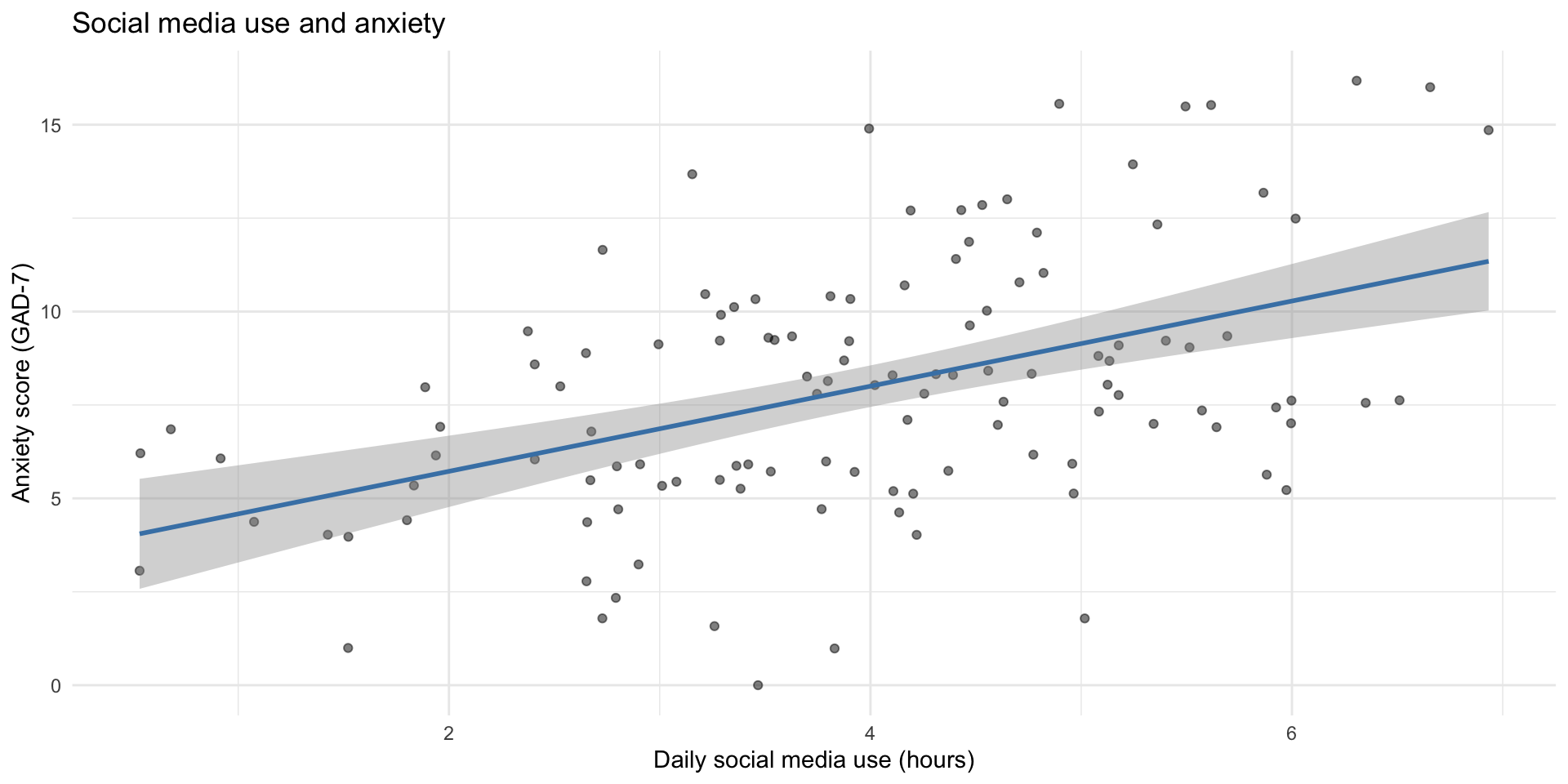
Every time you wrote geom_smooth(method = "lm"), you were fitting a line through the data.
    Pearson's product-moment correlation

data:  study_data$hours_social_media and study_data$gad7_total
t = 5.6485, df = 118, p-value = 1.138e-07
alternative hypothesis: true correlation is not equal to 0
95 percent confidence interval:
 0.3075349 0.5916611
sample estimates:
      cor
0.4613455
What to report: r, p-value, and 95% confidence interval.
study_data |>
  select(hours_social_media, gad7_total, phq9_total, therapy_hours) |>
  cor(use = "complete.obs") |>
  round(2)
hours_social_media gad7_total phq9_total therapy_hours
hours_social_media 1.00 0.46 0.36 0.00
gad7_total 0.46 1.00 0.22 0.09
phq9_total 0.36 0.22 1.00 0.06
therapy_hours 0.00 0.09 0.06 1.00Each cell is the correlation between the row variable and the column variable. The diagonal is always 1 (a variable correlates perfectly with itself).
cor_matrix <- study_data |>
  select(hours_social_media, gad7_total, phq9_total, therapy_hours) |>
  cor(use = "complete.obs")

# Manual heatmap with ggplot
cor_matrix |>
  as.data.frame() |>
  rownames_to_column("var1") |>
  pivot_longer(-var1, names_to = "var2", values_to = "r") |>
  ggplot(aes(x = var1, y = var2, fill = r)) +
  geom_tile() +
  geom_text(aes(label = round(r, 2)), size = 4) +
  scale_fill_gradient2(low = "#e74c3c", mid = "white", high = "#2c3e50",
                       midpoint = 0, limits = c(-1, 1)) +
  labs(title = "Correlation matrix", x = NULL, y = NULL) +
  theme_minimal() +
  theme(axis.text.x = element_text(angle = 45, hjust = 1))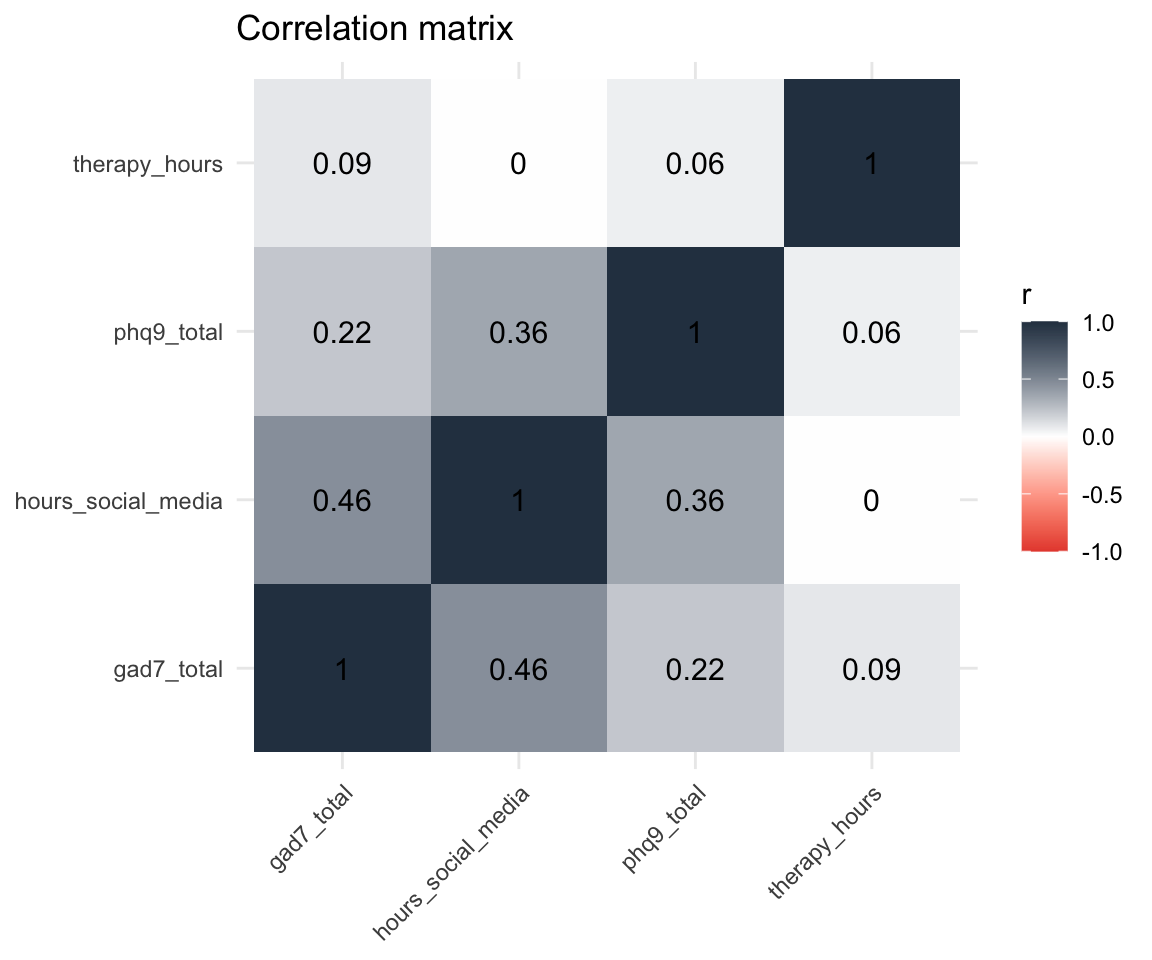
| Correlation | Why it’s not causal |
|---|---|
| Ice cream sales & drowning deaths | Both increase in summer (confound: temperature) |
| Shoe size & reading ability | Both increase with age (confound: development) |
| Social media & anxiety | Anxious people may seek social media for comfort (reverse causation) |
To establish causation, you need an experiment — random assignment, manipulation, control group. Correlation from observational data tells you variables are related, not that one causes the other.
Using the study_data dataset (already loaded):
therapy_hours and depression_postcor.test() — is the correlation significant?Time: 10 minutes
Tip
Negative correlation means as one variable goes up, the other goes down. Think about what that means for therapy and depression.
📤 Submit your code on Canvas for participation credit. Paste what you have — it doesn’t need to work perfectly.
Correlation tells you the relationship exists and how strong it is.
Regression goes further — it gives you an equation to predict one variable from another.
The equation: y = b0 + b1 * x
Read this as: “Predict anxiety (gad7_total) from social media use (hours_social_media).”
The ~ means “predicted by.”
Call:
lm(formula = gad7_total ~ hours_social_media, data = study_data)

Residuals:
    Min      1Q  Median      3Q     Max
-7.3946 -2.0579 -0.2734  2.3845  6.9013

Coefficients:
                   Estimate Std. Error t value Pr(>|t|)
(Intercept)          3.4445     0.8437   4.083 8.13e-05 ***
hours_social_media   1.1395     0.2017   5.649 1.14e-07 ***
---
Signif. codes:  0 '***' 0.001 '**' 0.01 '*' 0.05 '.' 0.1 ' ' 1

Residual standard error: 3.074 on 118 degrees of freedom
Multiple R-squared:  0.2128,    Adjusted R-squared:  0.2062
F-statistic: 31.91 on 1 and 118 DF, p-value: 1.138e-07| Term | Estimate | p | In plain language |
|---|---|---|---|
| (Intercept) | 3.44 | < .001 | Predicted anxiety when social media = 0 hours |
| hours_social_media | 1.14 | < .001 | For each additional hour of social media, anxiety increases by this much |
In a sentence: For each additional hour of daily social media use, anxiety scores increase by about 1.1 points on the GAD-7.
R-squared is the proportion of variation in y that is predictable from x.
The other 79% reflects everything else that varies across people (genetics, life events, personality, measurement noise).
ggplot(study_data, aes(x = hours_social_media, y = gad7_total)) +
  geom_point(alpha = 0.5) +
  geom_smooth(method = "lm", color = "steelblue") +
  labs(
    title = "Social media use predicts higher anxiety",
    subtitle = paste0("b = ", round(tidy(model)$estimate[2], 2),
                      ", R² = ", round(glance(model)$r.squared, 2)),
    x = "Daily social media use (hours)",
    y = "Anxiety score (GAD-7)"
  ) +
  theme_minimal()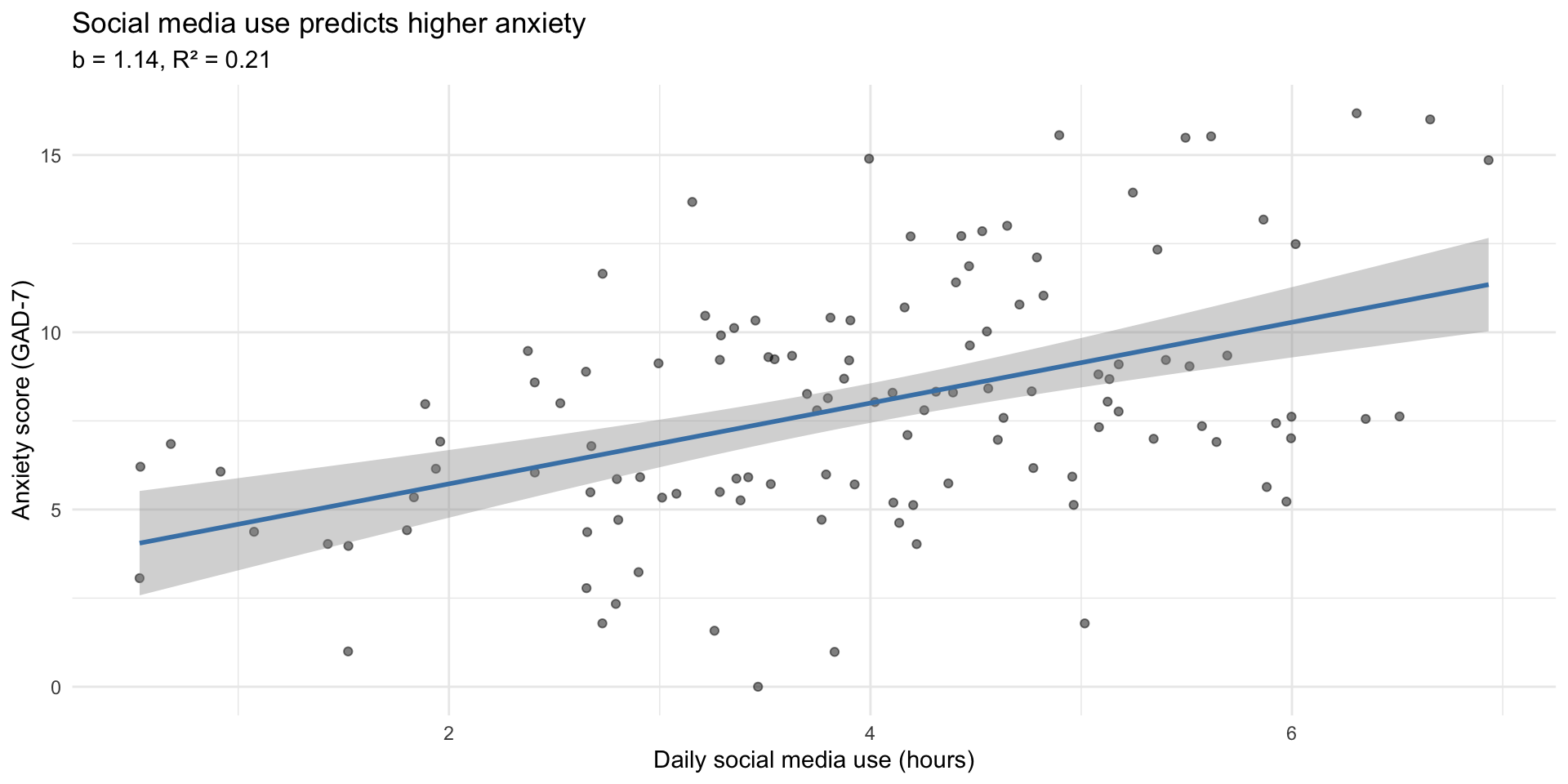
The raw summary() output is hard to work with. broom::tidy() gives you a tidy data frame:
# A tibble: 2 × 5
  term               estimate std.error statistic     p.value
  <chr>                 <dbl>     <dbl>     <dbl>       <dbl>
1 (Intercept)            3.44     0.844      4.08 0.0000813
2 hours_social_media 1.14 0.202 5.65 0.000000114| r.squared | adj.r.squared | sigma | p.value |
|---|---|---|---|
| 0.213 | 0.206 | 3.074 | 0 |
The workflow you now know:
cor() to measure strength and directionlm() to get the equation and test significancebroom::tidy() + knitr::kable() for clean tablesThis is what researchers do. You now have the tools.
We’ve been looking at class survey data all term. Now we can quantify what we’ve been seeing.
# Correlation: sleep and stress
cor(class_survey$sleep_hrs, class_survey$stress, use = "complete.obs")
[1] -0.1750722
    Pearson's product-moment correlation

data:  class_survey$sleep_hrs and class_survey$stress
t = -0.97395, df = 30, p-value = 0.3379
alternative hypothesis: true correlation is not equal to 0
95 percent confidence interval:
 -0.4936316  0.1849099
sample estimates:
       cor
-0.1750722 group_by() + summarize() works the same with cor() as with any other summary:
class_survey |>
  group_by(chronotype) |>
  summarize(
    r = cor(sleep_hrs, stress, use = "complete.obs"),
    n = n()
  )
# A tibble: 3 × 3
chronotype r n
<chr> <dbl> <int>
1 Evening person 0.0725 22
2 Morning person -0.474 9
3 Neither -0.990 3One pipeline, one correlation per group. Same skill you’ve been using all term — just a new summary function.
class_model <- lm(stress ~ sleep_hrs, data = class_survey)
tidy(class_model) |> knitr::kable(digits = 3)| term | estimate | std.error | statistic | p.value |
|---|---|---|---|---|
| (Intercept) | 7.472 | 2.462 | 3.035 | 0.005 |
| sleep_hrs | -0.329 | 0.338 | -0.974 | 0.338 |
In plain language: For each additional hour of sleep, stress changes by -0.33 points. Sleep explains 3% of the variation in stress.
ggplot(class_survey, aes(x = sleep_hrs, y = stress)) +
  geom_jitter(width = 0.2, height = 0.2, alpha = 0.6, size = 3) +
  geom_smooth(method = "lm", color = "steelblue") +
  labs(
    title = "Does Sleep Predict Stress in Our Class?",
    subtitle = paste0("b = ", slope_val, ", R² = ", r2_val),
    x = "Average hours of sleep per night",
    y = "Current stress level (1–10)"
  ) +
  theme_minimal(base_size = 14)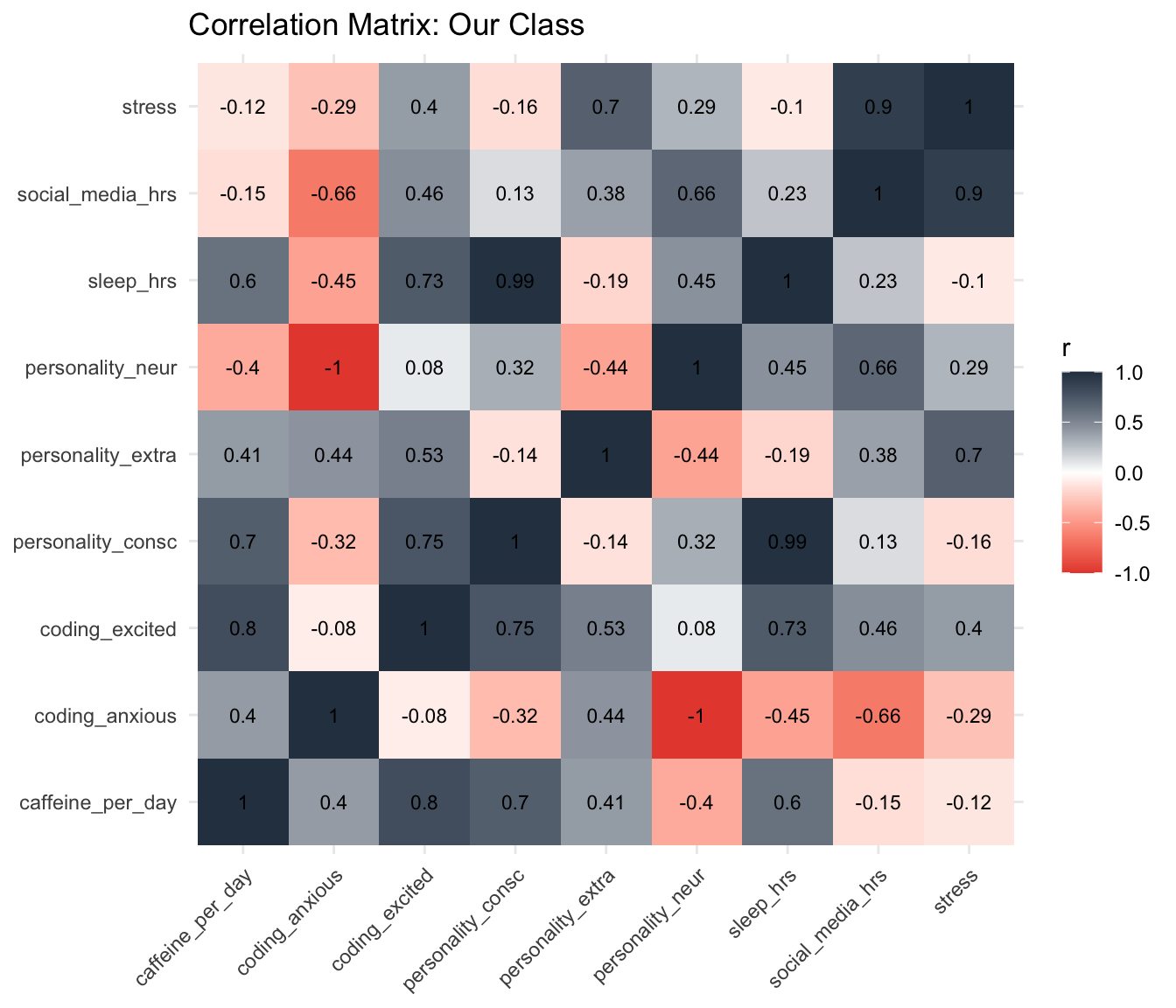
class_survey |>
  select(sleep_hrs, caffeine_per_day, social_media_hrs, stress,
         coding_excited, coding_anxious,
         personality_neur, personality_extra, personality_consc) |>
  cor(use = "complete.obs") |>
  as.data.frame() |>
  rownames_to_column("var1") |>
  pivot_longer(-var1, names_to = "var2", values_to = "r") |>
  ggplot(aes(x = var1, y = var2, fill = r)) +
  geom_tile() +
  geom_text(aes(label = round(r, 2)), size = 3) +
  scale_fill_gradient2(low = "#e74c3c", mid = "white", high = "#2c3e50",
                       midpoint = 0, limits = c(-1, 1)) +
  labs(title = "Correlation Matrix: Our Class", x = NULL, y = NULL) +
  theme_minimal() +
  theme(axis.text.x = element_text(angle = 45, hjust = 1))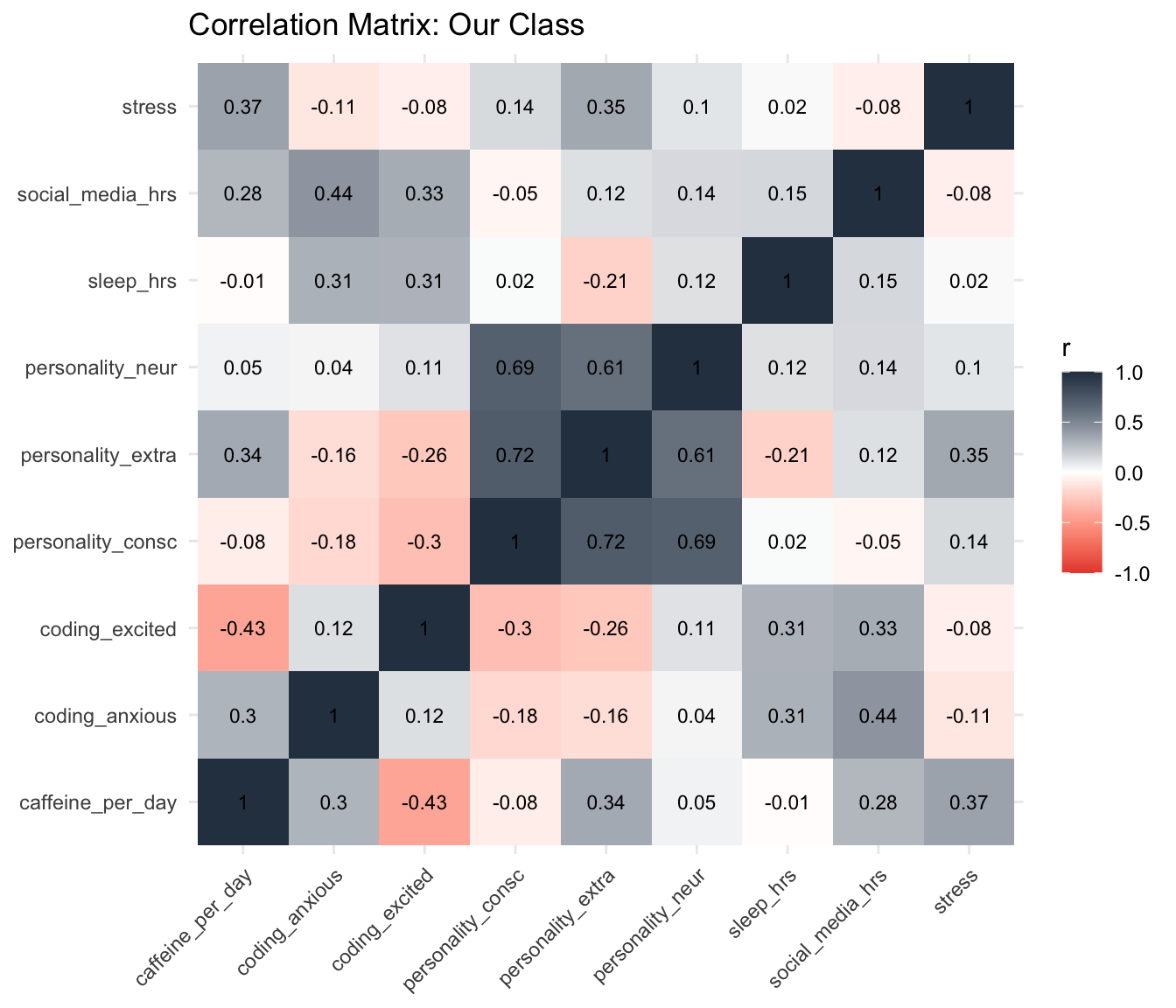
Today you learned simple regression — one predictor, one outcome.
Real research often uses:
lm(y ~ x1 + x2 + x3))aov(y ~ group))All of these build on lm(). The syntax is nearly identical.
The hard part — learning R, wrangling data, making visualizations — is done.
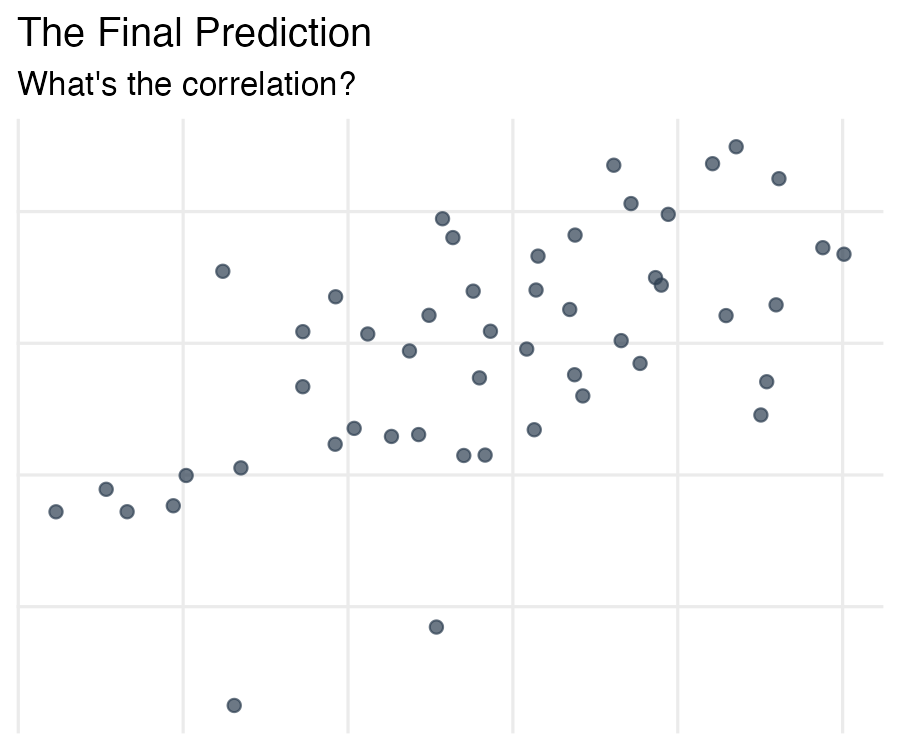
Look at this scatterplot. The axis labels and numbers have been removed — all you have are the points.
The Final Prediction
The actual values will be revealed on Wednesday. The team closest to the true values earns a bonus point.
Submit on Canvas by tomorrow (Tuesday) at 11:59 PM.
Take 5 minutes now with your team to discuss and submit.
No new reading — focus on your final project!
Do:
The pattern you see in a scatterplot and the numbers from lm() are telling you the same story — one with your eyes, one with math.
PSY 410 | Session 17