x <- c(TRUE, FALSE, TRUE, NA, FALSE)
x
[1] TRUE FALSE TRUE NA FALSEPSY 410: Data Science for Psychology
2026-05-06
A participant rates these three items from the Rosenberg Self-Esteem Scale on a 1–5 scale (1 = Strongly Disagree, 5 = Strongly Agree):
| # | Item | Resp. |
|---|---|---|
| 1 | I feel that I am a person of worth, at least on an equal plane with others. | 4 |
| 2 | I feel that I have a number of good qualities. | 3 |
| 3 | All in all, I am inclined to feel that I am a failure. | 2 |
What’s their self-esteem score so far?
If you said 9, you forgot that item 3 is reverse-coded — a 2 should become (5 + 1) - 2 = 4, making the real total 11. Mistakes like this happen in published papers, and they live in how you handle data types.
In R, every value has a type:
"hello" is a string (character)42 is a number (double)TRUE is a logical (boolean)"Female" can be a factor (categorical)Understanding types helps you choose the right functions, avoid cryptic errors, and transform data correctly.
We’ll dive into two fundamental types:
Psychology application: Computing scale scores, recoding responses, handling missing data
Logical vectors contain only TRUE, FALSE, or NA:
| Operator | Meaning |
|---|---|
== |
Equal to |
!= |
Not equal to |
< |
Less than |
> |
Greater than |
<= |
Less than or equal to |
>= |
Greater than or equal to |
%in% |
Is in a set |
Combine comparisons with Boolean operators:
| Operator | Meaning | Example |
|---|---|---|
& |
AND | age >= 18 & age < 65 |
| |
OR | diagnosis == "Depression" | diagnosis == "Anxiety" |
! |
NOT | !is.na(response) |
survey_data <- tibble(
  id = 1:5,
  age = c(17, 22, 45, 70, 30),
  consent = c(FALSE, TRUE, TRUE, TRUE, TRUE),
  depression = c(10, 25, 18, 12, 30)
)

# Keep only consenting adults with high depression
survey_data |>
  filter(consent & age >= 18 & depression >= 20)
# A tibble: 2 × 4
id age consent depression
<int> <dbl> <lgl> <dbl>
1 2 22 TRUE 25
2 5 30 TRUE 30Check if any or all values are TRUE:
[1] TRUE[1] FALSERemember: TRUE = 1 and FALSE = 0
if_else() creates new values based on a condition:
# A tibble: 5 × 5
     id   age consent depression age_group
  <int> <dbl> <lgl>        <dbl> <chr>
1     1    17 FALSE           10 Minor
2     2    22 TRUE            25 Adult
3     3    45 TRUE            18 Adult
4     4    70 TRUE            12 Adult
5     5    30 TRUE            30 Adult
Syntax: if_else(condition, value_if_true, value_if_false)
By default, if_else() keeps NA values:
[1] "Low" "Low" NA "High" "High"For more than two outcomes, use case_when():
survey_data |>
  mutate(
    depression_category = case_when(
      depression < 14 ~ "Minimal",
      depression < 20 ~ "Mild",
      depression < 29 ~ "Moderate",
      depression >= 29 ~ "Severe"
    )
  )
# A tibble: 5 × 5
id age consent depression depression_category
<int> <dbl> <lgl> <dbl> <chr>
1 1 17 FALSE 10 Minimal
2 2 22 TRUE 25 Moderate
3 3 45 TRUE 18 Mild
4 4 70 TRUE 12 Minimal
5 5 30 TRUE 30 Severe TRUE condition winsNA| Situation | Use |
|---|---|
| Two outcomes (yes/no, pass/fail) | if_else() |
| Three or more categories | case_when() |
| Recoding a Likert scale into groups | case_when() |
| Flagging a single condition | if_else() |
When in doubt, start with if_else(). Graduate to case_when() when you need more categories.
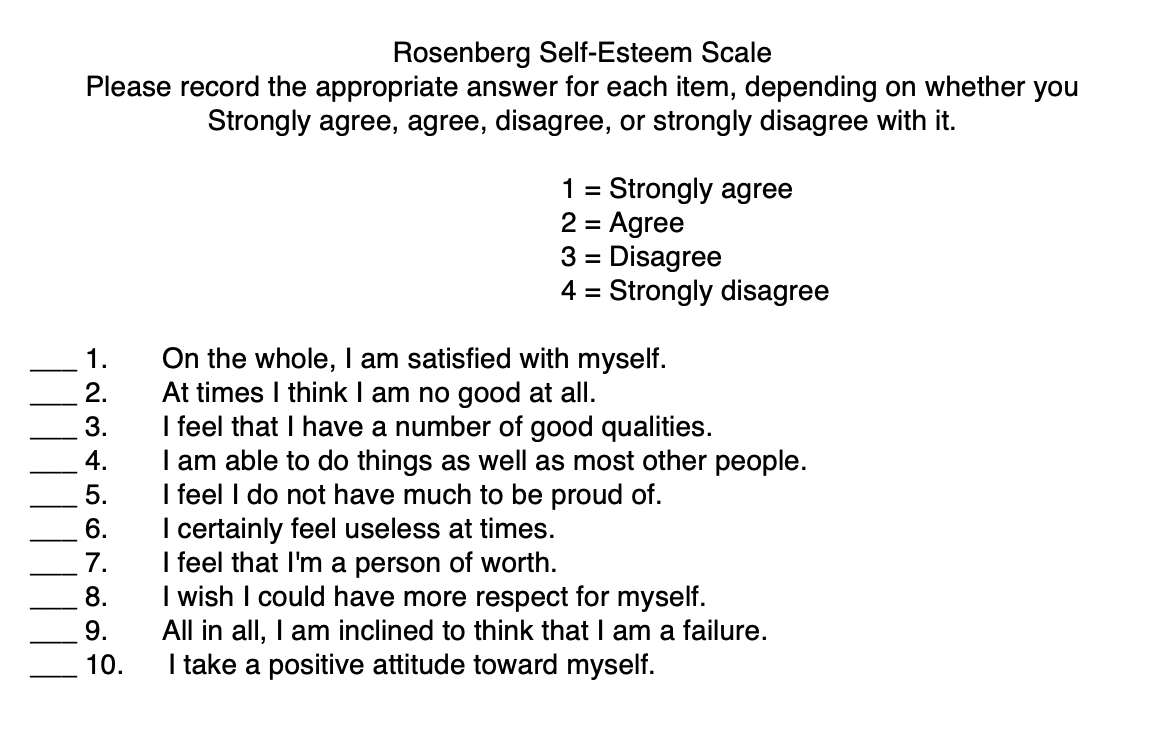
Rosenberg Self-Esteem Scale showing 10 items with Likert response options — items 2, 5, 6, 8, and 9 are reverse-coded
Many scales have reverse-coded items:
# Original responses (1-5 scale)
rosenberg <- tibble(
  id = 1:3,
  item1 = c(5, 4, 3),  # Regular item
  item2 = c(2, 3, 4)   # Reverse-coded item
)

# Reverse code item2
rosenberg = rosenberg |>
  mutate(
    item2_reversed = case_when(
      item2 == 1 ~ 5,
      item2 == 2 ~ 4,
      item2 == 3 ~ 3,
      item2 == 4 ~ 2,
      item2 == 5 ~ 1
    )
)For scales, use arithmetic:
# A tibble: 3 × 4
     id item1 item2 item2_reversed
  <int> <dbl> <dbl>          <dbl>
1     1     5     2              4
2     2     4     3              3
3 3 3 4 2General formula: (max + min) - original_value
6 - x (because 1 + 5 = 6)8 - x (because 1 + 7 = 8)You have survey data with a 1-7 attention check item where the correct answer is 4:
passed that is TRUE if they answered 4, FALSE otherwisestatus with three values: “Passed”, “Failed”, or “No response” (for NA)Time: 10 minutes
attention_data <- attention_data |>
  mutate(
    passed = attention_check == 4,
    # if_else with the `missing` argument handles NA in one shot
    status = if_else(attention_check == 4, "Passed", "Failed",
                     missing = "No response"),
    # same logic, using the passed column we just created
    status2 = if_else(passed, "Passed", "Failed",
                      missing = "No response"),
    # case_when names each condition explicitly — check NA first
    status3 = case_when(
      is.na(attention_check) ~ "No response",
      attention_check == 4   ~ "Passed",
      .default               = "Failed"
    )
  )

# Proportion who passed
mean(attention_data$passed, na.rm = TRUE)R distinguishes two numeric types:
Most of the time, R uses doubles automatically:
You rarely need to worry about this distinction!
Common calculations you’ve been using:
Most summary functions need na.rm = TRUE to handle missing data:
You’ve collected survey data with multiple items per scale:
scale_data <- tibble(
  id = 1:4,
  anxiety1 = c(3, 2, 4, NA),
  anxiety2 = c(4, 3, 5, 2),
  anxiety3 = c(3, 2, 4, 1),
  anxiety4 = c(4, 3, NA, 2)
)

scale_data
# A tibble: 4 × 5
id anxiety1 anxiety2 anxiety3 anxiety4
<int> <dbl> <dbl> <dbl> <dbl>
1 1 3 4 3 4
2 2 2 3 2 3
3 3 4 5 4 NA
4 4 NA 2 1 2How do you compute a total or mean score?
# A tibble: 4 × 6
     id anxiety1 anxiety2 anxiety3 anxiety4 anxiety_total
  <int>    <dbl>    <dbl>    <dbl>    <dbl>         <dbl>
1     1        3        4        3        4            14
2     2        2        3        2        3            10
3     3        4        5        4       NA            NA
4     4       NA        2        1        2            NA
Problem: If any item is NA, the whole sum is NA!
By default, mutate() works column-wise — sum() and mean() inside it see entire columns, not individual rows.
For scale scoring we need the opposite: combine values across columns within a single participant.
Without it, sum() collapses across the whole column — the same number for every row:
scale_data |>
  mutate(
    anxiety_total = sum(c(anxiety1, anxiety2, anxiety3, anxiety4),
                        na.rm = TRUE)
  )
# A tibble: 4 × 6
id anxiety1 anxiety2 anxiety3 anxiety4 anxiety_total
<int> <dbl> <dbl> <dbl> <dbl> <dbl>
1 1 3 4 3 4 42
2 2 2 3 2 3 42
3 3 4 5 4 NA 42
4 4 NA 2 1 2 42That’s not what we want.
Now combine sum(..., na.rm = TRUE) with rowwise():
scale_data |>
  rowwise() |>
  mutate(
    anxiety_mean = mean(c(anxiety1, anxiety2, anxiety3, anxiety4),
                        na.rm = TRUE)
  ) |>
  ungroup()
# A tibble: 4 × 6
id anxiety1 anxiety2 anxiety3 anxiety4 anxiety_mean
<int> <dbl> <dbl> <dbl> <dbl> <dbl>
1 1 3 4 3 4 3.5
2 2 2 3 2 3 2.5
3 3 4 5 4 NA 4.33
4 4 NA 2 1 2 1.67Tip
Mean vs Total: Use means when participants might have different numbers of items answered.
# A tibble: 4 × 4
     id anxiety_mean anxiety_total n_items
  <int>        <dbl>         <dbl>   <int>
1     1         3.5             14       4
2     2         2.5             10       4
3     3         4.33            13       3
4 4 1.67 5 3Should you compute a scale score if someone only answered 1 out of 4 items?
Common rules:
scale_data |>
  rowwise() |>
  mutate(
    n_answered = sum(!is.na(c(anxiety1, anxiety2, anxiety3, anxiety4))),
    anxiety_mean = if_else(
      n_answered >= 3,  # At least 3 of 4 items
      mean(c(anxiety1, anxiety2, anxiety3, anxiety4), na.rm = TRUE),
      NA_real_  # NA if too many missing
    )
  ) |>
  ungroup()
# A tibble: 4 × 7
id anxiety1 anxiety2 anxiety3 anxiety4 n_answered anxiety_mean
<int> <dbl> <dbl> <dbl> <dbl> <int> <dbl>
1 1 3 4 3 4 4 3.5
2 2 2 3 2 3 4 2.5
3 3 4 5 4 NA 3 4.33
4 4 NA 2 1 2 3 1.67Some measures have multiple subscales:
# A tibble: 3 × 4
     id depression anxiety stress
  <int>      <dbl>   <dbl>  <dbl>
1     1        2.5     1.5    3.5
2     2        3       4      2.5
3 3 1.5 2.5 4 (max + min) - valuerowwise() + sum()/mean() with na.rm = TRUE📖 Read:
✅ Do:
Scoring a scale correctly is the most common data task in psychology — and the easiest place to introduce errors.
See you Monday for strings and factors!
The PHQ-9 is a 9-item depression screener (0-3 scale):
phq_data |>
  rowwise() |>
  mutate(
    # c_across() lets us select multiple columns rowwise
    n_answered = sum(!is.na(c_across(phq1:phq9))),

    # Two thresholds: keep total only if enough items answered
    total_7 = if_else(n_answered >= 7,
                      sum(c_across(phq1:phq9), na.rm = TRUE),
                      NA_real_),
    total_9 = if_else(n_answered >= 9,
                      sum(c_across(phq1:phq9), na.rm = TRUE),
                      NA_real_)
  ) |>
  ungroup() |>
  mutate(
    # Check is.na first — comparisons with NA return NA and fall through
    category = case_when(
      is.na(total_9) ~ NA,
      total_9 <  5   ~ "Minimal",
      total_9 < 10   ~ "Mild",
      total_9 < 15   ~ "Moderate",
      total_9 < 20   ~ "Moderately Severe",
      .default       = "Severe"   # catches 20–27
    )
  )
PSY 410 | Session 12