Exploratory Data Analysis: Covariation

PSY 410: Data Science for Psychology

Dr. Sara Weston

2026-04-29

From variation to covariation

Psychology is about relationships

Last time, you explored how individual variables behave — distributions, outliers, missing data.

But psychology is about relationships:

  • Does treatment predict depression?
  • Does age relate to reaction time?
  • Does anxiety co-occur with insomnia?

Today we learn to see those relationships in data — before testing them statistically.

Categorical + Continuous

Example: Mental health by treatment group

# Simulated therapy outcome data
therapy_data <- tibble(
  condition = rep(c("Control", "CBT", "Mindfulness"), each = 50),
  depression_post = c(
    rnorm(50, mean = 18, sd = 5),  # Control
    rnorm(50, mean = 12, sd = 5),  # CBT
    rnorm(50, mean = 14, sd = 5)   # Mindfulness
  )
)

Example: Mental health by treatment group

glimpse(therapy_data)
Rows: 150
Columns: 2
$ condition       <chr> "Control", "Control", "Control", "Control", "Control",…
$ depression_post <dbl> 20.817283, 20.456254, 16.944924, 13.227615, 23.140762,…

Boxplots: The classic choice

ggplot(therapy_data, aes(x = condition, y = depression_post)) +
  geom_boxplot() +
  labs(
    title = "Post-treatment depression scores by condition",
    x = "Treatment condition",
    y = "Depression score (BDI-II)"
  ) +
  theme_minimal()

Boxplots: The classic choice

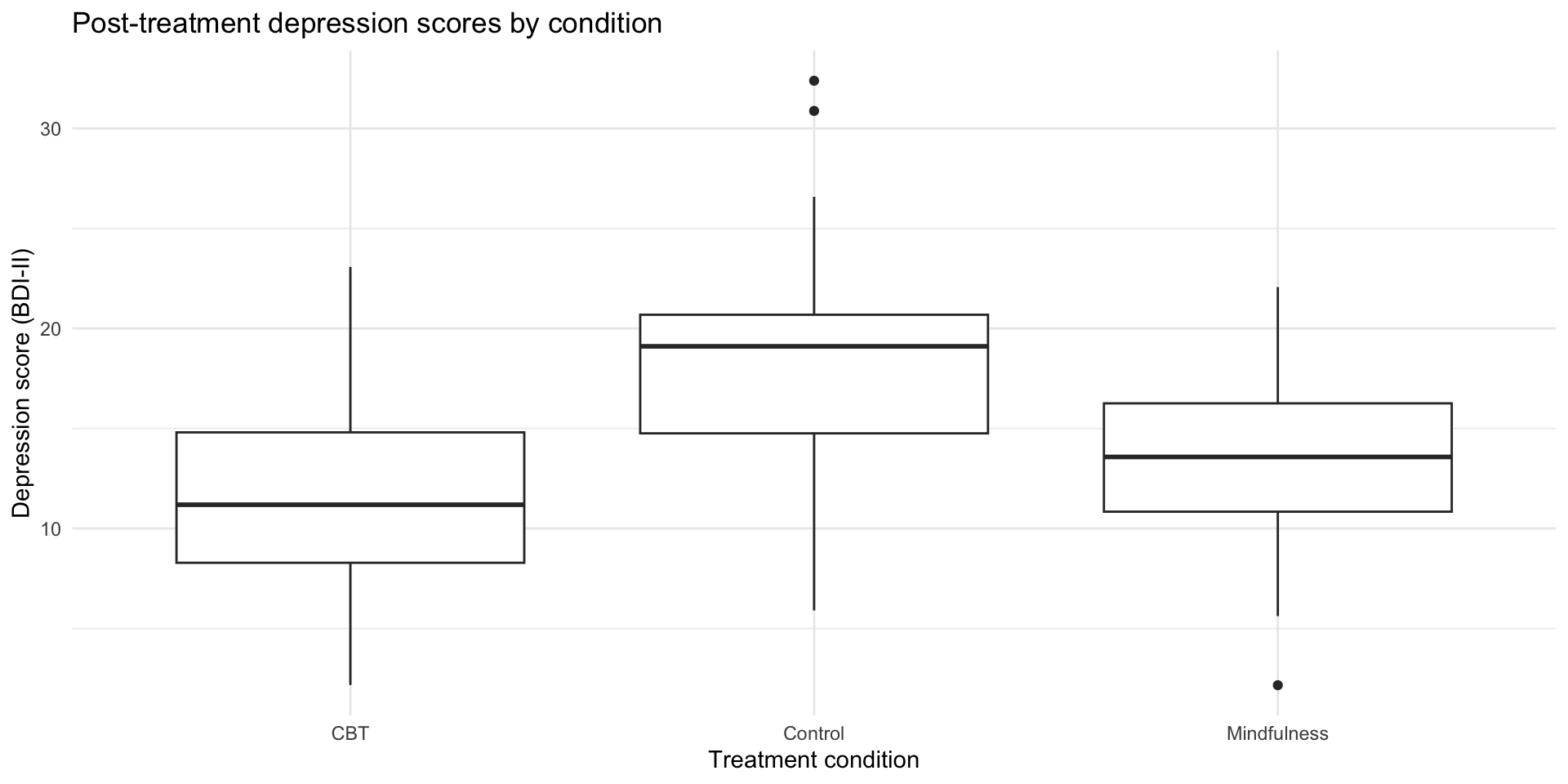
Boxplot comparing post-treatment depression scores across Control, CBT, and Mindfulness groups, showing CBT has the lowest median depression score.

What boxplots show

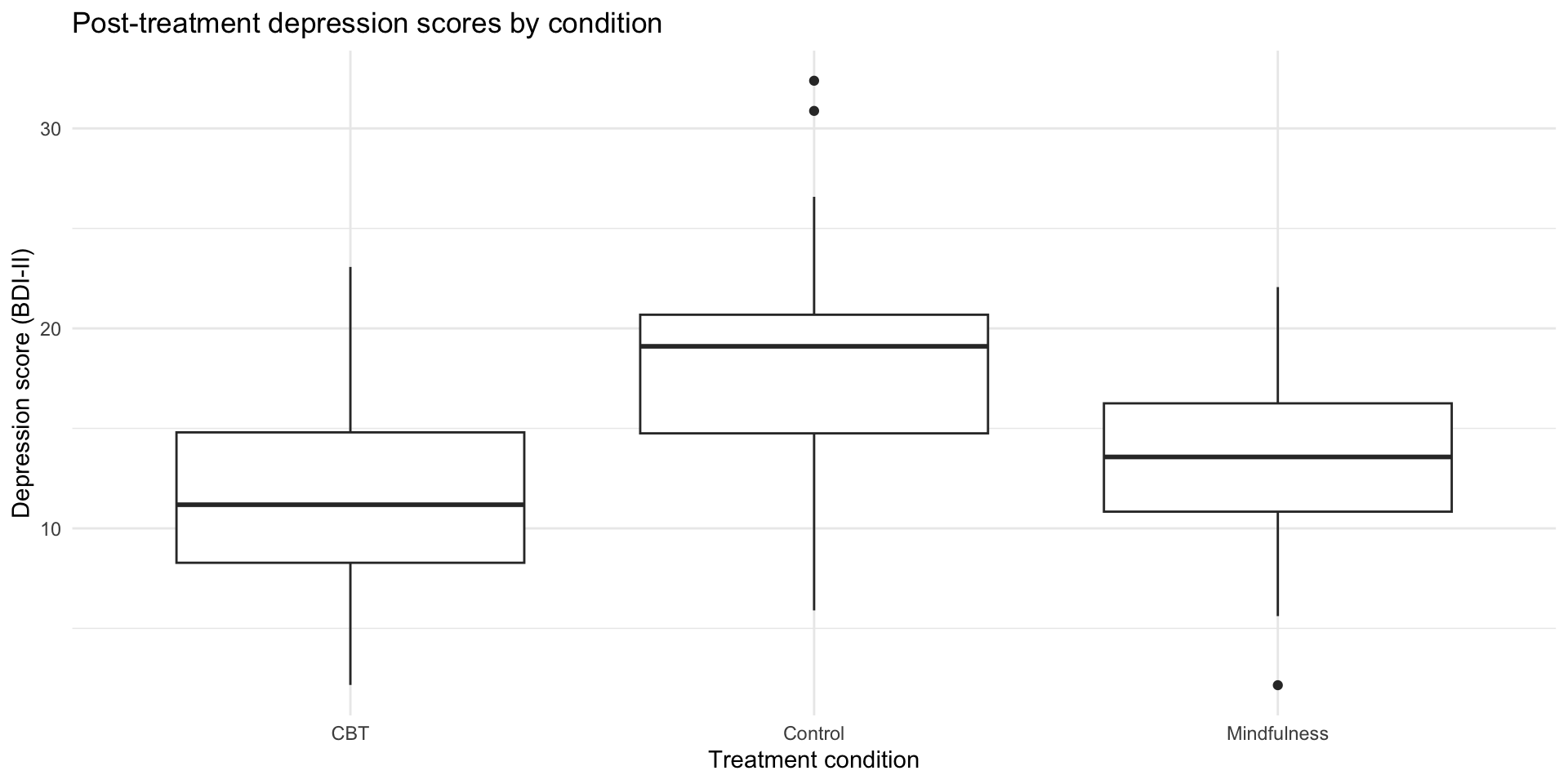
Boxplot comparing post-treatment depression scores across Control, CBT, and Mindfulness groups, with annotations pointing to the median line, IQR box, whiskers, and outlier dots.

  • Line in middle: median
  • Box: 25th to 75th percentile (IQR)
  • Whiskers: extend to 1.5 × IQR
  • Dots: outliers beyond whiskers

Great for comparing distributions, but they hide the actual data points.

The problem with boxplots

Boxplots summarize, but they hide important information:

  • The actual distribution shape (is it bimodal? skewed?)
  • Individual data points (how many observations are there?)
  • The raw data (where do specific values fall?)

We can do better.

Raincloud plots

The modern psych visualization

Raincloud plots combine three elements:

  1. Violin (distribution shape)
  2. Boxplot (summary stats)
  3. Jittered points (individual data)

They’re increasingly popular in psychology publications because they show everything.

Use the ggrain package. (More details here.)

Building a raincloud
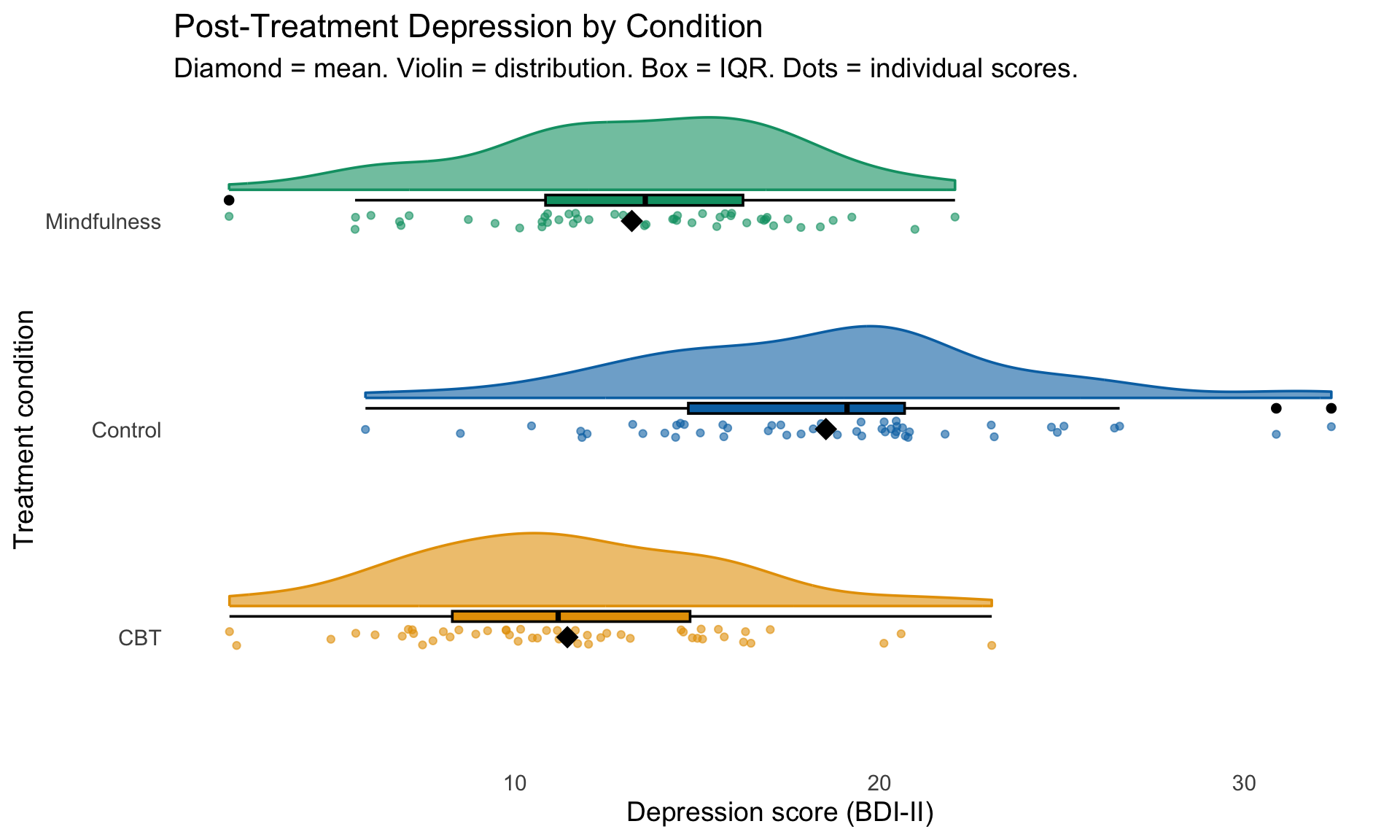
Horizontal raincloud plot of post-treatment depression scores by condition, combining violin shapes, boxplots, jittered points, and diamond-shaped means. CBT shows the lowest scores, followed by Mindfulness, then Control.
library(ggrain)
therapy_data |>
  ggplot(aes(
    x = condition, 
    y = depression_post, 
    fill = condition, 
    color = condition)) +
  # geom_rain creates all parts of your raincloud
  geom_rain(
    alpha = .6,
    # change just the boxplot part
    boxplot.args = list(color = "black")) + 
  # The mean
  stat_summary(fun = mean, geom = "point", shape = 18, size = 5, color = "black") +
  scale_fill_manual(
    values = c("Control" = "#0072B2", "CBT" = "#E69F00", "Mindfulness" = "#009E73")) +
  scale_color_manual(
    values = c("Control" = "#0072B2", "CBT" = "#E69F00", "Mindfulness" = "#009E73")) +
  labs(
    title = "Post-Treatment Depression by Condition",
    subtitle = "Diamond = mean. Violin = distribution. Box = IQR. Dots = individual scores.",
    x = "Treatment condition",
    y = "Depression score (BDI-II)"
  ) +
  coord_flip() +
  theme_minimal(base_size = 14) +
  theme(
    legend.position = "none",
    panel.grid = element_blank())

Why rainclouds are great

Compare these three views of the same data:

Three-panel comparison of the same therapy data shown as a boxplot only, a violin plot only, and a full raincloud plot, demonstrating how rainclouds reveal the most information about distribution shape, summary statistics, and individual data points.

When to use which

Plot type Shows Best for
Boxplot Median, IQR, outliers Quick comparison, large datasets
Raincloud Distribution + summary + raw data Psychology papers, presentations, publications
Violin + jitter Distribution + raw data Alternative to raincloud, simpler to code

Pair coding break

Your turn: Compare by gender

Using the therapy data, explore whether depression scores differ by gender:

  1. Add a gender variable to the data (use sample() to randomly assign “Male”, “Female”, “Non-binary”)
  2. Create a visualization showing depression scores by gender
  3. Try at least two different geom types
  4. Add appropriate labels

Time: 10 minutes

Categorical + Categorical

Example: Diagnosis by gender

# Simulated diagnostic data
diagnosis_data <- tibble(
  gender = sample(c("Male", "Female", "Non-binary"), 200, replace = TRUE),
  diagnosis = sample(c("Depression", "Anxiety", "Both", "Other"),
                     200, replace = TRUE)
)

head(diagnosis_data)
# A tibble: 6 × 2
  gender     diagnosis
  <chr>      <chr>    
1 Non-binary Both     
2 Female     Anxiety  
3 Male       Other    
4 Female     Both     
5 Male       Both     
6 Non-binary Other    

Option 1: Stacked bar chart

ggplot(diagnosis_data, aes(x = gender, fill = diagnosis)) +
  geom_bar() +
  labs(
    title = "Diagnosis by gender",
    x = "Gender",
    y = "Count",
    fill = "Diagnosis"
  ) +
  theme_minimal()

Option 1: Stacked bar chart

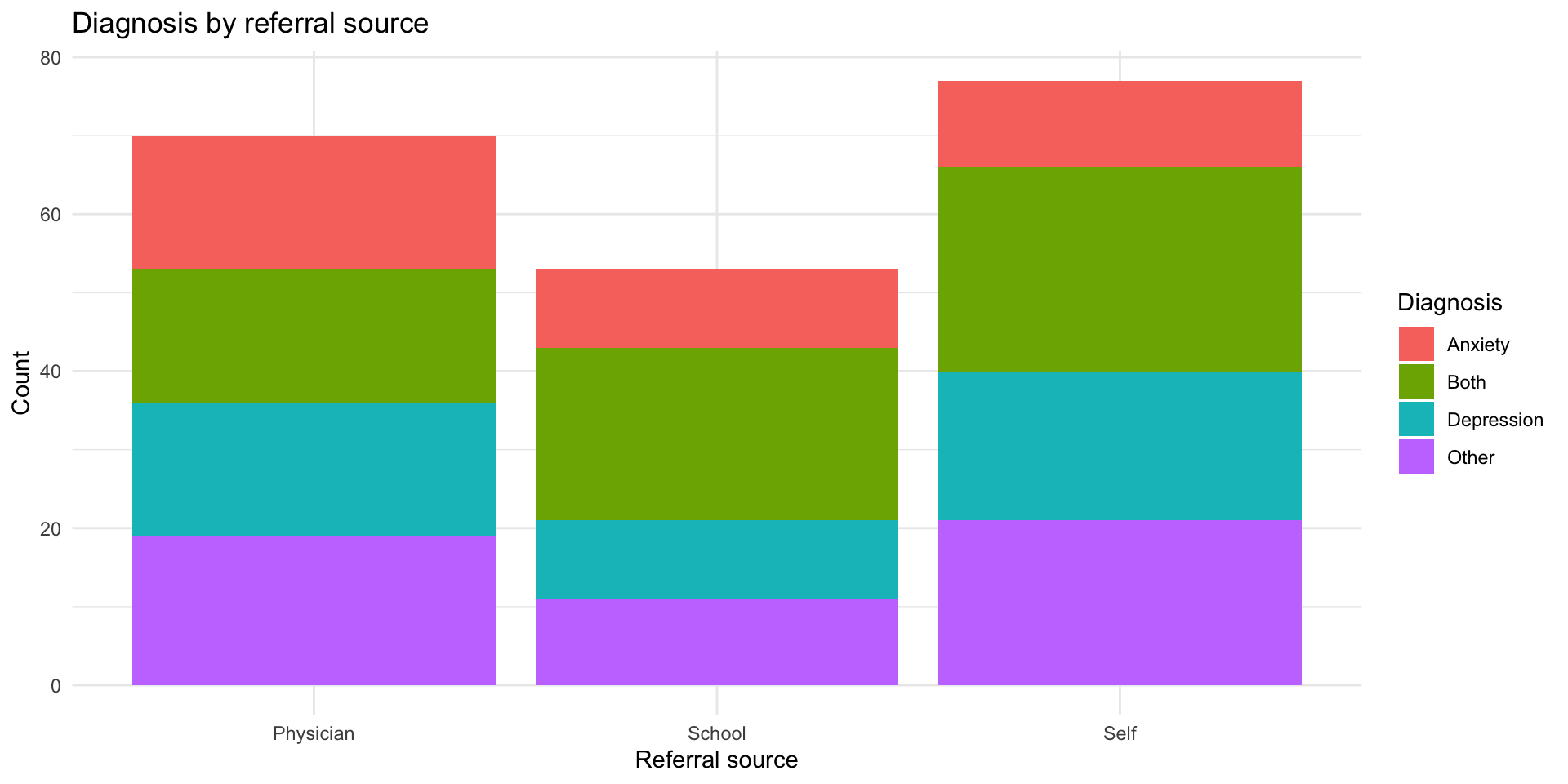
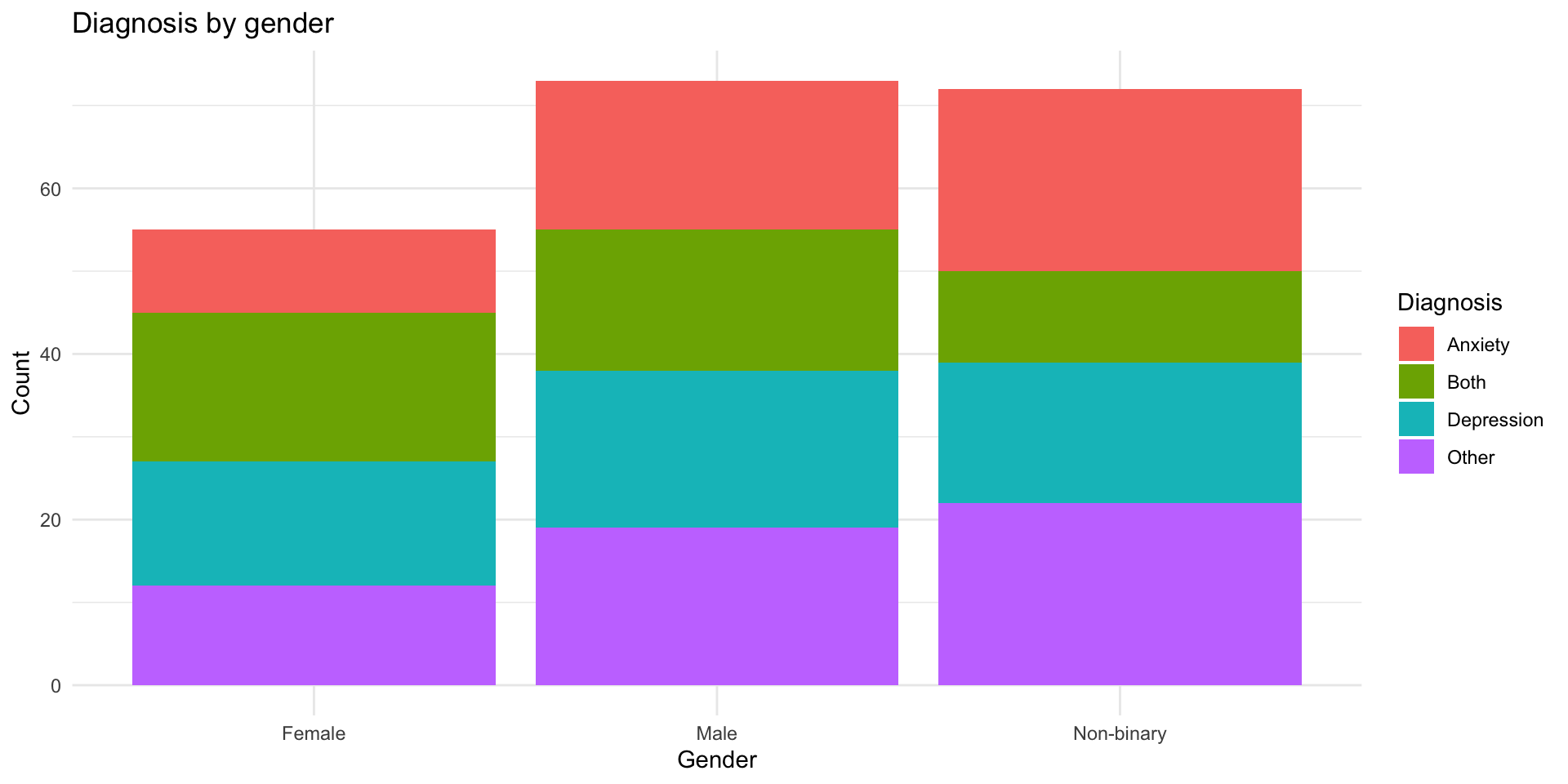
Stacked bar chart showing counts of diagnoses (Depression, Anxiety, Both, Other) stacked within each gender category (Female, Male, Non-binary).

Option 2: Side-by-side bars

ggplot(diagnosis_data, aes(x = gender, fill = diagnosis)) +
  geom_bar(position = "dodge") +
  labs(
    title = "Diagnosis by gender",
    x = "Gender",
    y = "Count",
    fill = "Diagnosis"
  ) +
  theme_minimal()

Option 2: Side-by-side bars

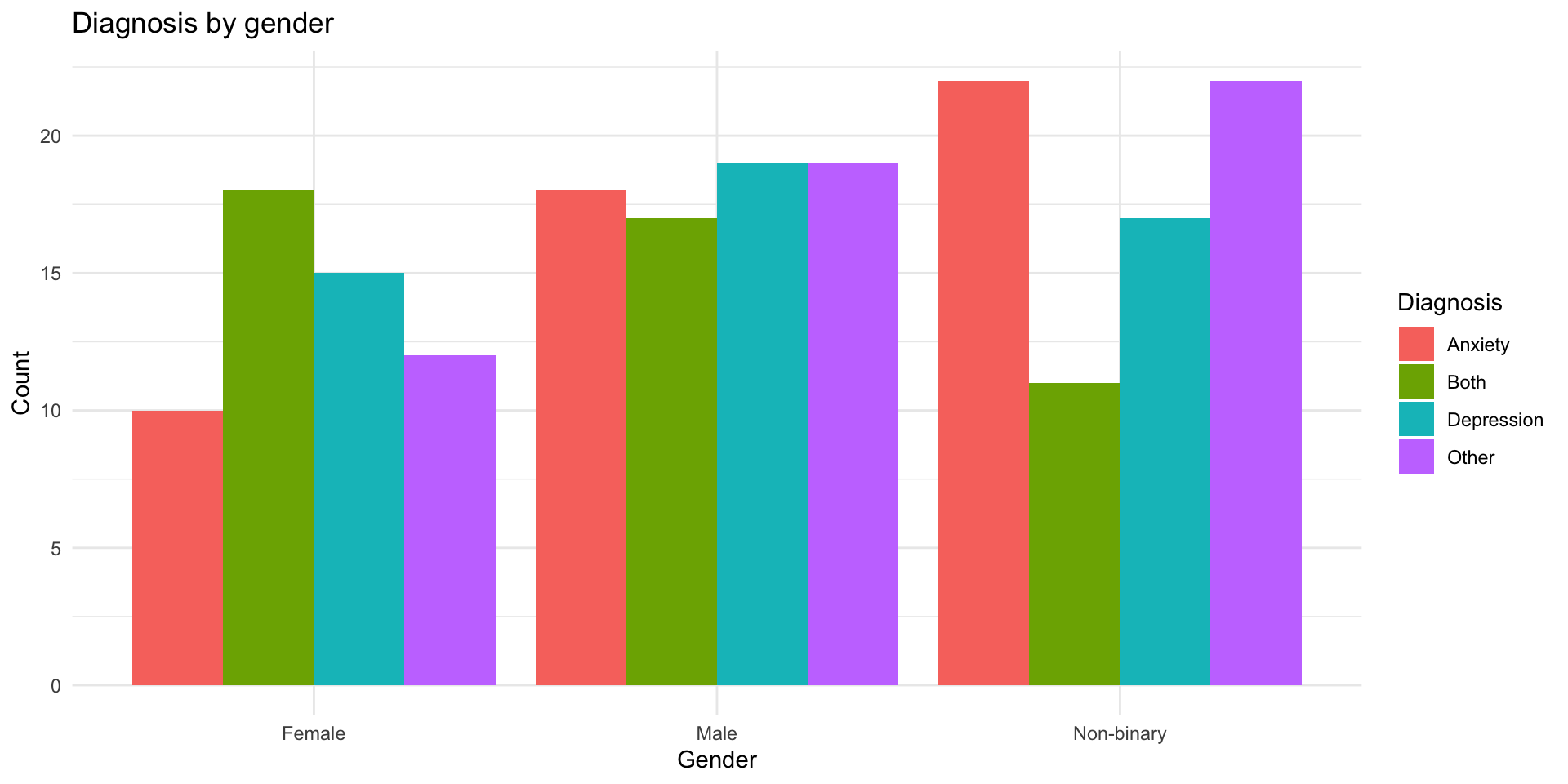
Side-by-side bar chart comparing diagnosis counts across gender groups, with separate bars for each diagnosis category placed next to each other within each gender.

Option 3: Proportions

ggplot(diagnosis_data, aes(x = gender, fill = diagnosis)) +
  geom_bar(position = "fill") +
  labs(
    title = "Diagnosis distribution by gender",
    x = "Gender",
    y = "Proportion",
    fill = "Diagnosis"
  ) +
  theme_minimal()

Option 3: Proportions

Proportional stacked bar chart showing the relative proportion of each diagnosis within each gender group, with all bars normalized to 100%.

Option 4: geom_count()

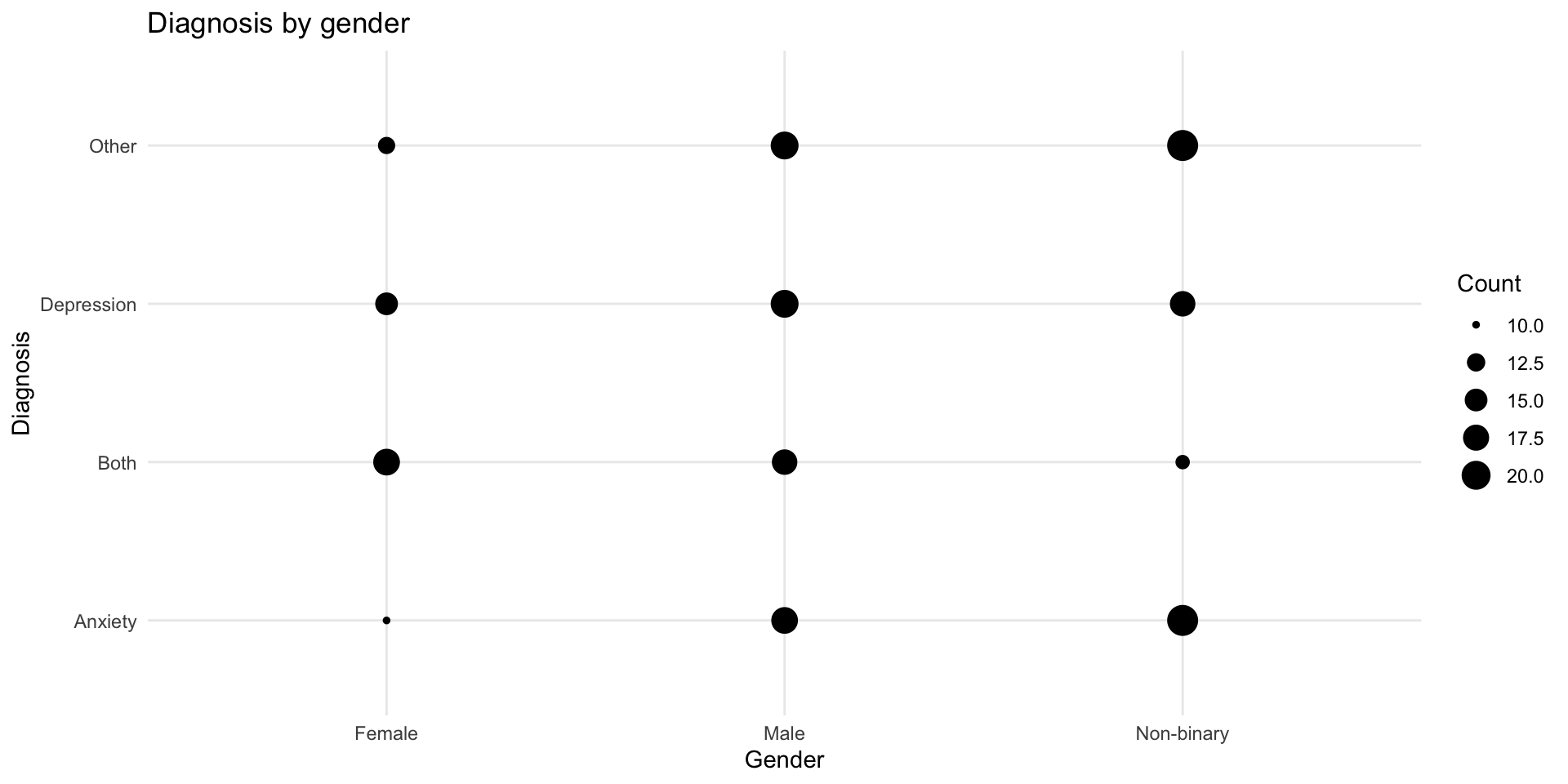
Shows the size of overlaps:

ggplot(diagnosis_data, aes(x = gender, y = diagnosis)) +
  geom_count() +
  labs(
    title = "Diagnosis by gender",
    x = "Gender",
    y = "Diagnosis",
    size = "Count"
  ) +
  theme_minimal()

Option 4: geom_count()

Bubble chart showing the co-occurrence of gender and diagnosis categories, where larger circles indicate more individuals with that combination.

Option 5: Tile with counts

diagnosis_counts <- diagnosis_data |>
  count(gender, diagnosis)

ggplot(diagnosis_counts, aes(x = gender, y = diagnosis, fill = n)) +
  geom_tile() +
  scale_fill_viridis_c() +
  labs(
    title = "Diagnosis by gender",
    x = "Gender",
    y = "Diagnosis",
    fill = "Count"
  ) +
  theme_minimal()

Option 5: Tile with counts

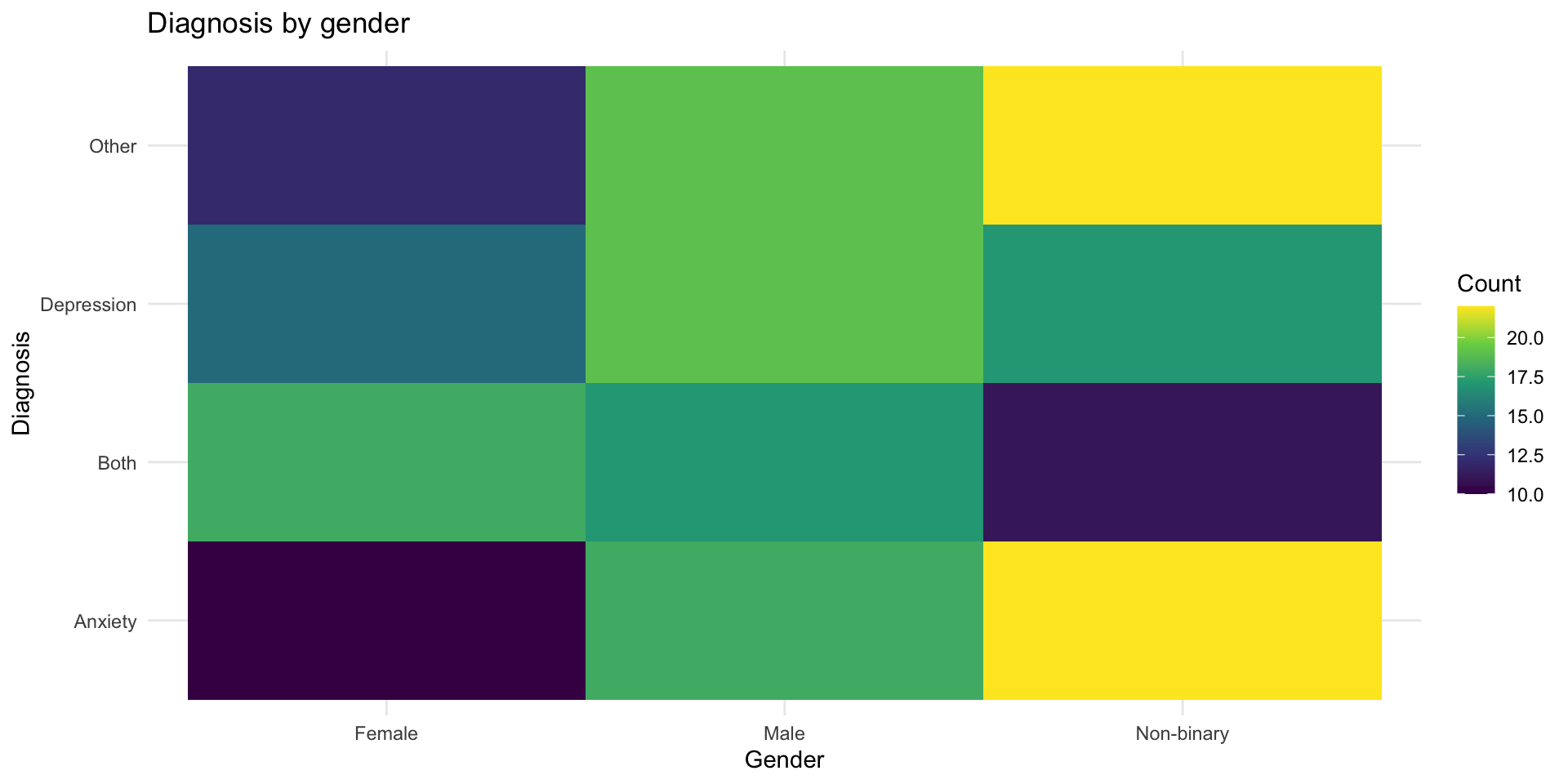
Heatmap tile plot of diagnosis counts by gender, with color intensity (viridis scale) representing the number of individuals in each gender-diagnosis combination.

Continuous + Continuous

The classic: Scatterplots

# Simulated reaction time data
rt_data <- tibble(
  age = runif(100, 18, 70),
  reaction_time = 200 + age * 3 + rnorm(100, 0, 40)
)

glimpse(rt_data)
Rows: 100
Columns: 2
$ age           <dbl> 23.16535, 24.21917, 28.05804, 41.73791, 56.98531, 19.185…
$ reaction_time <dbl> 291.9136, 289.9209, 342.0351, 304.0829, 411.5414, 240.54…

Basic scatterplot

ggplot(rt_data, aes(x = age, y = reaction_time)) +
  geom_point() +
  labs(
    title = "Reaction time by age",
    x = "Age (years)",
    y = "Reaction time (ms)"
  ) +
  theme_minimal()

Basic scatterplot

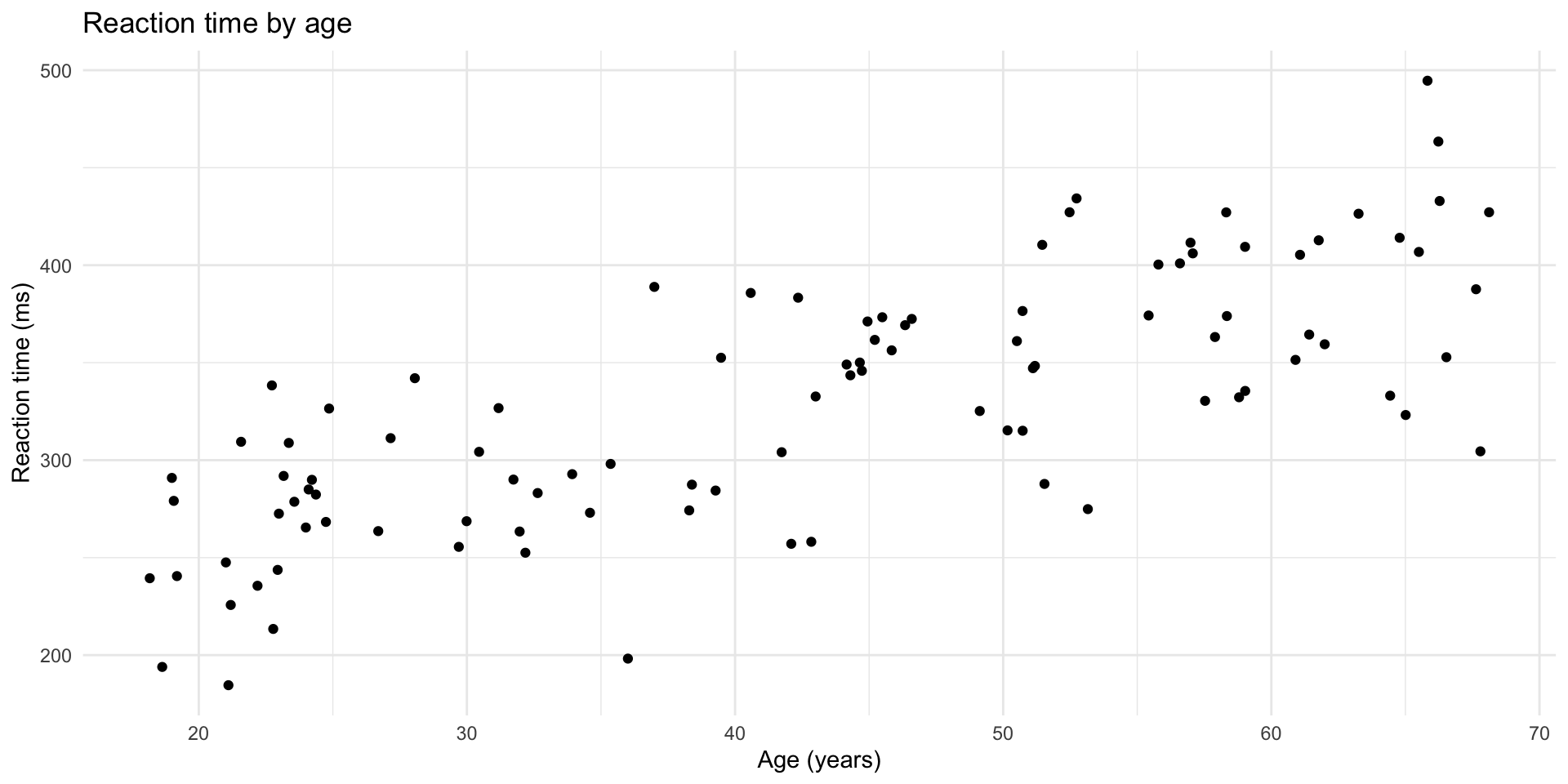
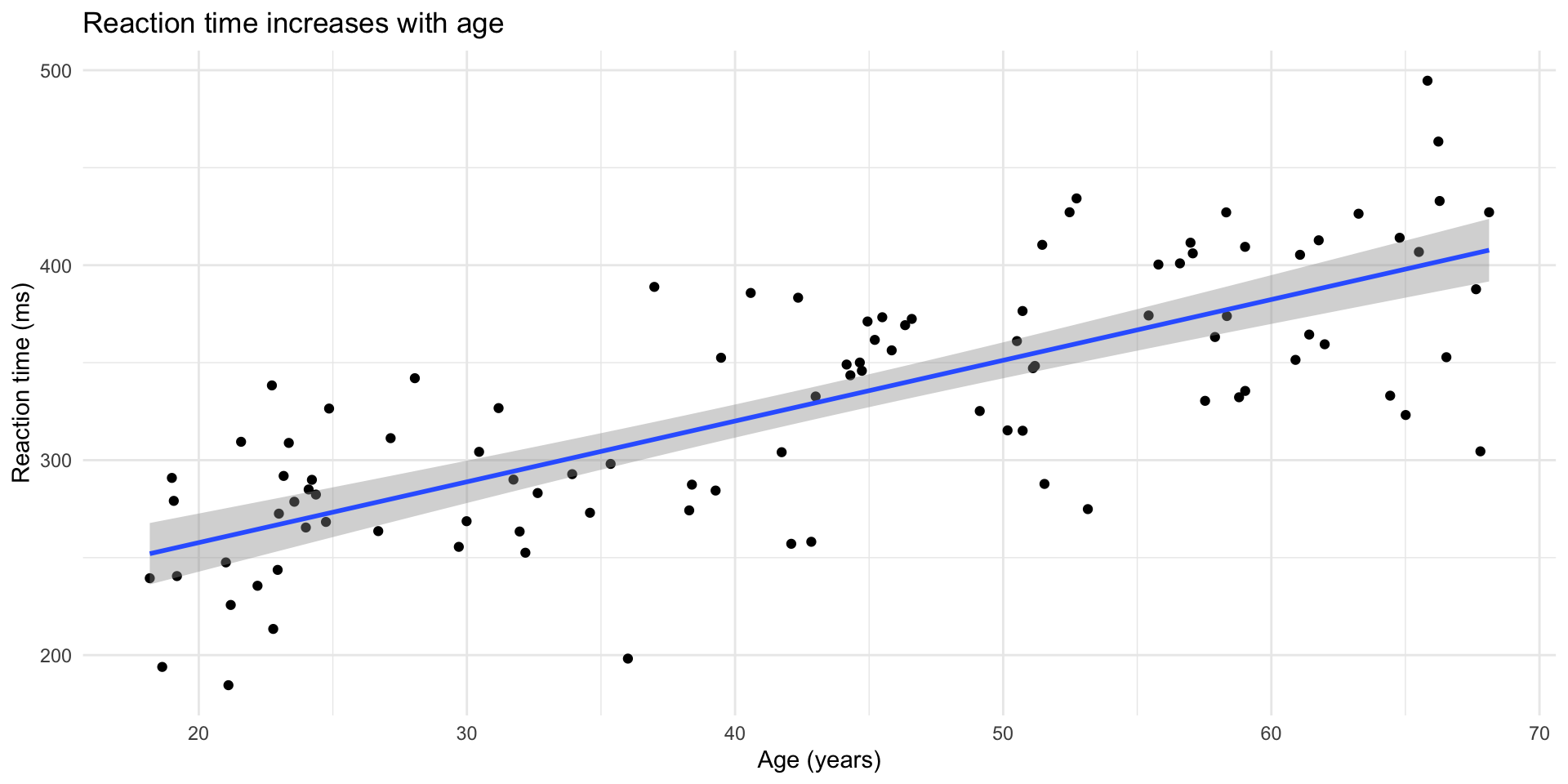
Scatterplot of reaction time versus age showing a positive trend where older participants tend to have slower reaction times.

Add a trend line

ggplot(rt_data, aes(x = age, y = reaction_time)) +
  geom_point() +
  geom_smooth(method = "lm", se = TRUE) +
  labs(
    title = "Reaction time increases with age",
    x = "Age (years)",
    y = "Reaction time (ms)"
  ) +
  theme_minimal()

Add a trend line

Scatterplot of reaction time versus age with a linear trend line and confidence band, showing reaction time increases with age.

The problem: Overplotting

With lots of data, points overlap and hide the true density:

# Lots of data
big_rt_data <- tibble(
  age = runif(5000, 18, 70),
  reaction_time = 200 + age * 3 + rnorm(5000, 0, 40)
)

Overplotting problem demonstrated

ggplot(big_rt_data, aes(x = age, y = reaction_time)) +
  geom_point() +
  labs(title = "Hard to see where the data is dense") +
  theme_minimal()

Overplotting problem demonstrated

Scatterplot of 5,000 reaction time observations that appears as a dense, nearly solid mass of overlapping points, demonstrating the overplotting problem.

Solution 1: Transparency (alpha)

ggplot(big_rt_data, aes(x = age, y = reaction_time)) +
  geom_point(alpha = 0.1) +
  labs(title = "Using alpha = 0.1 to show density") +
  theme_minimal()

Solution 1: Transparency (alpha)

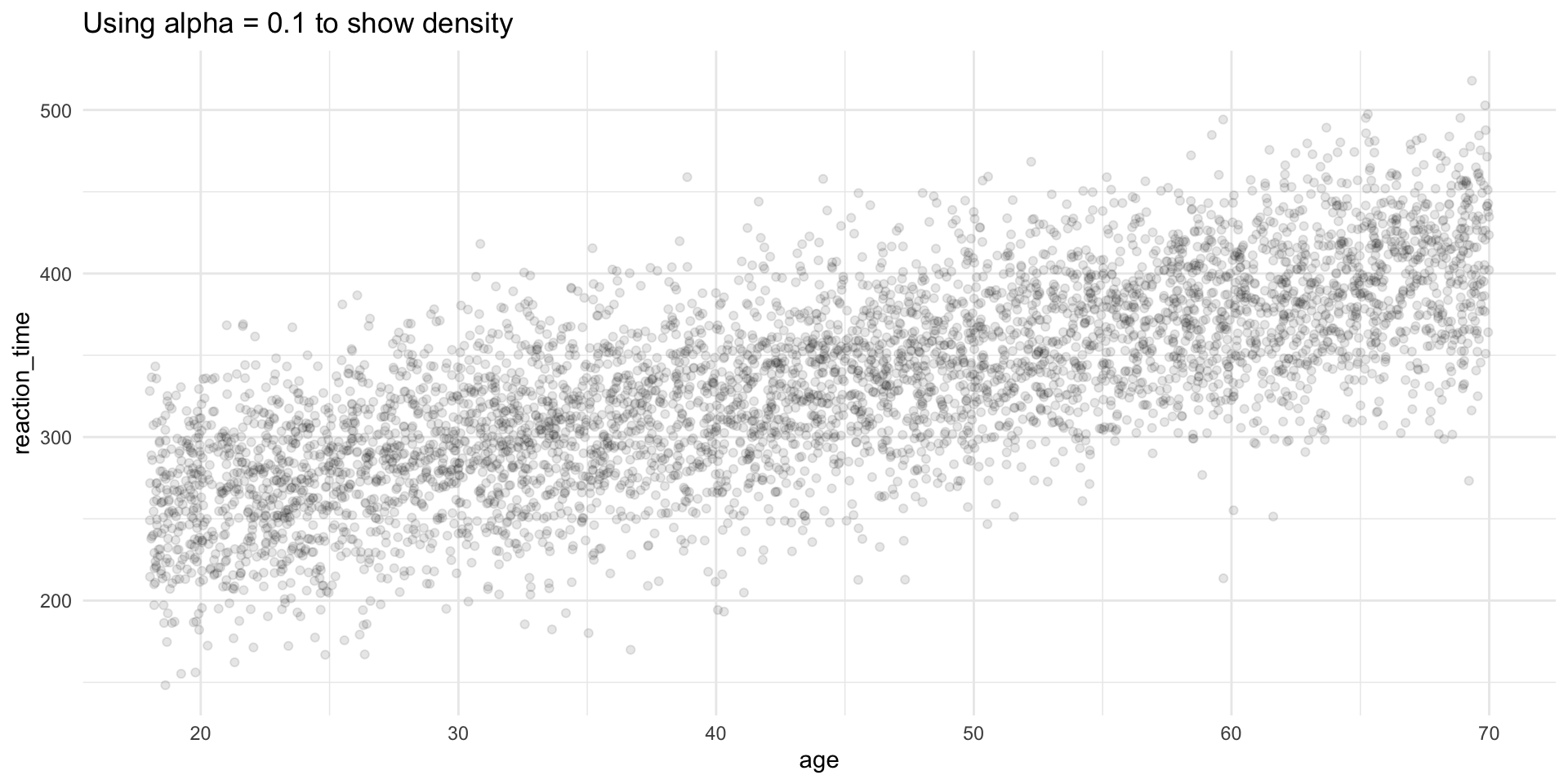
Scatterplot of 5,000 reaction time observations using transparent points (alpha = 0.1), revealing that the densest concentration of data follows a positive linear trend.

Solution 2: geom_bin2d()

ggplot(big_rt_data, aes(x = age, y = reaction_time)) +
  geom_bin2d() +
  scale_fill_viridis_c() +
  labs(
    title = "2D bins show density",
    fill = "Count"
  ) +
  theme_minimal()

Solution 2: geom_bin2d()

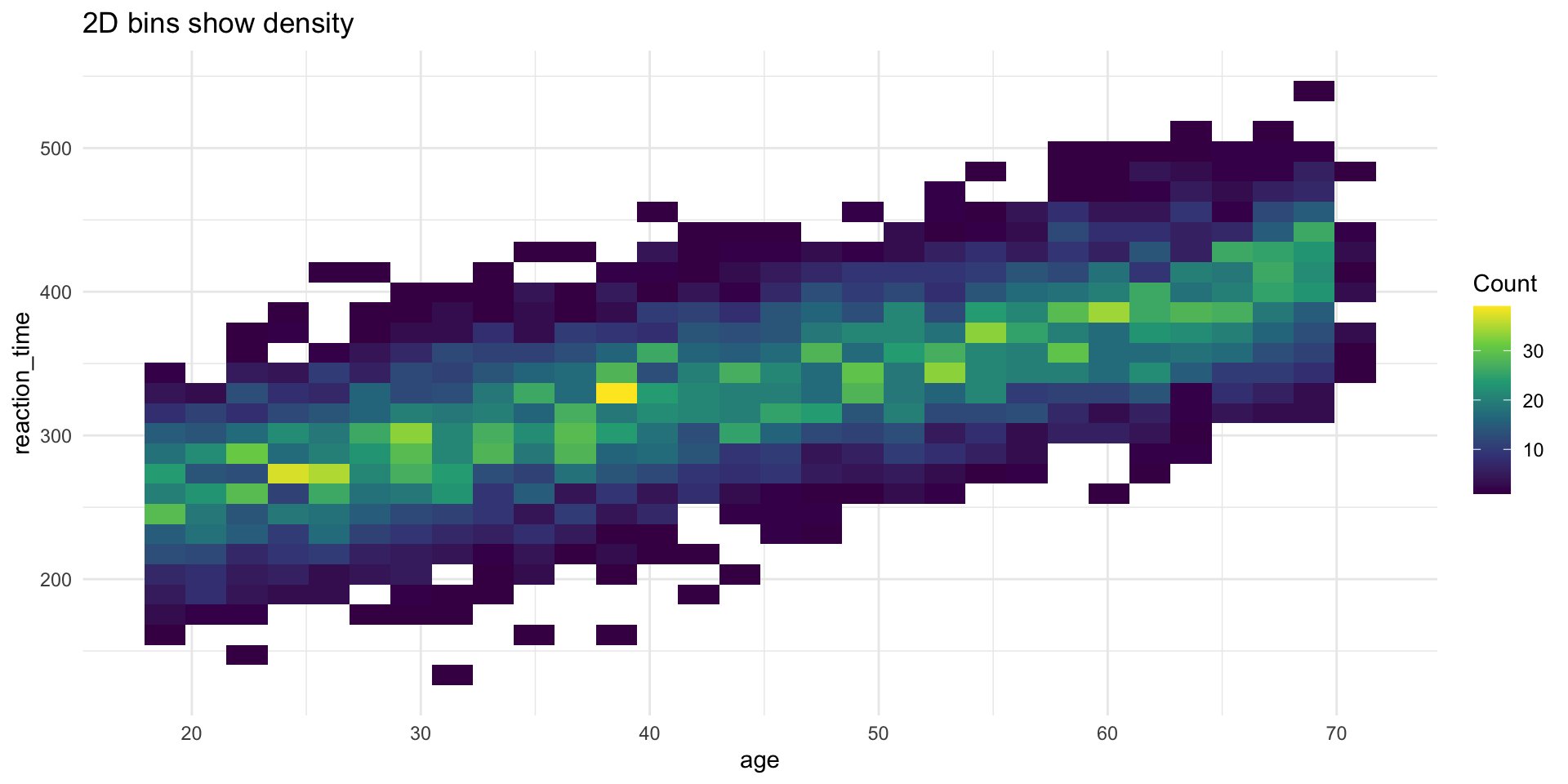
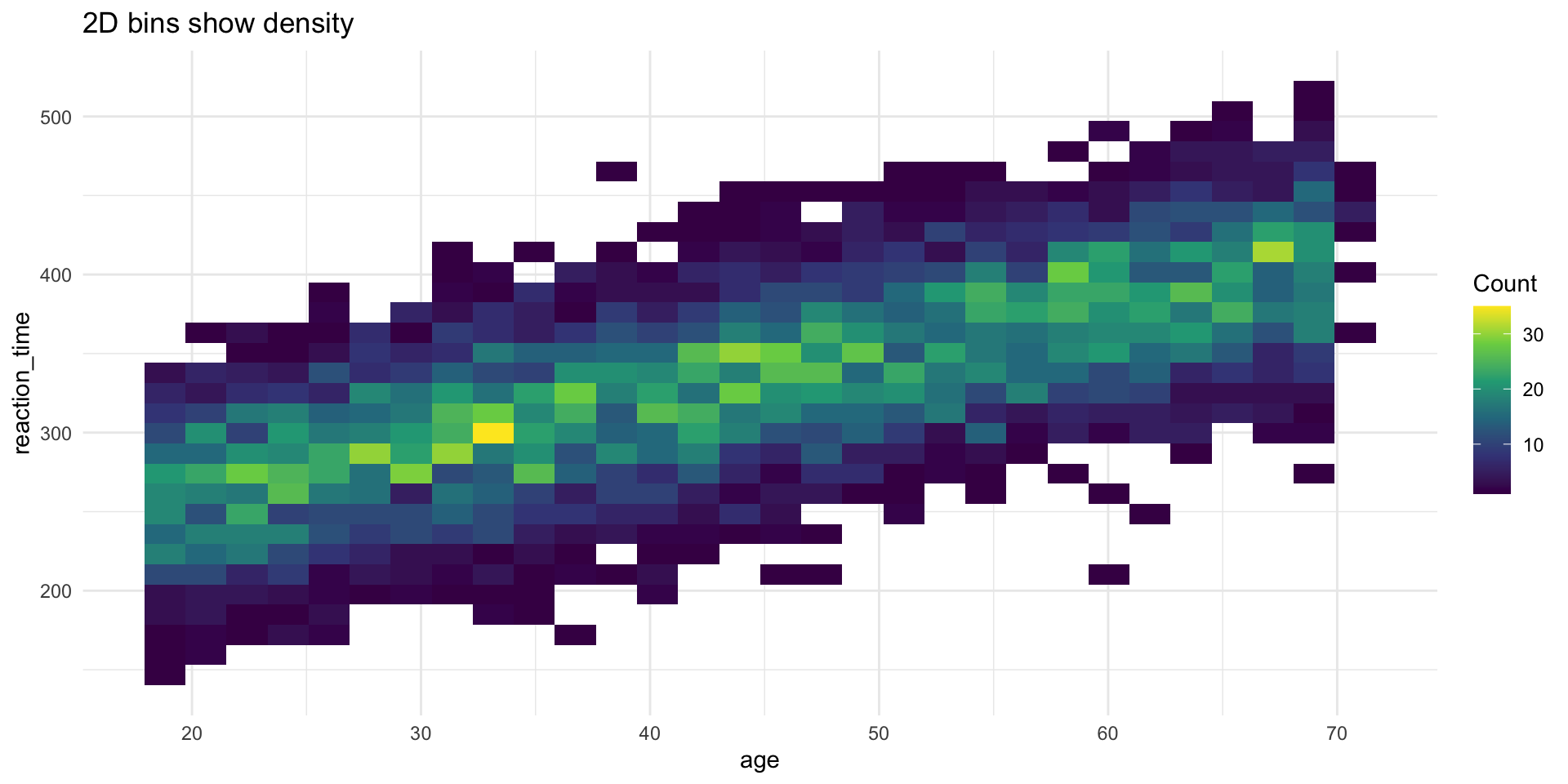
Two-dimensional bin plot of reaction time versus age, with rectangular bins colored by count using a viridis scale, showing highest density along the central trend.

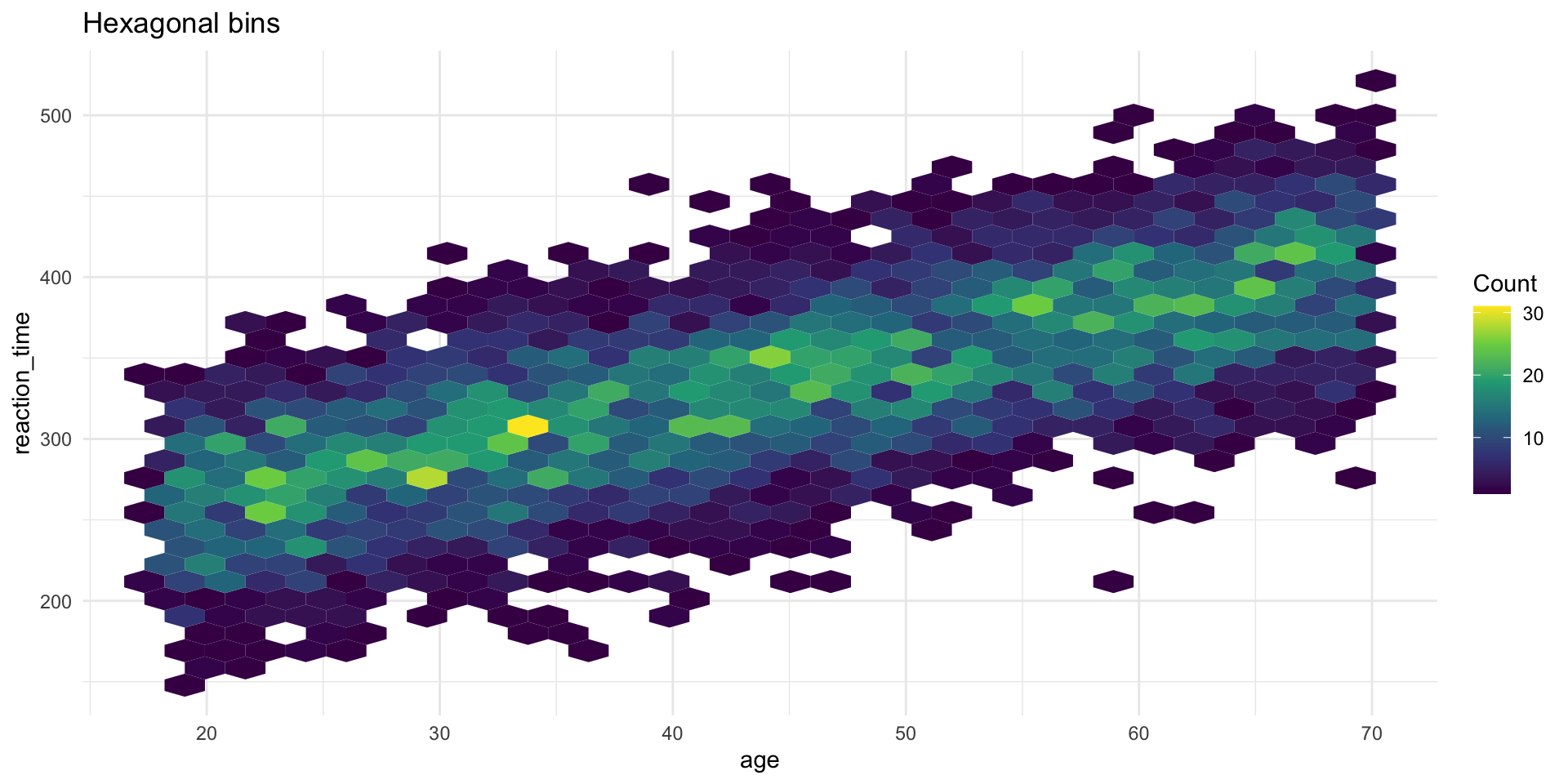
Solution 3: geom_hex()

ggplot(big_rt_data, aes(x = age, y = reaction_time)) +
  geom_hex() +
  scale_fill_viridis_c() +
  labs(
    title = "Hexagonal bins",
    fill = "Count"
  ) +
  theme_minimal()

Solution 3: geom_hex()

Hexagonal bin plot of reaction time versus age, with hexagons colored by count using a viridis scale, showing highest density along the positive linear trend.

Correlation coefficient

A single number summary of the linear relationship:

cor(rt_data$age, rt_data$reaction_time)
[1] 0.7556987

Note

  • r = 1: perfect positive relationship
  • r = 0: no linear relationship
  • r = -1: perfect negative relationship

But always plot your data first! (See: Anscombe’s Quartet)

Patterns and models

What patterns tell us

When you see covariation, ask:

  1. Could it be coincidence? (Maybe, especially with small samples)
  2. What’s the mechanism? (How are these variables related?)
  3. Is there a confound? (Could a third variable explain both?)

Warning

Correlation ≠ Causation

Covariation suggests a relationship, but doesn’t prove one variable causes the other.

Real data example

Let’s explore a real dataset: mpg (fuel economy data)

glimpse(mpg)
Rows: 234
Columns: 11
$ manufacturer <chr> "audi", "audi", "audi", "audi", "audi", "audi", "audi", "…
$ model        <chr> "a4", "a4", "a4", "a4", "a4", "a4", "a4", "a4 quattro", "…
$ displ        <dbl> 1.8, 1.8, 2.0, 2.0, 2.8, 2.8, 3.1, 1.8, 1.8, 2.0, 2.0, 2.…
$ year         <int> 1999, 1999, 2008, 2008, 1999, 1999, 2008, 1999, 1999, 200…
$ cyl          <int> 4, 4, 4, 4, 6, 6, 6, 4, 4, 4, 4, 6, 6, 6, 6, 6, 6, 8, 8, …
$ trans        <chr> "auto(l5)", "manual(m5)", "manual(m6)", "auto(av)", "auto…
$ drv          <chr> "f", "f", "f", "f", "f", "f", "f", "4", "4", "4", "4", "4…
$ cty          <int> 18, 21, 20, 21, 16, 18, 18, 18, 16, 20, 19, 15, 17, 17, 1…
$ hwy          <int> 29, 29, 31, 30, 26, 26, 27, 26, 25, 28, 27, 25, 25, 25, 2…
$ fl           <chr> "p", "p", "p", "p", "p", "p", "p", "p", "p", "p", "p", "p…
$ class        <chr> "compact", "compact", "compact", "compact", "compact", "c…

Question 1: Does engine size affect fuel economy?

ggplot(mpg, aes(x = displ, y = hwy)) +
  geom_point() +
  geom_smooth(method = "lm") +
  labs(
    title = "Larger engines are less fuel efficient",
    x = "Engine displacement (liters)",
    y = "Highway MPG"
  ) +
  theme_minimal()

Question 1: Does engine size affect fuel economy?

Scatterplot of highway MPG versus engine displacement with a linear trend line, showing a clear negative relationship where larger engines have lower fuel efficiency.

Question 2: Does this vary by car type?

ggplot(mpg, aes(x = displ, y = hwy, color = class)) +
  geom_point() +
  labs(
    title = "Engine size vs fuel economy by car type",
    x = "Engine displacement (liters)",
    y = "Highway MPG",
    color = "Car type"
  ) +
  theme_minimal()

Question 2: Does this vary by car type?

Scatterplot of highway MPG versus engine displacement with points colored by car type, revealing that the overall negative trend varies across vehicle classes like 2seaters and subcompacts.

Question 3: Which car types are most common?

ggplot(mpg, aes(y = fct_infreq(class))) +
  geom_bar() +
  labs(
    title = "SUVs are the most common vehicle type",
    x = "Count",
    y = "Car type"
  ) +
  theme_minimal()

Question 3: Which car types are most common?

Horizontal bar chart of vehicle types ordered by frequency, showing SUVs as the most common type followed by compact and midsize cars.

Your class data: Covariation

Stress by chronotype

ggplot(class_survey, aes(x = chronotype, y = stress, fill = chronotype)) +
  geom_boxplot(alpha = 0.7, show.legend = FALSE) +
  labs(
    title = "Are Night Owls More Stressed?",
    x = "Chronotype",
    y = "Current stress level (1–10)"
  ) +
  theme_minimal(base_size = 14)

Stress by chronotype

Boxplots comparing self-reported stress levels across chronotype groups (Morning, Evening, Neither), showing how stress varies by sleep preference.

Coding excitement vs. coding anxiety

ggplot(class_survey, aes(x = coding_excited, y = coding_anxious)) +
  geom_jitter(width = 0.2, height = 0.2, alpha = 0.6, size = 3) +
  geom_smooth(method = "lm", se = FALSE, color = "steelblue") +
  labs(
    title = "Does Excitement Buffer Anxiety About Coding?",
    x = "Excitement about learning to code (1–10)",
    y = "Anxiety about learning to code (1–10)"
  ) +
  theme_minimal(base_size = 14)

Coding excitement vs. coding anxiety

Scatterplot of coding excitement versus coding anxiety scores, showing whether students who are more excited about coding also tend to be more or less anxious about it.

Caffeine and sleep

ggplot(class_survey, aes(x = caffeine_per_day, y = sleep_hrs)) +
  geom_jitter(width = 0.2, height = 0.2, alpha = 0.6, size = 3) +
  geom_smooth(method = "lm", se = FALSE, color = "steelblue") +
  labs(
    title = "More Caffeine, Less Sleep?",
    x = "Caffeinated drinks per day",
    y = "Average hours of sleep per night"
  ) +
  theme_minimal(base_size = 14)

Caffeine and sleep

Scatterplot of caffeine drinks per day versus average hours of sleep, with a trend line showing whether caffeine consumption is associated with sleep duration.

End-of-deck exercise

Your final project proposal

For your final project, you’ll need to:

  1. Choose a dataset with at least 2-3 variables of interest
  2. Formulate 2-3 research questions about relationships in the data
  3. Plan visualizations to explore those relationships

Exercise: Start exploring potential datasets. Find one that interests you and create 2-3 exploratory visualizations showing different types of covariation (categorical + continuous, continuous + continuous, etc.).

This will form the basis of your proposal, due today!

Wrapping up

Key takeaways

  1. Covariation = relationships between variables
  2. Different plot types for different variable combinations:
    • Categorical + continuous: boxplot, raincloud plots
    • Categorical + categorical: bar charts, tiles, geom_count()
    • Continuous + continuous: scatterplot, 2D bins, hex
  3. Raincloud plots are the gold standard for psychology — they show distribution, summary stats, and raw data
  4. Watch for overplotting — use alpha, jitter, or binning
  5. Always visualize first before computing correlations
  6. Patterns suggest but don’t prove causation

Before next class

📖 Read:

  • R4DS Ch 12: Logical vectors
  • R4DS Ch 13: Numbers

Do:

  • Submit Assignment 5
  • Submit your Final Project Proposal (due today!)
  • Start thinking about how you’ll compute scale scores (next session)

The one thing to remember

Relationships hide in data. Your job is to make them visible — carefully, honestly.

See you Monday for data types and scale scoring!