Data Transformation II

PSY 410: Data Science for Psychology

Dr. Sara Weston

2026-04-08

From rows to statistics

Your advisor’s first question

Last time, you learned to pick rows, sort them, and create new columns.

But your advisor doesn’t want rows. They want a number:

“What’s the average depression score by condition?”

Today we learn to answer that — with group_by() + summarize().

summarize()

summarize() collapses data

Reduces a data frame to a single row of summary statistics:

flights |>
  summarize(
    avg_delay = mean(dep_delay, na.rm = TRUE),
    max_delay = max(dep_delay, na.rm = TRUE),
    n_flights = n()
  )
# A tibble: 1 × 3
  avg_delay max_delay n_flights
      <dbl>     <dbl>     <int>
1      12.6      1301    336776
Key summary functions

Function What it computes
mean(), median() Central tendency
sd(), var() Spread
min(), max() Extremes
sum() Total
n() Count of rows
n_distinct() Count of unique values

The na.rm argument

Most summary functions need na.rm = TRUE to handle missing values:

x <- c(1, 2, NA, 4, 5)

mean(x)                  # Returns NA
[1] NA
mean(x, na.rm = TRUE)    # Returns 3
[1] 3

Tip

Always use na.rm = TRUE unless you specifically want NA propagation.

summarize() alone isn’t very useful

One row of summary stats? That’s what mean() already does.

mean(flights$dep_delay, na.rm = TRUE)
[1] 12.63907

The power comes when we combine it with group_by().

group_by()

group_by() + summarize() = magic

flights |>
  group_by(month) |>
  summarize(
    avg_delay = mean(dep_delay, na.rm = TRUE),
    n_flights = n()
  )
# A tibble: 12 × 3
   month avg_delay n_flights
   <int>     <dbl>     <int>
 1     1     10.0      27004
 2     2     10.8      24951
 3     3     13.2      28834
 4     4     13.9      28330
 5     5     13.0      28796
 6     6     20.8      28243
 7     7     21.7      29425
 8     8     12.6      29327
 9     9      6.72     27574
10    10      6.24     28889
11    11      5.44     27268
12    12     16.6      28135

What happened?

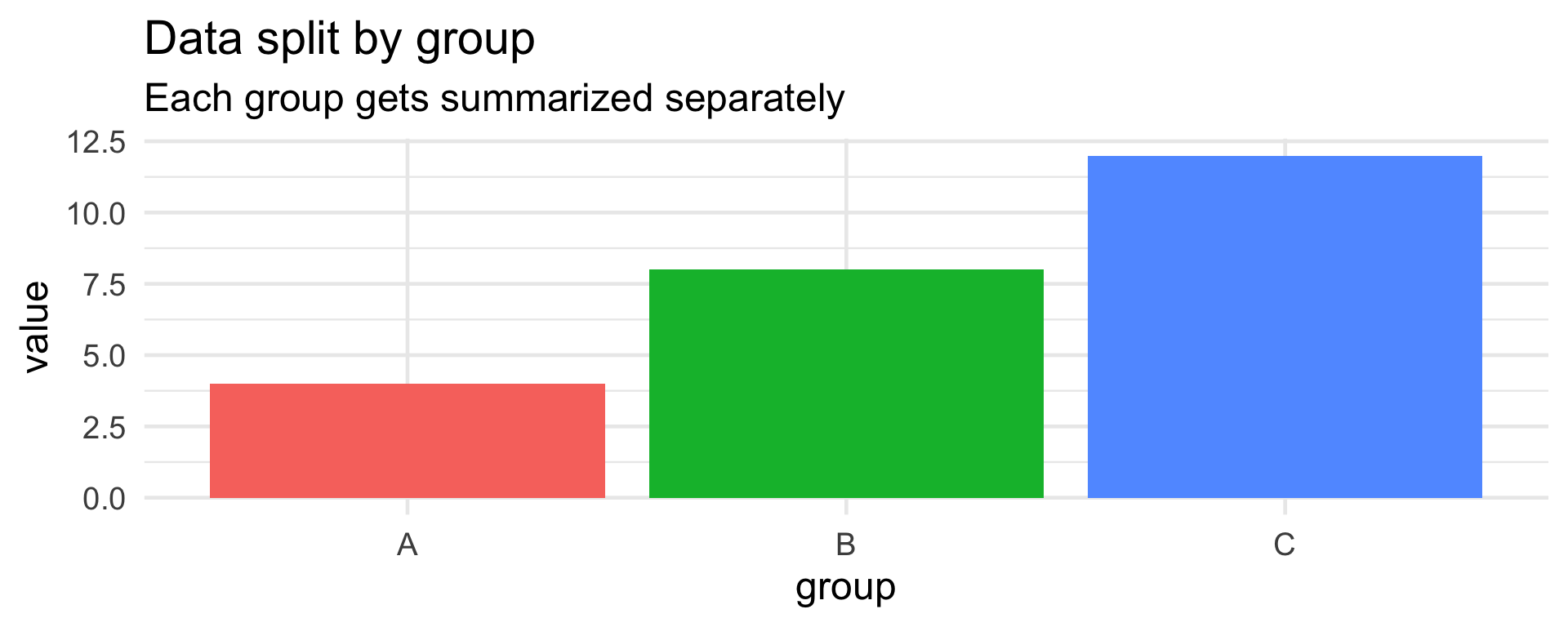
  1. group_by(month) split the data into 12 groups (one per month)
  2. summarize() calculated statistics within each group
  3. Result: one row per group

Visualizing group_by()

Bar chart showing data split into three groups (A, B, C) with different values in each, illustrating how group_by() separates data so each group is summarized independently.

Group by multiple variables

# Average delay by month AND carrier
flights |>
  group_by(month, carrier) |>
  summarize(
    avg_delay = mean(dep_delay, na.rm = TRUE),
    n_flights = n()
  )
# A tibble: 185 × 4
# Groups:   month [12]
   month carrier avg_delay n_flights
   <int> <chr>       <dbl>     <int>
 1     1 9E          16.9       1573
 2     1 AA           6.93      2794
 3     1 AS           7.35        62
 4     1 B6           9.49      4427
 5     1 DL           3.85      3690
 6     1 EV          24.2       4171
 7     1 F9          10           59
 8     1 FL           1.97       328
 9     1 HA          54.4         31
10     1 MQ           6.49      2271
# ℹ 175 more rows

The .groups argument

You may see this message:

`summarise()` has grouped output by 'month'. You can override using the `.groups` argument.

Control this with:

# Keep grouping (default with multiple groups)
summarize(..., .groups = "keep")

# Drop all grouping
summarize(..., .groups = "drop")

# Drop last group level
summarize(..., .groups = "drop_last")

Group by for psychology

# Means by condition
data |>
  group_by(condition) |>
  summarize(
    mean_score = mean(score, na.rm = TRUE),
    sd_score = sd(score, na.rm = TRUE),
    n = n()
  )

Group by for psychology

# Descriptives by condition AND gender
data |>
  group_by(condition, gender) |>
  summarize(
    m = mean(outcome),
    se = sd(outcome) / sqrt(n())
  )

Multiple summaries at once

flights |>
  group_by(carrier) |>
  summarize(
    # Central tendency
    mean_delay = mean(arr_delay, na.rm = TRUE),
    median_delay = median(arr_delay, na.rm = TRUE),
    # Spread
    sd_delay = sd(arr_delay, na.rm = TRUE),
    # Counts
    n_flights = n(),
    n_dest = n_distinct(dest)
  ) |>
  arrange(mean_delay)  # Best to worst carriers

Multiple summaries at once

# A tibble: 16 × 6
   carrier mean_delay median_delay sd_delay n_flights n_dest
   <chr>        <dbl>        <dbl>    <dbl>     <int>  <int>
 1 AS          -9.93           -17     36.5       714      1
 2 HA          -6.92           -13     75.1       342      1
 3 AA           0.364           -9     42.5     32729     19
 4 DL           1.64            -8     44.4     48110     40
 5 VX           1.76            -9     50.0      5162      5
 6 US           2.13            -6     33.1     20536      6
 7 UA           3.56            -6     41.0     58665     47
 8 9E           7.38            -7     50.1     18460     49
 9 B6           9.46            -3     42.8     54635     42
10 WN           9.65            -3     46.9     12275     11
11 MQ          10.8             -1     43.2     26397     20
12 OO          11.9             -7     48.6        32      5
13 YV          15.6             -2     52.9       601      3
14 EV          15.8             -1     49.9     54173     61
15 FL          20.1              5     54.1      3260      3
16 F9          21.9              6     61.6       685      1

Pair coding break

Your turn: 10 minutes

With a partner, using the flights dataset:

  1. Calculate the average departure delay for each carrier
  2. Which airline has the worst average delay?
  3. Bonus: Also calculate the number of flights per carrier. Does the worst airline just have fewer flights?

Before we move on

📤 Upload your code to Canvas for participation credit. Paste what you have into today’s in-class submission — it doesn’t need to work perfectly.

What you can already do

With summarize() + group_by(), you can answer questions like:

  • “What’s the average depression score by condition?”
  • “Which group had the most variability?”
  • “How many participants completed each phase?”

These are the building blocks of a results section. Next: some shortcuts.

count() — a shortcut

Counting is common

# How many flights per carrier?
flights |>
  group_by(carrier) |>
  summarize(n = n())
# A tibble: 16 × 2
   carrier     n
   <chr>   <int>
 1 9E      18460
 2 AA      32729
 3 AS        714
 4 B6      54635
 5 DL      48110
 6 EV      54173
 7 F9        685
 8 FL       3260
 9 HA        342
10 MQ      26397
11 OO         32
12 UA      58665
13 US      20536
14 VX       5162
15 WN      12275
16 YV        601

count() does this automatically

flights |>
  count(carrier)
# A tibble: 16 × 2
   carrier     n
   <chr>   <int>
 1 9E      18460
 2 AA      32729
 3 AS        714
 4 B6      54635
 5 DL      48110
 6 EV      54173
 7 F9        685
 8 FL       3260
 9 HA        342
10 MQ      26397
11 OO         32
12 UA      58665
13 US      20536
14 VX       5162
15 WN      12275
16 YV        601

Same result, less typing!

count() with multiple variables

flights |>
  count(carrier, origin)
# A tibble: 35 × 3
   carrier origin     n
   <chr>   <chr>  <int>
 1 9E      EWR     1268
 2 9E      JFK    14651
 3 9E      LGA     2541
 4 AA      EWR     3487
 5 AA      JFK    13783
 6 AA      LGA    15459
 7 AS      EWR      714
 8 B6      EWR     6557
 9 B6      JFK    42076
10 B6      LGA     6002
# ℹ 25 more rows

Adding weights

# Total distance flown by each carrier
flights |>
  count(carrier, wt = distance, name = "total_miles")
# A tibble: 16 × 2
   carrier total_miles
   <chr>         <dbl>
 1 9E          9788152
 2 AA         43864584
 3 AS          1715028
 4 B6         58384137
 5 DL         59507317
 6 EV         30498951
 7 F9          1109700
 8 FL          2167344
 9 HA          1704186
10 MQ         15033955
11 OO            16026
12 UA         89705524
13 US         11365778
14 VX         12902327
15 WN         12229203
16 YV           225395

Combining operations

The full dplyr toolkit

Now you can combine everything:

data |>
  filter()    |>   # Subset rows
  select()    |>   # Pick columns
  mutate()    |>   # Create columns
  group_by()  |>   # Define groups
  summarize() |>   # Calculate summaries
  arrange()        # Sort results

A complete analysis pipeline

# Which airlines were most delayed in summer?
flights |>
  filter(month %in% c(6, 7, 8)) |>    # Summer months only
  filter(!is.na(arr_delay)) |>         # Remove missing
  group_by(carrier) |>                 # Group by airline
  summarize(
    avg_delay = mean(arr_delay),
    pct_delayed = mean(arr_delay > 0) * 100,  # % of flights delayed
    n_flights = n()
  ) |>
  filter(n_flights > 1000) |>          # Only airlines with many flights
  arrange(desc(avg_delay))             # Worst first

A complete analysis pipeline

# A tibble: 10 × 4
   carrier avg_delay pct_delayed n_flights
   <chr>       <dbl>       <dbl>     <int>
 1 MQ          18.6         52.6      6254
 2 EV          17.9         47.2     12715
 3 B6          17.7         48.9     14393
 4 9E          17.0         44.9      3972
 5 WN          16.6         47.2      3111
 6 VX          15.9         42.3      1451
 7 DL           9.56        40.9     12568
 8 UA           8.91        42.1     14941
 9 US           7.90        42.4      5086
10 AA           2.76        34.1      8271

Piping into ggplot

flights |>
  filter(!is.na(arr_delay)) |>
  group_by(month) |>
  summarize(avg_delay = mean(arr_delay)) |>
  ggplot(aes(x = factor(month), y = avg_delay)) +
  geom_col(fill = "steelblue") +
  labs(
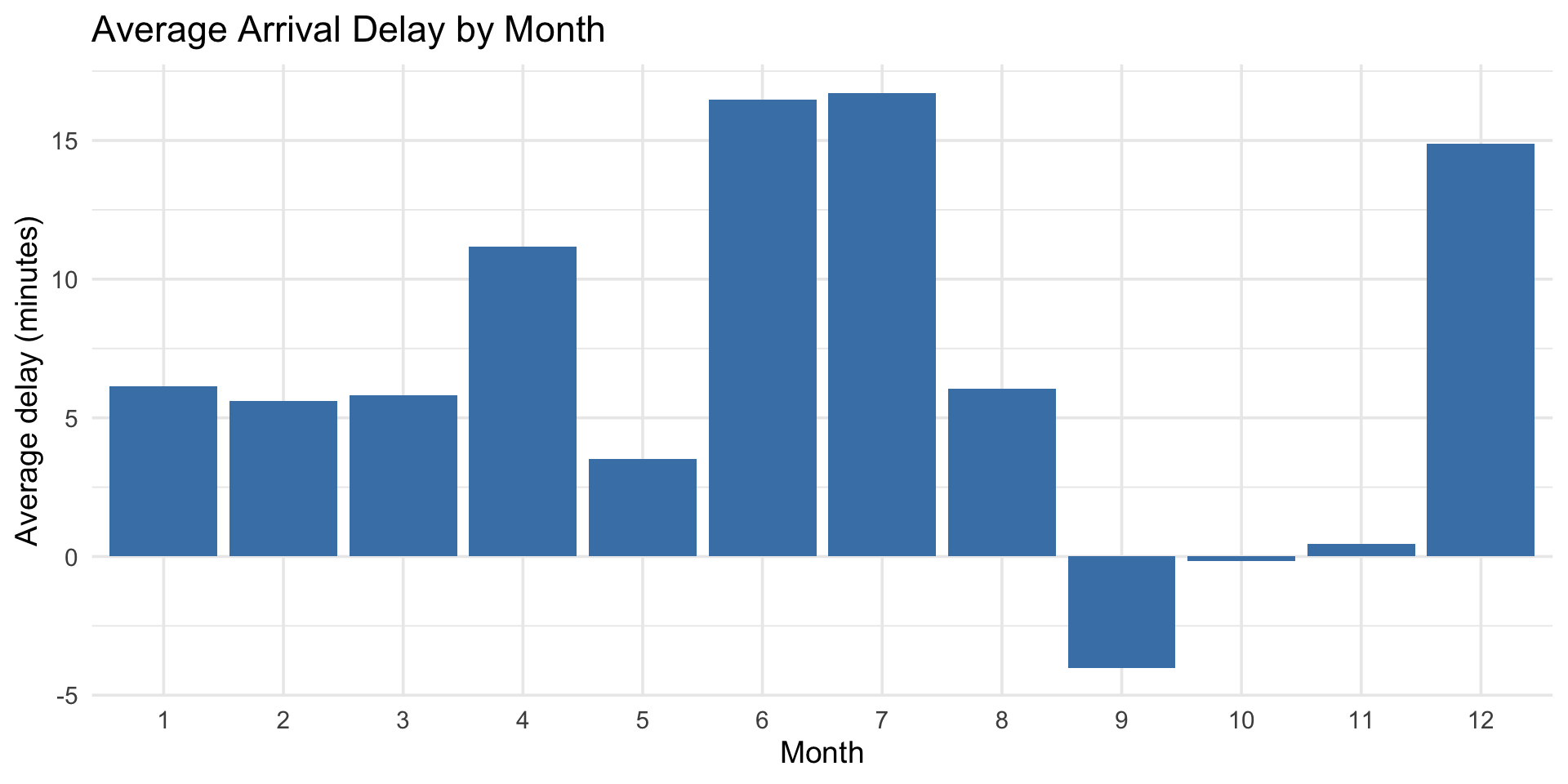
    title = "Average Arrival Delay by Month",
    x = "Month",
    y = "Average delay (minutes)"
  ) +
  theme_minimal(base_size = 14)

Piping into ggplot

Bar chart of average arrival delay by month showing delays peak in summer (June and July) and are lowest in fall, demonstrating how a dplyr pipeline can feed directly into ggplot.

group_by() with mutate()

group_by() also affects mutate() and filter():

# Add a column for mean delay PER CARRIER
flights |>
  group_by(carrier) |>
  mutate(
    carrier_mean_delay = mean(arr_delay, na.rm = TRUE),
    delay_vs_carrier = arr_delay - carrier_mean_delay
  ) |>
  select(carrier, arr_delay, carrier_mean_delay, delay_vs_carrier)

group_by() with mutate()

group_by() also affects mutate() and filter():

# A tibble: 336,776 × 4
# Groups:   carrier [16]
   carrier arr_delay carrier_mean_delay delay_vs_carrier
   <chr>       <dbl>              <dbl>            <dbl>
 1 UA             11              3.56              7.44
 2 UA             20              3.56             16.4 
 3 AA             33              0.364            32.6 
 4 B6            -18              9.46            -27.5 
 5 DL            -25              1.64            -26.6 
 6 UA             12              3.56              8.44
 7 B6             19              9.46              9.54
 8 EV            -14             15.8             -29.8 
 9 B6             -8              9.46            -17.5 
10 AA              8              0.364             7.64
# ℹ 336,766 more rows

Filtering within groups

# Find the 2 most delayed flights per month
flights |>
  group_by(month) |>
  filter(!is.na(arr_delay)) |>
  slice_max(arr_delay, n = 2) |>
  select(month, carrier, arr_delay)
# A tibble: 24 × 3
# Groups:   month [12]
   month carrier arr_delay
   <int> <chr>       <dbl>
 1     1 HA           1272
 2     1 MQ           1109
 3     2 F9            834
 4     2 DL            773
 5     3 DL            915
 6     3 DL            784
 7     4 DL            931
 8     4 DL            821
 9     5 MQ            875
10     5 AA            852
# ℹ 14 more rows

slice() variants

Function What it does
slice_head(n) First n rows
slice_tail(n) Last n rows
slice_max(var, n) n rows with highest var
slice_min(var, n) n rows with lowest var
slice_sample(n) Random n rows

All work within groups when preceded by group_by().

ungroup()

Sometimes you need to remove grouping:

flights |>
  group_by(carrier) |>
  mutate(carrier_mean = mean(arr_delay, na.rm = TRUE)) |>
  ungroup() |>                              # Remove grouping
  mutate(grand_mean = mean(arr_delay, na.rm = TRUE)) |>  # Now uses ALL flights
  select(carrier, arr_delay, carrier_mean, grand_mean)
# A tibble: 336,776 × 4
   carrier arr_delay carrier_mean grand_mean
   <chr>       <dbl>        <dbl>      <dbl>
 1 UA             11        3.56        6.90
 2 UA             20        3.56        6.90
 3 AA             33        0.364       6.90
 4 B6            -18        9.46        6.90
 5 DL            -25        1.64        6.90
 6 UA             12        3.56        6.90
 7 B6             19        9.46        6.90
 8 EV            -14       15.8         6.90
 9 B6             -8        9.46        6.90
10 AA              8        0.364       6.90
# ℹ 336,766 more rows

Code style matters

Spot the difference

# Version A
pD<-read_csv("participants.csv")
m<-pD|>filter(age>25)|>group_by(condition)|>summarize(m=mean(score,na.rm=TRUE),s=sd(score,na.rm=TRUE),n=n())
# Version B
participant_data <- read_csv("participants.csv")

# Adults only — age cutoff matches preregistration
participant_data |>
  filter(age > 25) |>
  group_by(condition) |>
  summarize(
    mean_score = mean(score, na.rm = TRUE),
    sd_score = sd(score, na.rm = TRUE),
    n = n()
  )

Same code. One you can debug at midnight. One you can’t.

The rules behind the difference

Spacing

  • Spaces around <-, ==, |>
  • Spaces after commas
  • One verb per line

Naming

  • snake_case: mean_score, not m
  • Meaningful: participant_data, not pD
  • Comments explain why, not what

Practice: Psychology example

Simulated experiment data

set.seed(42)

# Create a simulated experiment dataset
experiment <- tibble(
  participant_id = rep(1:60, each = 20),
  condition = rep(rep(c("control", "treatment"), each = 10), 60),
  trial = rep(1:20, 60),
  reaction_time = rnorm(1200, mean = 500, sd = 100) +
                  ifelse(rep(rep(c(0, 1), each = 10), 60) == 1, -30, 0),
  accuracy = rbinom(1200, 1, prob = 0.85 +
                    ifelse(rep(rep(c(0, 1), each = 10), 60) == 1, 0.05, 0))
)

Examine the data

experiment
# A tibble: 1,200 × 5
   participant_id condition trial reaction_time accuracy
            <int> <chr>     <int>         <dbl>    <int>
 1              1 control       1          637.        1
 2              1 control       2          444.        1
 3              1 control       3          536.        1
 4              1 control       4          563.        1
 5              1 control       5          540.        1
 6              1 control       6          489.        0
 7              1 control       7          651.        1
 8              1 control       8          491.        1
 9              1 control       9          702.        1
10              1 control      10          494.        1
# ℹ 1,190 more rows

Participant-level summaries

# First, summarize BY PARTICIPANT
participant_summaries <- experiment |>
  group_by(participant_id, condition) |>
  summarize(
    mean_rt = mean(reaction_time),
    accuracy = mean(accuracy) * 100,
    n_trials = n(),
    .groups = "drop"
  )

participant_summaries

Participant-level summaries

# A tibble: 120 × 5
   participant_id condition mean_rt accuracy n_trials
            <int> <chr>       <dbl>    <dbl>    <int>
 1              1 control      555.       90       10
 2              1 treatment    454.       90       10
 3              2 control      482.       80       10
 4              2 treatment    434.       70       10
 5              3 control      498.       80       10
 6              3 treatment    472.      100       10
 7              4 control      554.       90       10
 8              4 treatment    448.       90       10
 9              5 control      525.      100       10
10              5 treatment    461.       80       10
# ℹ 110 more rows

Condition-level summaries

# Now summarize ACROSS PARTICIPANTS by condition
condition_summaries <- participant_summaries |>
  group_by(condition) |>
  summarize(
    M_rt = mean(mean_rt),
    SD_rt = sd(mean_rt),
    M_acc = mean(accuracy),
    SD_acc = sd(accuracy),
    n = n()
  )

condition_summaries
# A tibble: 2 × 6
  condition  M_rt SD_rt M_acc SD_acc     n
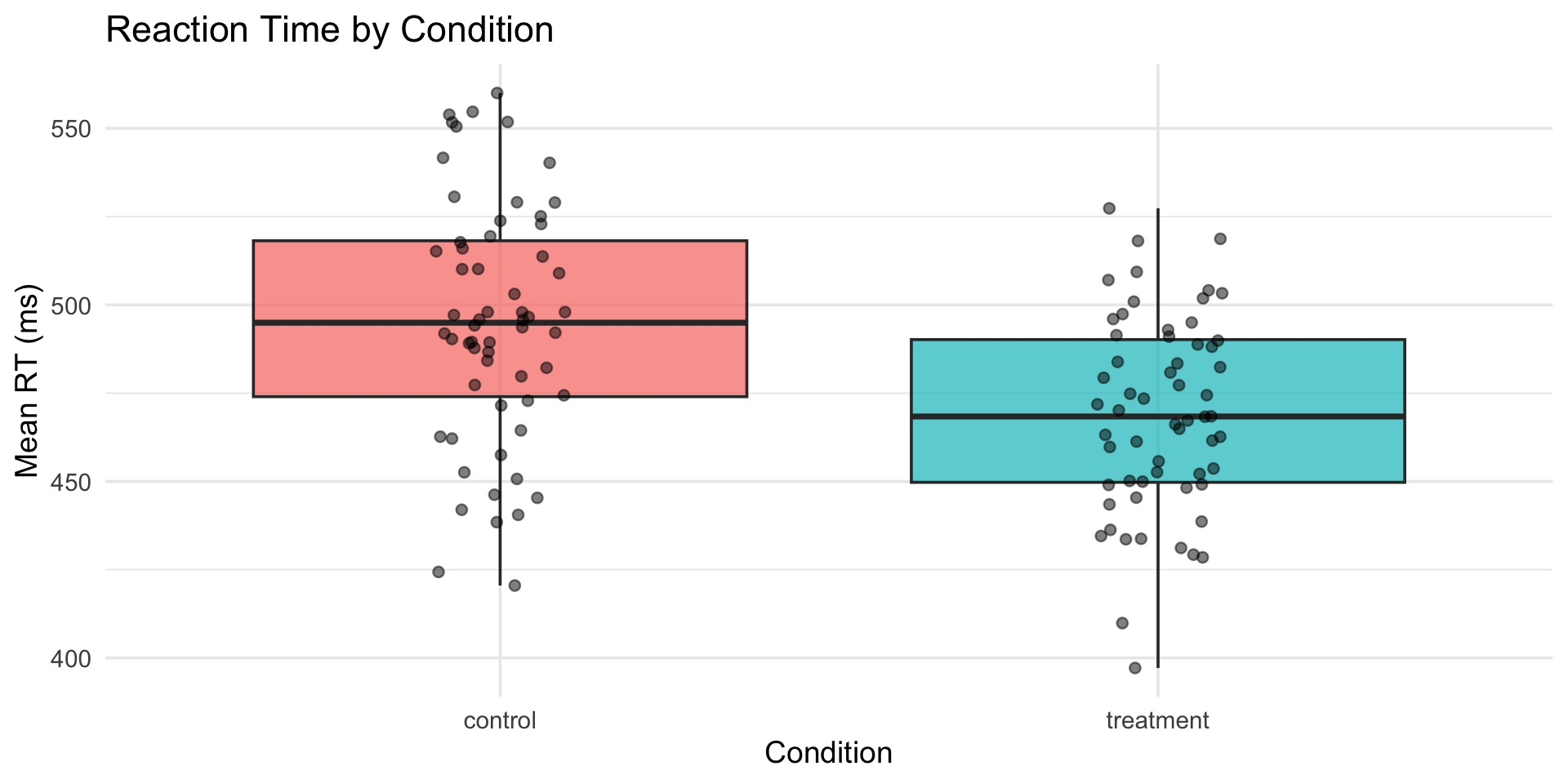
  <chr>     <dbl> <dbl> <dbl>  <dbl> <int>
1 control    495.  34.3  84.8   11.4    60
2 treatment  469.  27.7  89.2   10.1    60

Visualize the results

participant_summaries |>
  ggplot(aes(x = condition, y = mean_rt, fill = condition)) +
  geom_boxplot(alpha = 0.7) +
  geom_jitter(width = 0.1, alpha = 0.5) +
  labs(
    title = "Reaction Time by Condition",
    x = "Condition",
    y = "Mean RT (ms)"
  ) +
  theme_minimal(base_size = 14) +
  theme(legend.position = "none")

Visualize the results

Boxplot with overlaid data points comparing mean reaction time between control and treatment conditions, showing the treatment group has slightly faster reaction times with similar spread.

Get a head start: Assignment 2

Using the experiment data we just created:

  1. Filter to only accurate trials (accuracy == 1)
  2. Calculate mean RT per participant per condition
  3. Find the 5 participants with the fastest mean RT in each condition

Tip

This uses everything from today — filter(), group_by(), summarize(), and slice_min(). Work through it step by step.

Wrapping up

Today’s additions

Verb What it does
group_by() Define groups for operations
summarize() Calculate summary statistics
count() Quick frequency counts
ungroup() Remove grouping
slice_*() Select rows by position/rank

The analysis workflow

raw_data |>
  filter(valid_data) |>           # Clean
  select(relevant_vars) |>        # Focus
  mutate(new_vars) |>             # Transform
  group_by(conditions) |>         # Split
  summarize(statistics) |>        # Aggregate
  arrange(order) |>               # Sort
  ggplot() + ...                  # Visualize

Before next class

📖 Read:

Practice:

  • Calculate descriptive statistics by group
  • Build complete analysis pipelines
  • Focus on writing clean, readable code

Key takeaways

  1. group_by() + summarize() is incredibly powerful
  2. count() is a quick shortcut for frequencies
  3. Grouped operations work with mutate() and filter() too
  4. ungroup() when you need to work with all data again
  5. Code style matters — write for your future self

The one thing to remember

group_by() + summarize() is how you go from raw data to the descriptive statistics table in every published paper.

Next time: Data Tidying with tidyr