library(tidyverse)
library(nycflights13)  # For the flights dataset
# All 336,776 flights departing NYC in 2013Data Transformation I
PSY 410: Data Science for Psychology
Dr. Sara Weston
2026-04-06
Data transformation
A question you can’t answer yet
You collected survey data from 500 participants. You only want women over 25 who passed the attention check.
How do you get to just those rows?
That’s what filter() does. And it’s just the beginning — today we learn four verbs that turn raw data into exactly what you need.
The dplyr verbs
| Verb | What it does |
|---|---|
filter() |
Pick rows by their values |
arrange() |
Reorder rows |
select() |
Pick columns by name |
mutate() |
Create new columns |
summarize() |
Collapse to a summary |
Today: filter(), arrange(), select(), mutate()
Our dataset: flights
Rows: 336,776
Columns: 19
$ year           <int> 2013, 2013, 2013, 2013, 2013, 2013, 2013, 2013, 2013, 2…
$ month          <int> 1, 1, 1, 1, 1, 1, 1, 1, 1, 1, 1, 1, 1, 1, 1, 1, 1, 1, 1…
$ day            <int> 1, 1, 1, 1, 1, 1, 1, 1, 1, 1, 1, 1, 1, 1, 1, 1, 1, 1, 1…
$ dep_time       <int> 517, 533, 542, 544, 554, 554, 555, 557, 557, 558, 558, …
$ sched_dep_time <int> 515, 529, 540, 545, 600, 558, 600, 600, 600, 600, 600, …
$ dep_delay      <dbl> 2, 4, 2, -1, -6, -4, -5, -3, -3, -2, -2, -2, -2, -2, -1…
$ arr_time       <int> 830, 850, 923, 1004, 812, 740, 913, 709, 838, 753, 849,…
$ sched_arr_time <int> 819, 830, 850, 1022, 837, 728, 854, 723, 846, 745, 851,…
$ arr_delay      <dbl> 11, 20, 33, -18, -25, 12, 19, -14, -8, 8, -2, -3, 7, -1…
$ carrier        <chr> "UA", "UA", "AA", "B6", "DL", "UA", "B6", "EV", "B6", "…
$ flight         <int> 1545, 1714, 1141, 725, 461, 1696, 507, 5708, 79, 301, 4…
$ tailnum        <chr> "N14228", "N24211", "N619AA", "N804JB", "N668DN", "N394…
$ origin         <chr> "EWR", "LGA", "JFK", "JFK", "LGA", "EWR", "EWR", "LGA",…
$ dest           <chr> "IAH", "IAH", "MIA", "BQN", "ATL", "ORD", "FLL", "IAD",…
$ air_time       <dbl> 227, 227, 160, 183, 116, 150, 158, 53, 140, 138, 149, 1…
$ distance       <dbl> 1400, 1416, 1089, 1576, 762, 719, 1065, 229, 944, 733, …
$ hour           <dbl> 5, 5, 5, 5, 6, 5, 6, 6, 6, 6, 6, 6, 6, 6, 6, 5, 6, 6, 6…
$ minute         <dbl> 15, 29, 40, 45, 0, 58, 0, 0, 0, 0, 0, 0, 0, 0, 0, 59, 0…
$ time_hour      <dttm> 2013-01-01 05:00:00, 2013-01-01 05:00:00, 2013-01-01 0…
Understanding the data
year,month,day— departure datedep_time,arr_time— actual times (HHMM format)dep_delay,arr_delay— delays in minutes (negative = early)carrier— airline codeorigin,dest— airport codesair_time,distance— in minutes and miles
filter()
filter() picks rows
# A tibble: 842 × 19
    year month   day dep_time sched_dep_time dep_delay arr_time sched_arr_time
   <int> <int> <int>    <int>          <int>     <dbl>    <int>          <int>
 1  2013     1     1      517            515         2      830            819
 2  2013     1     1      533            529         4      850            830
 3  2013     1     1      542            540         2      923            850
 4  2013     1     1      544            545        -1     1004           1022
 5  2013     1     1      554            600        -6      812            837
 6  2013     1     1      554            558        -4      740            728
 7  2013     1     1      555            600        -5      913            854
 8  2013     1     1      557            600        -3      709            723
 9  2013     1     1      557            600        -3      838            846
10  2013     1     1      558            600        -2      753            745
# ℹ 832 more rows
# ℹ 11 more variables: arr_delay <dbl>, carrier <chr>, flight <int>,
#   tailnum <chr>, origin <chr>, dest <chr>, air_time <dbl>, distance <dbl>,
# hour <dbl>, minute <dbl>, time_hour <dttm>Comparison operators
| Operator | Meaning |
|---|---|
== |
equal to |
!= |
not equal to |
<, > |
less than, greater than |
<=, >= |
less/greater than or equal |
Warning
Use == for comparison, not =!
Filter examples
Multiple conditions
Conditions separated by , are combined with AND:
Equivalent to:
Logical operators
| Operator | Meaning |
|---|---|
& |
AND (both true) |
| |
OR (either true) |
! |
NOT (negation) |
Using OR
# A tibble: 55,403 × 19
    year month   day dep_time sched_dep_time dep_delay arr_time sched_arr_time
   <int> <int> <int>    <int>          <int>     <dbl>    <int>          <int>
 1  2013    11     1        5           2359         6      352            345
 2  2013    11     1       35           2250       105      123           2356
 3  2013    11     1      455            500        -5      641            651
 4  2013    11     1      539            545        -6      856            827
 5  2013    11     1      542            545        -3      831            855
 6  2013    11     1      549            600       -11      912            923
 7  2013    11     1      550            600       -10      705            659
 8  2013    11     1      554            600        -6      659            701
 9  2013    11     1      554            600        -6      826            827
10  2013    11     1      554            600        -6      749            751
# ℹ 55,393 more rows
# ℹ 11 more variables: arr_delay <dbl>, carrier <chr>, flight <int>,
#   tailnum <chr>, origin <chr>, dest <chr>, air_time <dbl>, distance <dbl>,
# hour <dbl>, minute <dbl>, time_hour <dttm>A useful shortcut: %in%
# A tibble: 55,403 × 19
    year month   day dep_time sched_dep_time dep_delay arr_time sched_arr_time
   <int> <int> <int>    <int>          <int>     <dbl>    <int>          <int>
 1  2013    11     1        5           2359         6      352            345
 2  2013    11     1       35           2250       105      123           2356
 3  2013    11     1      455            500        -5      641            651
 4  2013    11     1      539            545        -6      856            827
 5  2013    11     1      542            545        -3      831            855
 6  2013    11     1      549            600       -11      912            923
 7  2013    11     1      550            600       -10      705            659
 8  2013    11     1      554            600        -6      659            701
 9  2013    11     1      554            600        -6      826            827
10  2013    11     1      554            600        -6      749            751
# ℹ 55,393 more rows
# ℹ 11 more variables: arr_delay <dbl>, carrier <chr>, flight <int>,
#   tailnum <chr>, origin <chr>, dest <chr>, air_time <dbl>, distance <dbl>,
#   hour <dbl>, minute <dbl>, time_hour <dttm>
%in% checks if the value is in the vector.
Missing values: NA
NA means “not available” — a missing value.
Any operation with NA returns NA (it’s unknown!).
Checking for NA
Use is.na() to check for missing values:
Pair coding break
Your turn: 10 minutes
With a partner, using the flights dataset:
- Find all United Airlines (
"UA") flights - that were more than 2 hours late arriving
- and were flying to Los Angeles (
"LAX")
How many flights match? Which origin airport had the most?
Tip
You’ll need filter() with multiple conditions. Think about which operators you need.
Solution
arrange()
arrange() reorders rows
# A tibble: 336,776 × 19
    year month   day dep_time sched_dep_time dep_delay arr_time sched_arr_time
   <int> <int> <int>    <int>          <int>     <dbl>    <int>          <int>
 1  2013    12     7     2040           2123       -43       40           2352
 2  2013     2     3     2022           2055       -33     2240           2338
 3  2013    11    10     1408           1440       -32     1549           1559
 4  2013     1    11     1900           1930       -30     2233           2243
 5  2013     1    29     1703           1730       -27     1947           1957
 6  2013     8     9      729            755       -26     1002            955
 7  2013    10    23     1907           1932       -25     2143           2143
 8  2013     3    30     2030           2055       -25     2213           2250
 9  2013     3     2     1431           1455       -24     1601           1631
10  2013     5     5      934            958       -24     1225           1309
# ℹ 336,766 more rows
# ℹ 11 more variables: arr_delay <dbl>, carrier <chr>, flight <int>,
#   tailnum <chr>, origin <chr>, dest <chr>, air_time <dbl>, distance <dbl>,
# hour <dbl>, minute <dbl>, time_hour <dttm>Descending order
# A tibble: 336,776 × 19
    year month   day dep_time sched_dep_time dep_delay arr_time sched_arr_time
   <int> <int> <int>    <int>          <int>     <dbl>    <int>          <int>
 1  2013     1     9      641            900      1301     1242           1530
 2  2013     6    15     1432           1935      1137     1607           2120
 3  2013     1    10     1121           1635      1126     1239           1810
 4  2013     9    20     1139           1845      1014     1457           2210
 5  2013     7    22      845           1600      1005     1044           1815
 6  2013     4    10     1100           1900       960     1342           2211
 7  2013     3    17     2321            810       911      135           1020
 8  2013     6    27      959           1900       899     1236           2226
 9  2013     7    22     2257            759       898      121           1026
10  2013    12     5      756           1700       896     1058           2020
# ℹ 336,766 more rows
# ℹ 11 more variables: arr_delay <dbl>, carrier <chr>, flight <int>,
#   tailnum <chr>, origin <chr>, dest <chr>, air_time <dbl>, distance <dbl>,
#   hour <dbl>, minute <dbl>, time_hour <dttm>
Multiple sort columns
# A tibble: 336,776 × 19
    year month   day dep_time sched_dep_time dep_delay arr_time sched_arr_time
   <int> <int> <int>    <int>          <int>     <dbl>    <int>          <int>
 1  2013     1     1      517            515         2      830            819
 2  2013     1     1      533            529         4      850            830
 3  2013     1     1      542            540         2      923            850
 4  2013     1     1      544            545        -1     1004           1022
 5  2013     1     1      554            600        -6      812            837
 6  2013     1     1      554            558        -4      740            728
 7  2013     1     1      555            600        -5      913            854
 8  2013     1     1      557            600        -3      709            723
 9  2013     1     1      557            600        -3      838            846
10  2013     1     1      558            600        -2      753            745
# ℹ 336,766 more rows
# ℹ 11 more variables: arr_delay <dbl>, carrier <chr>, flight <int>,
#   tailnum <chr>, origin <chr>, dest <chr>, air_time <dbl>, distance <dbl>,
#   hour <dbl>, minute <dbl>, time_hour <dttm>
Quick mental model
You’ve now seen three verbs. Each answers a different question:
| Verb | Question it answers |
|---|---|
filter() |
Which rows do I keep? |
arrange() |
What order should they be in? |
select() |
Which columns do I need? |
mutate() |
What new columns should I create? |
We’ve done the first two. Now let’s pick our columns.
select()
select() picks columns
Select a range
Select helpers
| Helper | What it does |
|---|---|
starts_with("x") |
Columns starting with “x” |
ends_with("x") |
Columns ending with “x” |
contains("x") |
Columns containing “x” |
everything() |
All remaining columns |
Using select helpers
Using select helpers
# A tibble: 336,776 × 5
   dep_time sched_dep_time arr_time sched_arr_time air_time
      <int>          <int>    <int>          <int>    <dbl>
 1      517            515      830            819      227
 2      533            529      850            830      227
 3      542            540      923            850      160
 4      544            545     1004           1022      183
 5      554            600      812            837      116
 6      554            558      740            728      150
 7      555            600      913            854      158
 8      557            600      709            723       53
 9      557            600      838            846      140
10      558            600      753            745      138
# ℹ 336,766 more rows
Reorder columns
# A tibble: 336,776 × 19
   air_time distance  year month   day dep_time sched_dep_time dep_delay
      <dbl>    <dbl> <int> <int> <int>    <int>          <int>     <dbl>
 1      227     1400  2013     1     1      517            515         2
 2      227     1416  2013     1     1      533            529         4
 3      160     1089  2013     1     1      542            540         2
 4      183     1576  2013     1     1      544            545        -1
 5      116      762  2013     1     1      554            600        -6
 6      150      719  2013     1     1      554            558        -4
 7      158     1065  2013     1     1      555            600        -5
 8       53      229  2013     1     1      557            600        -3
 9      140      944  2013     1     1      557            600        -3
10      138      733  2013     1     1      558            600        -2
# ℹ 336,766 more rows
# ℹ 11 more variables: arr_time <int>, sched_arr_time <int>, arr_delay <dbl>,
#   carrier <chr>, flight <int>, tailnum <chr>, origin <chr>, dest <chr>,
#   hour <dbl>, minute <dbl>, time_hour <dttm>
Exclude columns
Use - to remove columns:
# A tibble: 336,776 × 18
   month   day dep_time sched_dep_time dep_delay arr_time sched_arr_time
   <int> <int>    <int>          <int>     <dbl>    <int>          <int>
 1     1     1      517            515         2      830            819
 2     1     1      533            529         4      850            830
 3     1     1      542            540         2      923            850
 4     1     1      544            545        -1     1004           1022
 5     1     1      554            600        -6      812            837
 6     1     1      554            558        -4      740            728
 7     1     1      555            600        -5      913            854
 8     1     1      557            600        -3      709            723
 9     1     1      557            600        -3      838            846
10     1     1      558            600        -2      753            745
# ℹ 336,766 more rows
# ℹ 11 more variables: arr_delay <dbl>, carrier <chr>, flight <int>,
#   tailnum <chr>, origin <chr>, dest <chr>, air_time <dbl>, distance <dbl>,
#   hour <dbl>, minute <dbl>, time_hour <dttm>
Exclude columns
The pattern so far
Notice: every verb has the same shape.
Data goes first. Then you describe what you want. This consistency is by design.
mutate()
mutate() creates new columns
# A tibble: 336,776 × 20
    year month   day dep_time sched_dep_time dep_delay arr_time sched_arr_time
   <int> <int> <int>    <int>          <int>     <dbl>    <int>          <int>
 1  2013     1     1      517            515         2      830            819
 2  2013     1     1      533            529         4      850            830
 3  2013     1     1      542            540         2      923            850
 4  2013     1     1      544            545        -1     1004           1022
 5  2013     1     1      554            600        -6      812            837
 6  2013     1     1      554            558        -4      740            728
 7  2013     1     1      555            600        -5      913            854
 8  2013     1     1      557            600        -3      709            723
 9  2013     1     1      557            600        -3      838            846
10  2013     1     1      558            600        -2      753            745
# ℹ 336,766 more rows
# ℹ 12 more variables: arr_delay <dbl>, carrier <chr>, flight <int>,
#   tailnum <chr>, origin <chr>, dest <chr>, air_time <dbl>, distance <dbl>,
# hour <dbl>, minute <dbl>, time_hour <dttm>, total_delay <dbl>Multiple new columns
mutate(flights,
       # Create new variables
       total_delay = dep_delay + arr_delay,
       speed = distance / air_time * 60,  # mph
       # Can reference columns you just created!
       delay_per_mile = total_delay / distance
)
# A tibble: 336,776 × 22
year month day dep_time sched_dep_time dep_delay arr_time sched_arr_time
<int> <int> <int> <int> <int> <dbl> <int> <int>
1 2013 1 1 517 515 2 830 819
2 2013 1 1 533 529 4 850 830
3 2013 1 1 542 540 2 923 850
4 2013 1 1 544 545 -1 1004 1022
5 2013 1 1 554 600 -6 812 837
6 2013 1 1 554 558 -4 740 728
7 2013 1 1 555 600 -5 913 854
8 2013 1 1 557 600 -3 709 723
9 2013 1 1 557 600 -3 838 846
10 2013 1 1 558 600 -2 753 745
# ℹ 336,766 more rows
# ℹ 14 more variables: arr_delay <dbl>, carrier <chr>, flight <int>,
# tailnum <chr>, origin <chr>, dest <chr>, air_time <dbl>, distance <dbl>,
# hour <dbl>, minute <dbl>, time_hour <dttm>, total_delay <dbl>, speed <dbl>,
# delay_per_mile <dbl>Useful functions in mutate()
Arithmetic: +, -, *, /, ^, %% (modulo), %/% (integer division)
Logs: log(), log2(), log10()
Offsets: lead(), lag() (for time series)
Cumulative: cumsum(), cummean(), cummax()
Ranking: min_rank(), dense_rank(), row_number()
Common transformations
mutate() for psychology
# Calculate scale scores (mean of items)
mutate(survey,
       bdi_total = (bdi_1 + bdi_2 + bdi_3 + bdi_4) / 4,
       # Or rowwise if you have many items:
       anxiety = rowMeans(select(., anx_1:anx_20), na.rm = TRUE)
)

# Create dummy codes
mutate(survey,
       female = if_else(gender == "female", 1, 0),
       treatment = if_else(condition == "treatment", 1, 0)
)

# Reverse code items
mutate(survey,
       item_5r = 8 - item_5  # For 1-7 scale
)The pipe makes your code read like a sentence
The problem with nested functions
What if we want to:
- Filter to January flights
- Select departure time and delay
- Arrange by delay
This is hard to read!
Intermediate objects approach
Works, but clutters your environment with objects.
The pipe: |>
The pipe takes the result of one function and passes it as the first argument to the next:
Reading piped code
Read |> as “then”:
Keyboard shortcut
The pipe is so common, there’s a shortcut:
- Windows/Linux: Ctrl + Shift + M
- Mac: Cmd + Shift + M
Tip
In RStudio settings, make sure “Use native pipe operator” is enabled (Tools → Global Options → Code)
Note: |> vs %>%
You’ll see both:
|>— the native pipe (built into R 4.1+)%>%— the magrittr pipe (older, from tidyverse)
They work almost identically. We’ll use |> since it’s now standard.
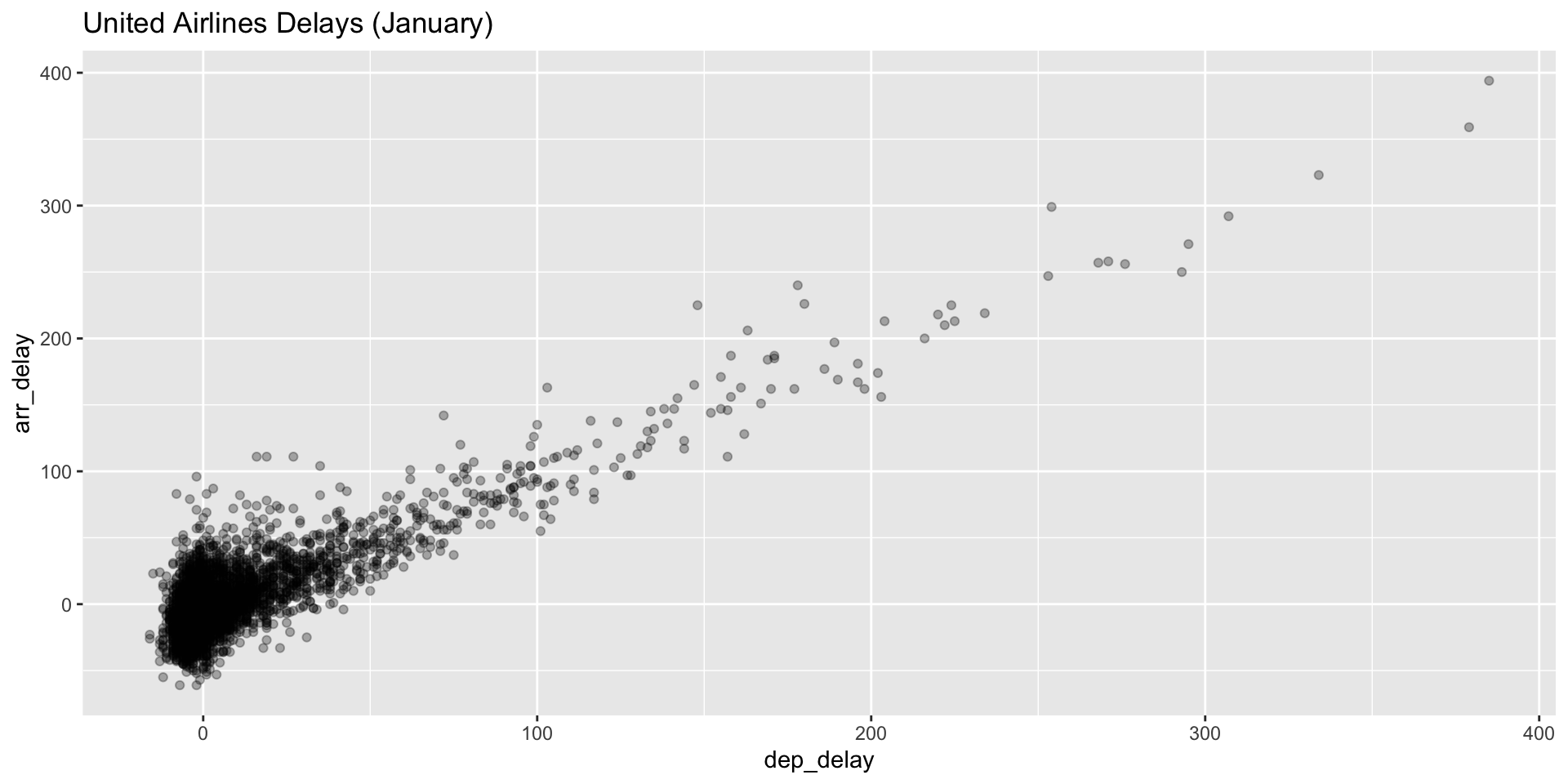
Piping into ggplot
The pipe works beautifully with ggplot:
Piping into ggplot
Putting it together
A complete workflow
# Which airlines have the longest delays in summer?
flights |>
  filter(month %in% c(6, 7, 8)) |>           # Summer months
  filter(!is.na(arr_delay)) |>               # Remove NAs
  mutate(delay_hours = arr_delay / 60) |>    # Convert to hours
  select(carrier, delay_hours) |>            # Keep relevant columns
arrange(desc(delay_hours)) # Longest delays firstA complete workflow
# A tibble: 84,124 × 2
   carrier delay_hours
   <chr>         <dbl>
 1 MQ             18.8
 2 MQ             16.5
 3 DL             14.9
 4 DL             14.2
 5 AA             13.4
 6 DL             13
 7 DL             12.8
 8 VX             11.3
 9 AA             10.8
10 VX             10.5
# ℹ 84,114 more rows
Get a head start
Your turn!
Using the flights dataset:
- Filter to American Airlines (“AA”) flights to Los Angeles (“LAX”)
- Create a new variable
speed(distance / air_time * 60) - Select carrier, origin, dest, and speed
- Arrange by speed (highest first)
- What’s the fastest AA flight to LAX?
Bonus: keeping only new columns
mutate() adds new columns while keeping existing ones.
Use .keep = "none" to only keep the new columns:
Wrapping up
The dplyr workflow
The pipe (|>) connects these verbs into a readable workflow.
Before next class
📖 Read:
✅ Practice:
- Transform
flightsin different ways - Create new variables with
mutate() - Build multi-step pipelines
Key takeaways
- filter() picks rows by condition
- arrange() reorders rows (use
desc()for descending) - select() picks columns (helpers like
contains()are useful) - mutate() creates new columns
- The pipe |> makes code readable and elegant
The one thing to remember
The pipe turns a wall of nested code into a sentence you can read aloud.
Next time: group_by() and summarize()
PSY 410 | Session 3