Your First Visualization

PSY 410: Data Science for Psychology

Dr. Sara Weston

2026-04-01

Why visualize?

Anscombe’s Quartet

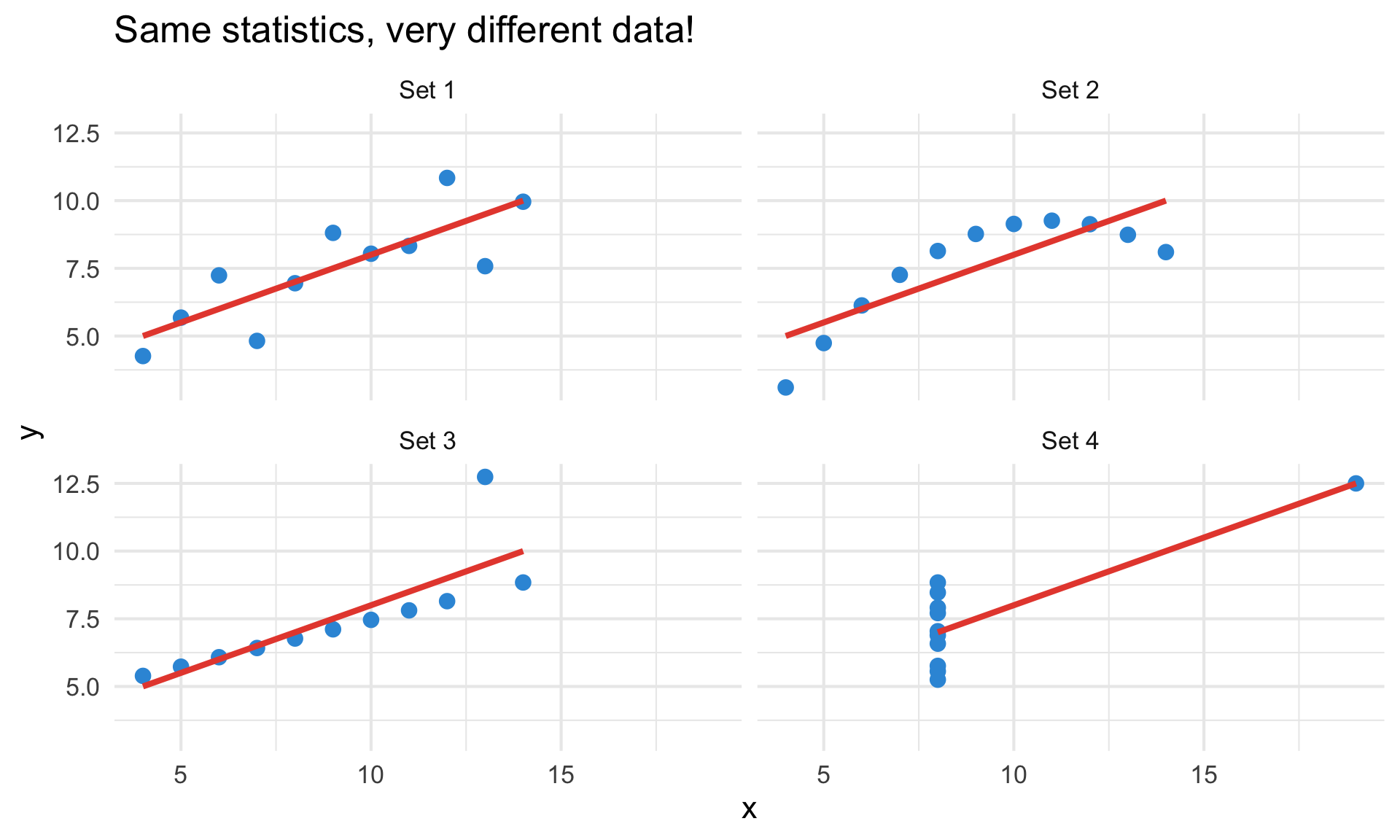
Four datasets with identical summary statistics:

set mean_x mean_y sd_x sd_y cor
1 9 7.5 3.32 2.03 0.82
2 9 7.5 3.32 2.03 0.82
3 9 7.5 3.32 2.03 0.82
4 9 7.5 3.32 2.03 0.82

But look at the plots!

Four scatterplots of Anscombe's Quartet, each with an identical linear regression line but very different data patterns — one linear, one curved, one with an outlier, and one clustered with a single extreme point.

Always visualize your data before running statistics.

Introduction to ggplot2

ggplot2 builds plots in layers, like a grammar

  • Created by Hadley Wickham (2005)
  • Based on the Grammar of Graphics by Leland Wilkinson
  • Most popular R visualization package
  • Part of the tidyverse

The “gg” stands for “Grammar of Graphics”

The grammar of graphics

Every ggplot has three essential components:

  1. Data — what you want to visualize
  2. Aesthetics (aes) — how variables map to visual properties
  3. Geoms — what geometric shapes represent the data
# The basic template
ggplot(data = <DATA>, mapping = aes(<MAPPINGS>)) +
  <GEOM_FUNCTION>()

Our dataset: mpg

# Fuel economy data for 234 cars
glimpse(mpg)
Rows: 234
Columns: 11
$ manufacturer <chr> "audi", "audi", "audi", "audi", "audi", "audi", "audi", "…
$ model        <chr> "a4", "a4", "a4", "a4", "a4", "a4", "a4", "a4 quattro", "…
$ displ        <dbl> 1.8, 1.8, 2.0, 2.0, 2.8, 2.8, 3.1, 1.8, 1.8, 2.0, 2.0, 2.…
$ year         <int> 1999, 1999, 2008, 2008, 1999, 1999, 2008, 1999, 1999, 200…
$ cyl          <int> 4, 4, 4, 4, 6, 6, 6, 4, 4, 4, 4, 6, 6, 6, 6, 6, 6, 8, 8, …
$ trans        <chr> "auto(l5)", "manual(m5)", "manual(m6)", "auto(av)", "auto…
$ drv          <chr> "f", "f", "f", "f", "f", "f", "f", "4", "4", "4", "4", "4…
$ cty          <int> 18, 21, 20, 21, 16, 18, 18, 18, 16, 20, 19, 15, 17, 17, 1…
$ hwy          <int> 29, 29, 31, 30, 26, 26, 27, 26, 25, 28, 27, 25, 25, 25, 2…
$ fl           <chr> "p", "p", "p", "p", "p", "p", "p", "p", "p", "p", "p", "p…
$ class        <chr> "compact", "compact", "compact", "compact", "compact", "c…

Your first plot

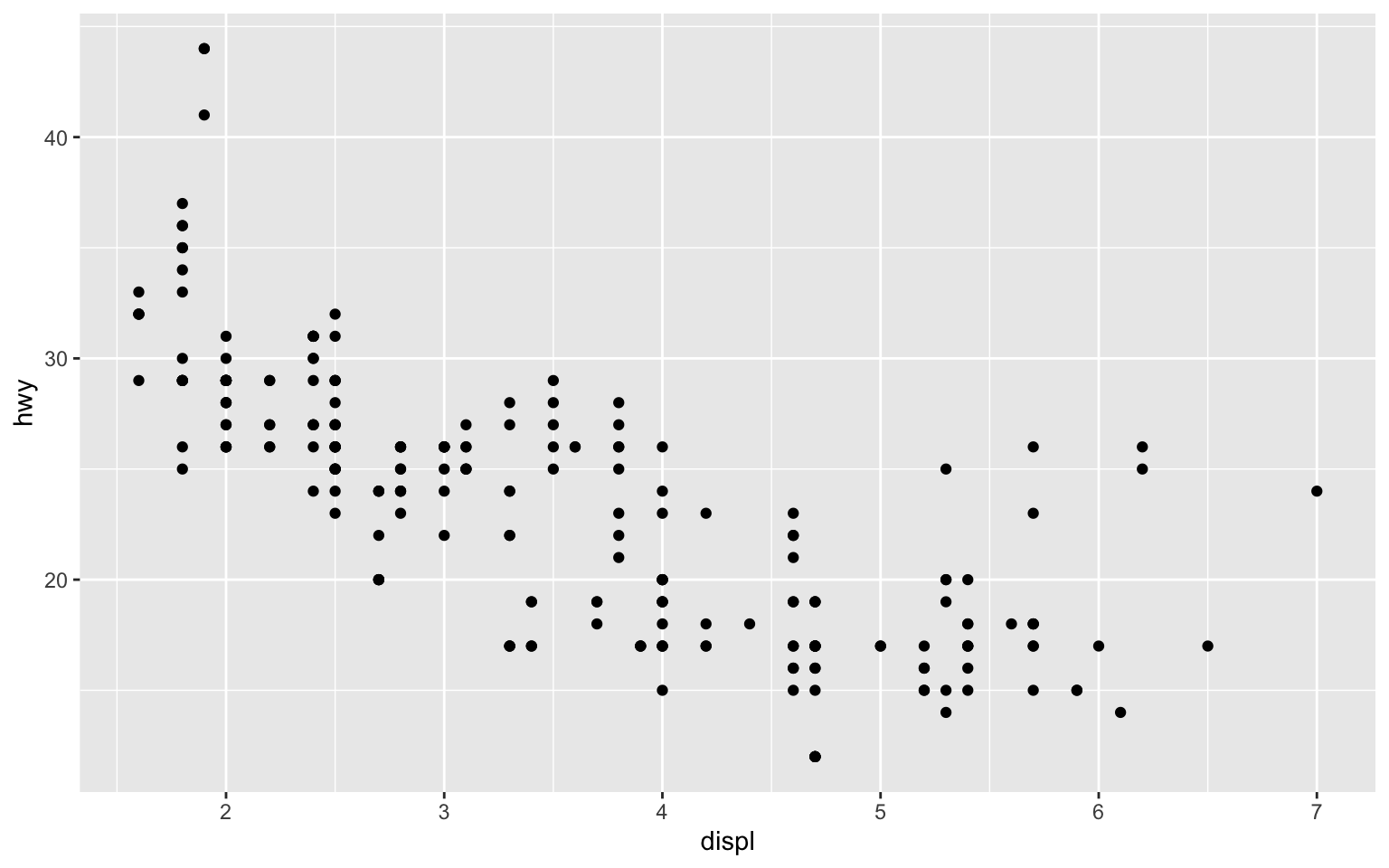
# Relationship between engine size and highway mpg
ggplot(data = mpg, mapping = aes(x = displ, y = hwy)) +
  geom_point()

Your first plot

Scatterplot of engine displacement versus highway miles per gallon showing a negative curved relationship — cars with larger engines tend to get worse fuel economy.

Breaking it down

ggplot(data = mpg, mapping = aes(x = displ, y = hwy)) +
  # ↑ Data and aesthetic mappings
  geom_point()
  # ↑ Geometric object (points = scatterplot)
  • data = mpg — use the mpg dataset
  • aes(x = displ, y = hwy) — map displacement to x, highway mpg to y
  • geom_point() — represent data as points

You can also write it without the argument names — these are equivalent:

ggplot(mpg, aes(x = displ, y = hwy)) +   # what I'll use in slides
  geom_point()

Aesthetic mappings

What are aesthetics?

Aesthetics are visual properties of geoms:

  • x, y — position
  • color — outline or line color
  • fill — interior color (bars, boxes)
  • size, shape, alpha — size, shape, and transparency

We’ll focus on color today — you’ll explore the others in assignments.

Mapping color to a variable

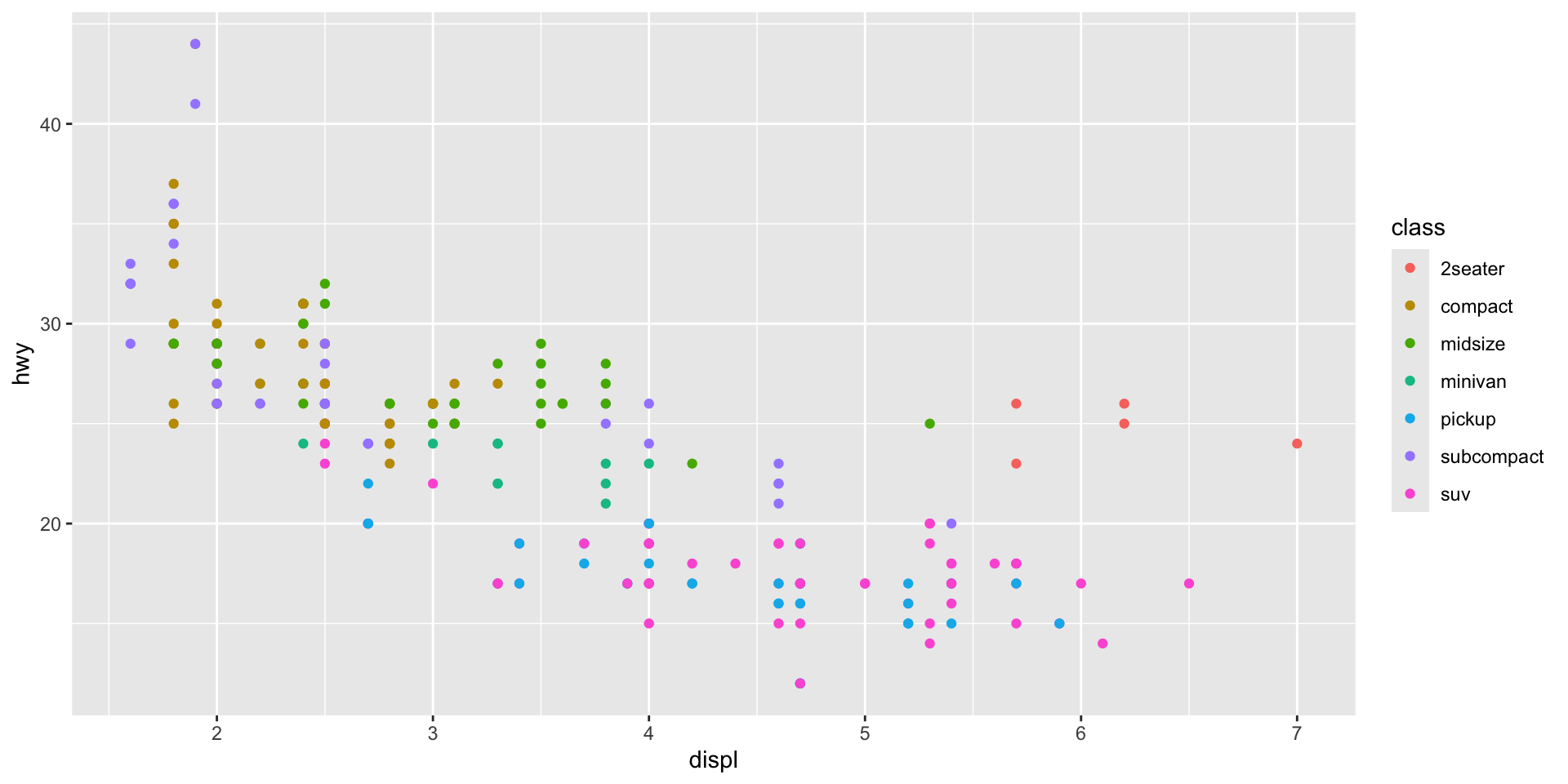
What if we want to see which points are which car class?

ggplot(mpg, aes(x = displ, y = hwy, color = class)) +
  geom_point()

Mapping color to a variable

Scatterplot of engine displacement versus highway mpg with points colored by vehicle class, showing that compact and subcompact cars cluster at high mpg and low displacement while SUVs and pickups cluster at low mpg and high displacement.

Setting vs. mapping

Mapping — aesthetic varies with data (inside aes())

ggplot(mpg, aes(x = displ, y = hwy, color = class)) +
  geom_point()

Setting — aesthetic is constant (outside aes())

ggplot(mpg, aes(x = displ, y = hwy)) +
  geom_point(color = "blue", size = 3)

Common mistake!

# What happens if you put a constant inside aes()?
ggplot(mpg, aes(x = displ, y = hwy, color = "blue")) +
  geom_point()

ggplot thinks “blue” is a category name!

Common mistake!
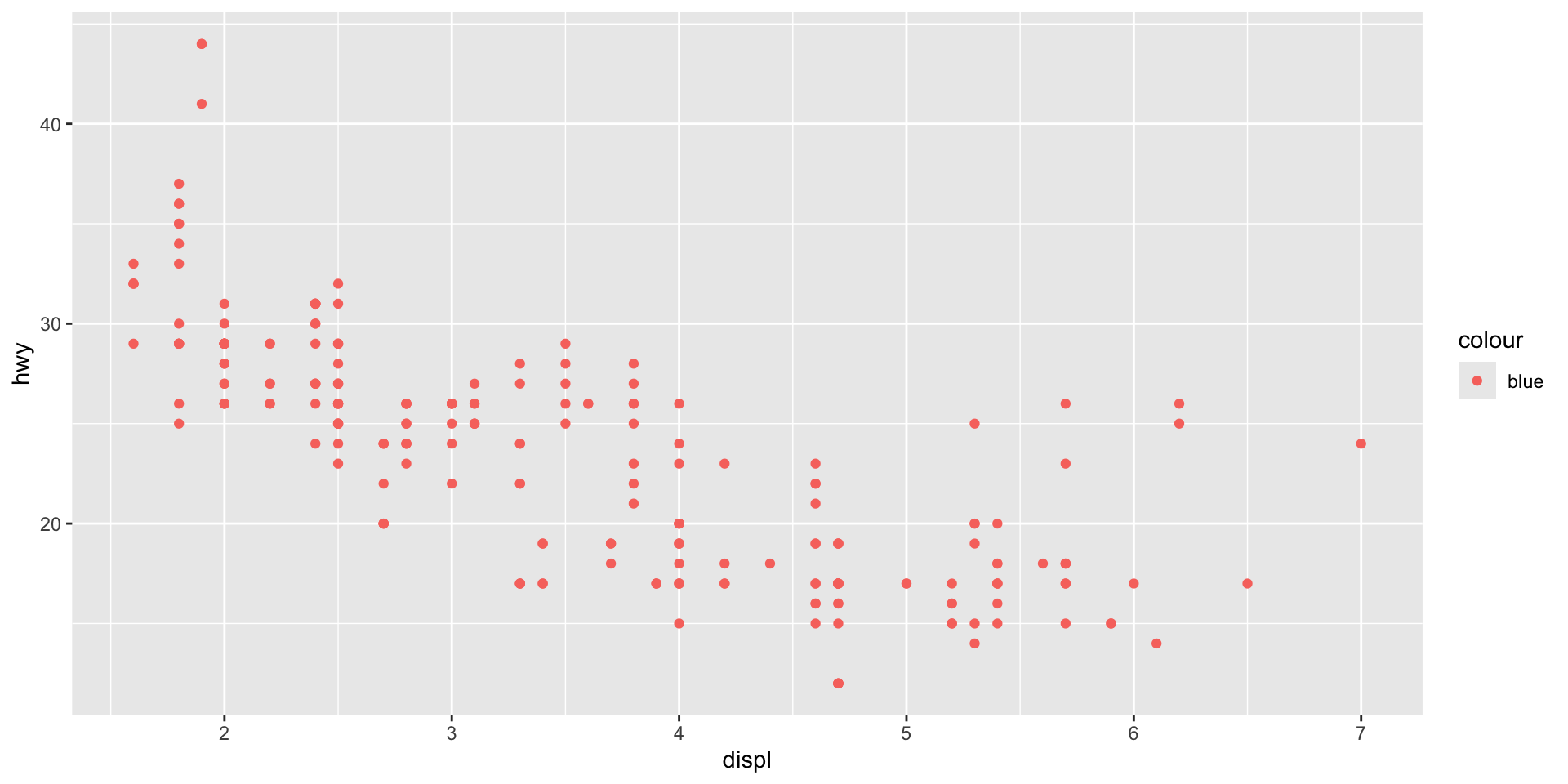
Scatterplot where all points are salmon-red instead of blue, with a legend showing a single category labeled 'blue' — illustrating the common mistake of placing a color name inside aes() where ggplot treats it as a categorical variable.

Different data types need different geoms

Common geoms

Geom What it makes
geom_point() Scatterplot
geom_line() Line graph
geom_bar() Bar chart
geom_histogram() Histogram
geom_boxplot() Box plot
geom_smooth() Smoothed line

geom_smooth()

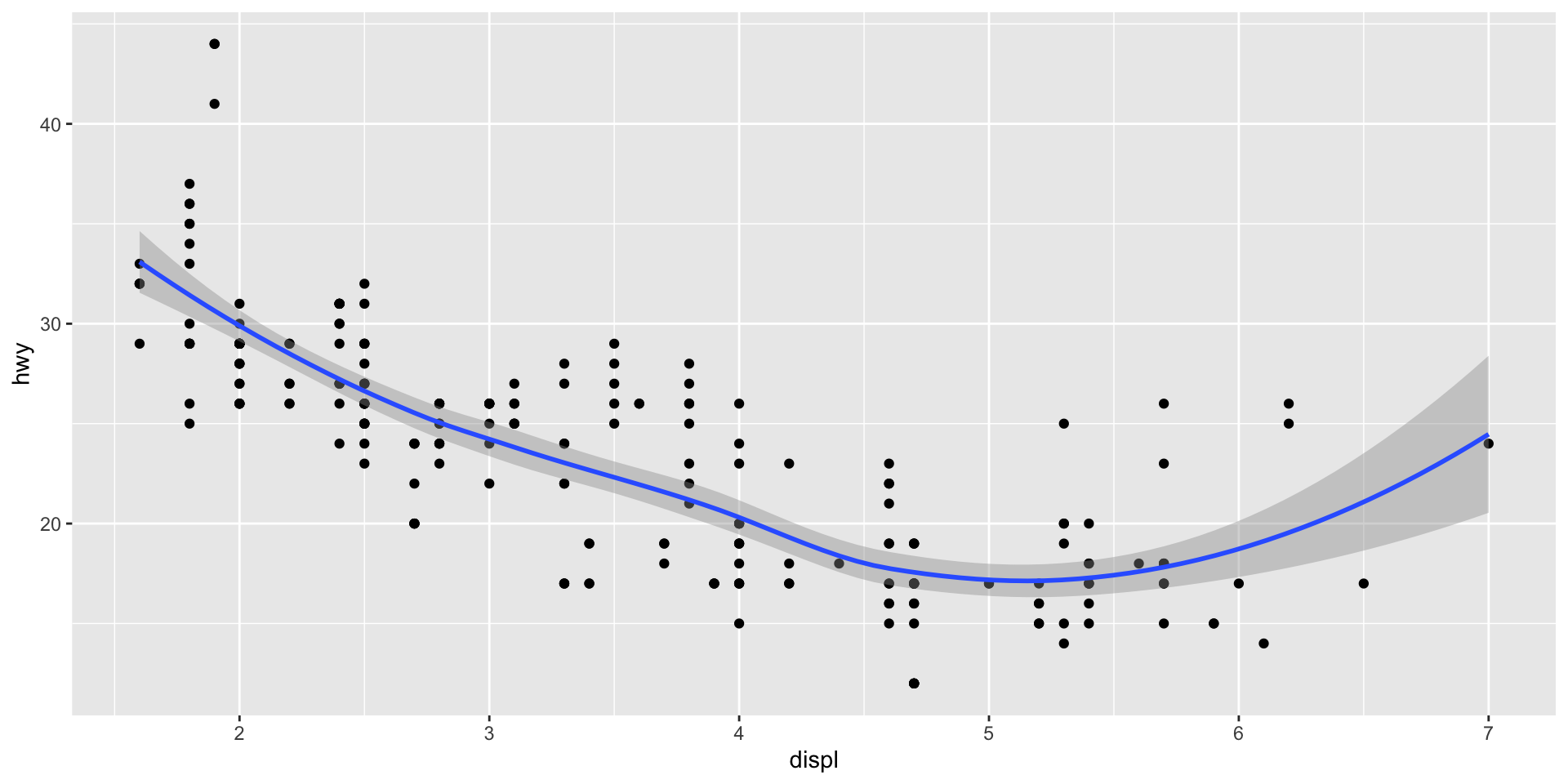
Add a trend line to your scatterplot:

ggplot(mpg, aes(x = displ, y = hwy)) +
  geom_point() +
  geom_smooth()  # Adds a smoothed trend line

geom_smooth()

Scatterplot of engine displacement versus highway mpg with a smoothed (loess) trend line and gray confidence band showing a negative curved relationship that levels off around 5 liters of displacement.

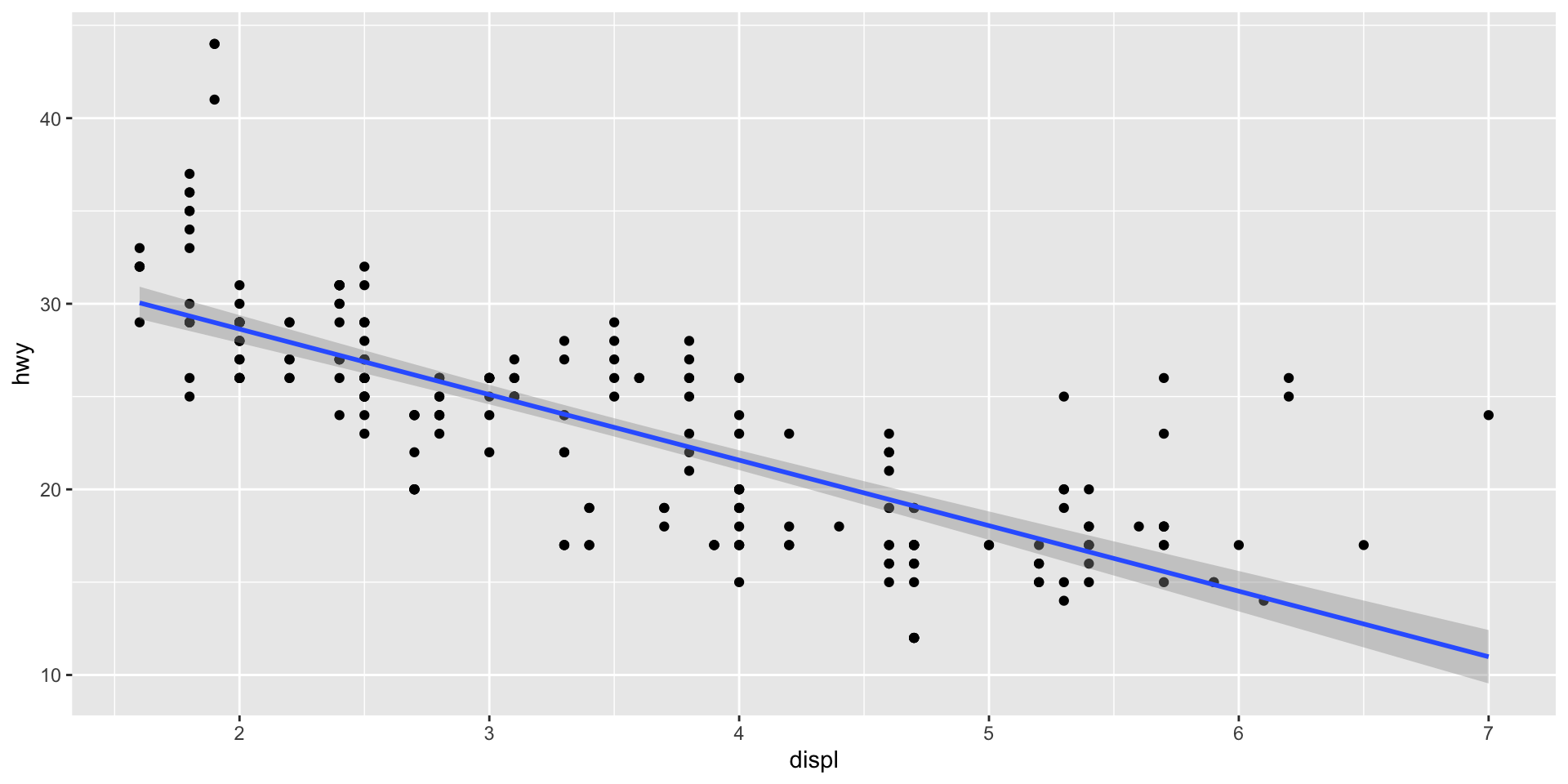
Linear trend line

ggplot(mpg, aes(x = displ, y = hwy)) +
  geom_point() +
  geom_smooth(method = "lm")  # lm = linear model

Linear trend line

Scatterplot of engine displacement versus highway mpg with a straight linear regression line and confidence band showing a clear negative linear trend — highway mpg decreases as engine size increases.

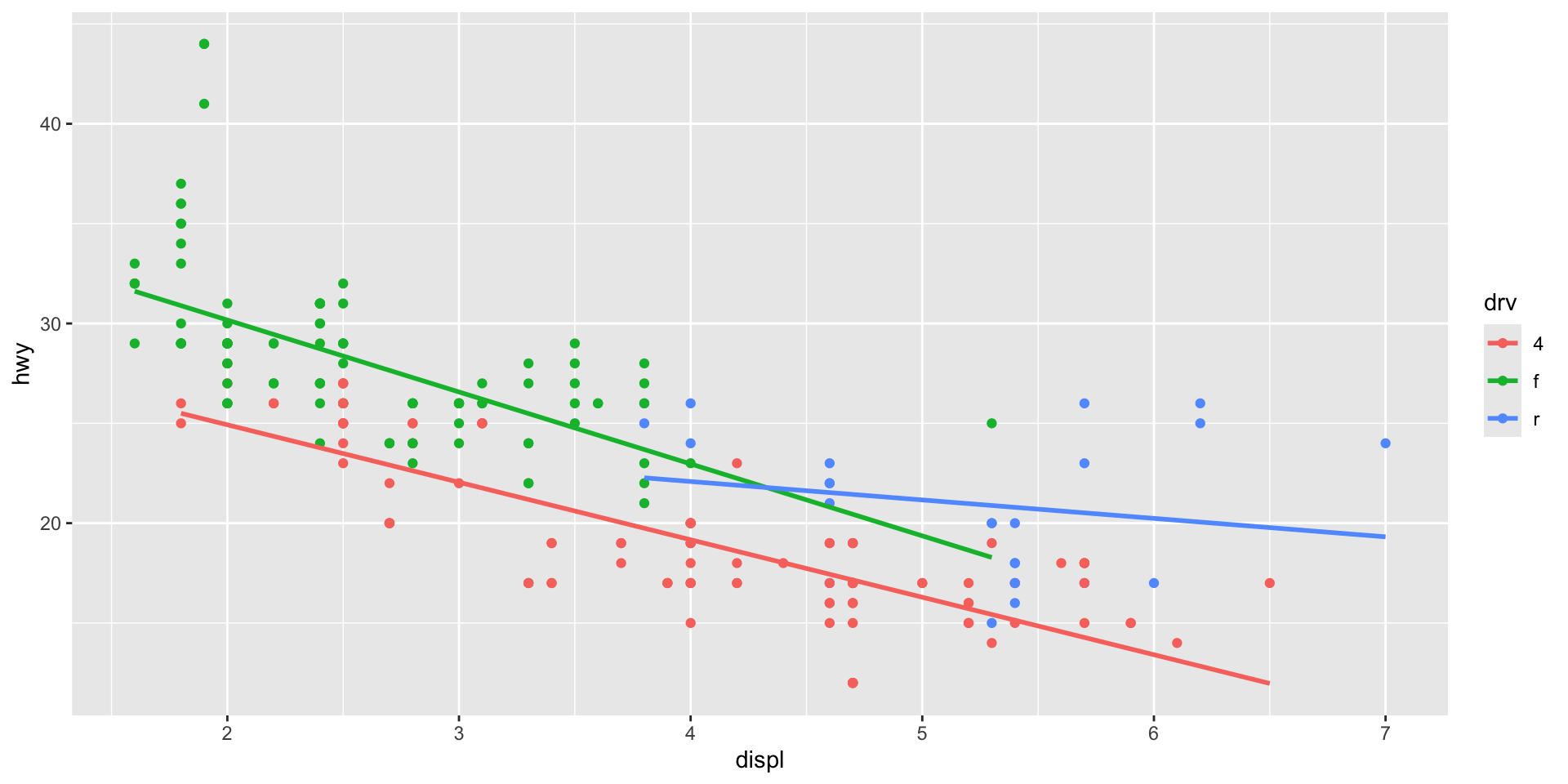
Layering geoms

Each + adds a layer:

ggplot(mpg, aes(x = displ, y = hwy, color = drv)) +
  geom_point() +
  geom_smooth(method = "lm", se = FALSE)  # se = FALSE removes confidence band

Layering geoms

Scatterplot of engine displacement versus highway mpg colored by drive type (front, rear, 4-wheel) with separate linear trend lines for each group, showing that all three drive types have negative trends but at different levels.

Pair coding break

Your turn: 10 minutes

With a partner, create a scatterplot using the mpg dataset:

  1. Plot cty (x-axis) vs hwy (y-axis)
  2. Color points by fuel type (fl)
  3. Add a smooth trend line
  4. Give it a title and axis labels
  5. Who can make theirs look the best?

Tip

You have everything you need from the last few slides. Start with the basic template and build from there.

Before we move on

📤 Upload your code to Canvas for participation credit. Paste what you have into today’s in-class submission — it doesn’t need to work perfectly.

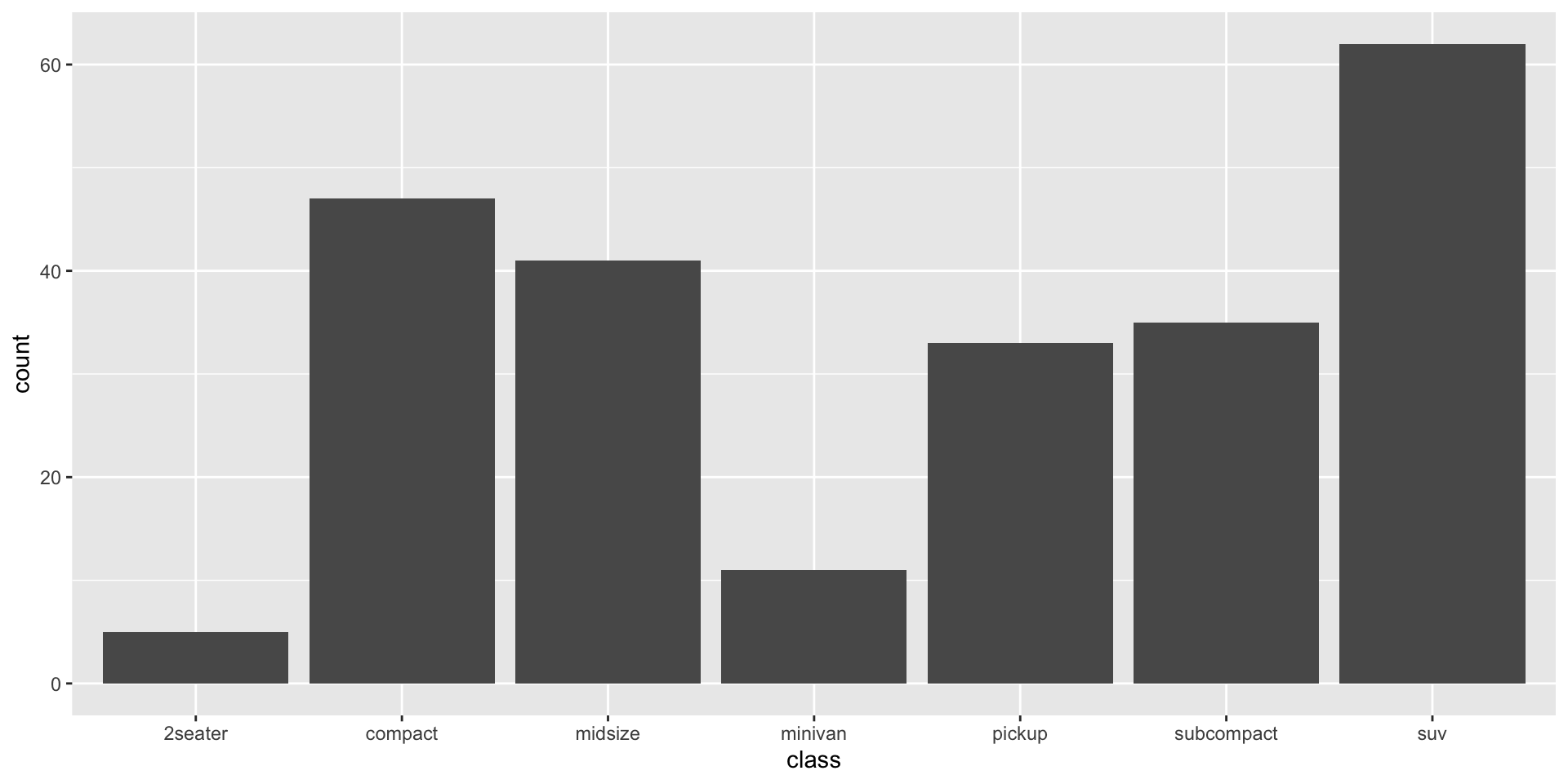
geom_bar() — categorical data

# Counts of each car class
ggplot(mpg, aes(x = class)) +
  geom_bar()

geom_bar() — categorical data

Bar chart showing the count of vehicles in each car class — SUVs are the most common category with over 60 vehicles, followed by compact and midsize, while 2-seaters are the least common.

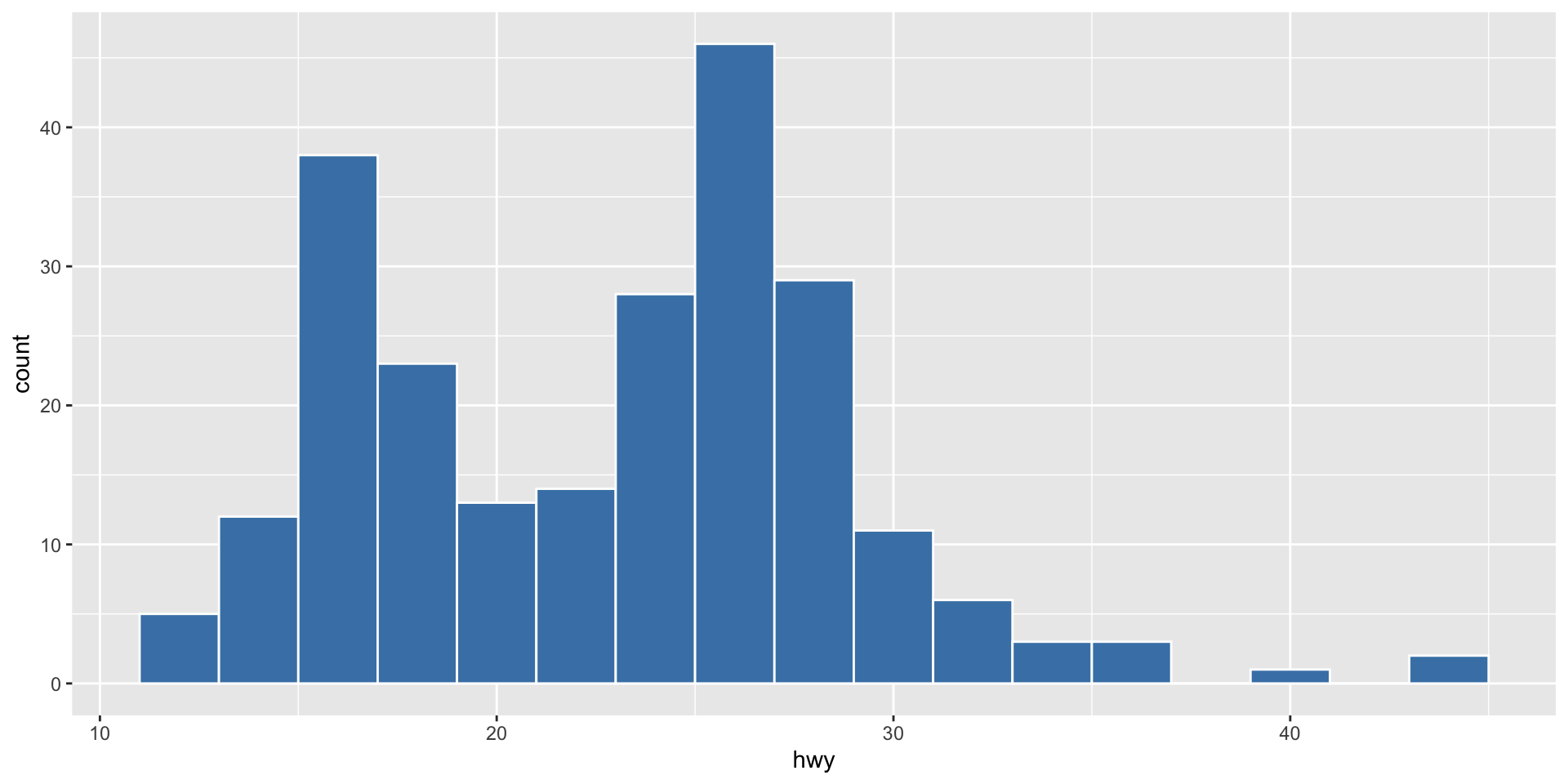
geom_histogram() — distributions

# Distribution of highway mpg
ggplot(mpg, aes(x = hwy)) +
  geom_histogram(binwidth = 2, fill = "steelblue", color = "white")

geom_histogram() — distributions

Histogram of highway miles per gallon with steel blue bars and white borders, showing a roughly bimodal distribution with peaks around 17 and 27 mpg.

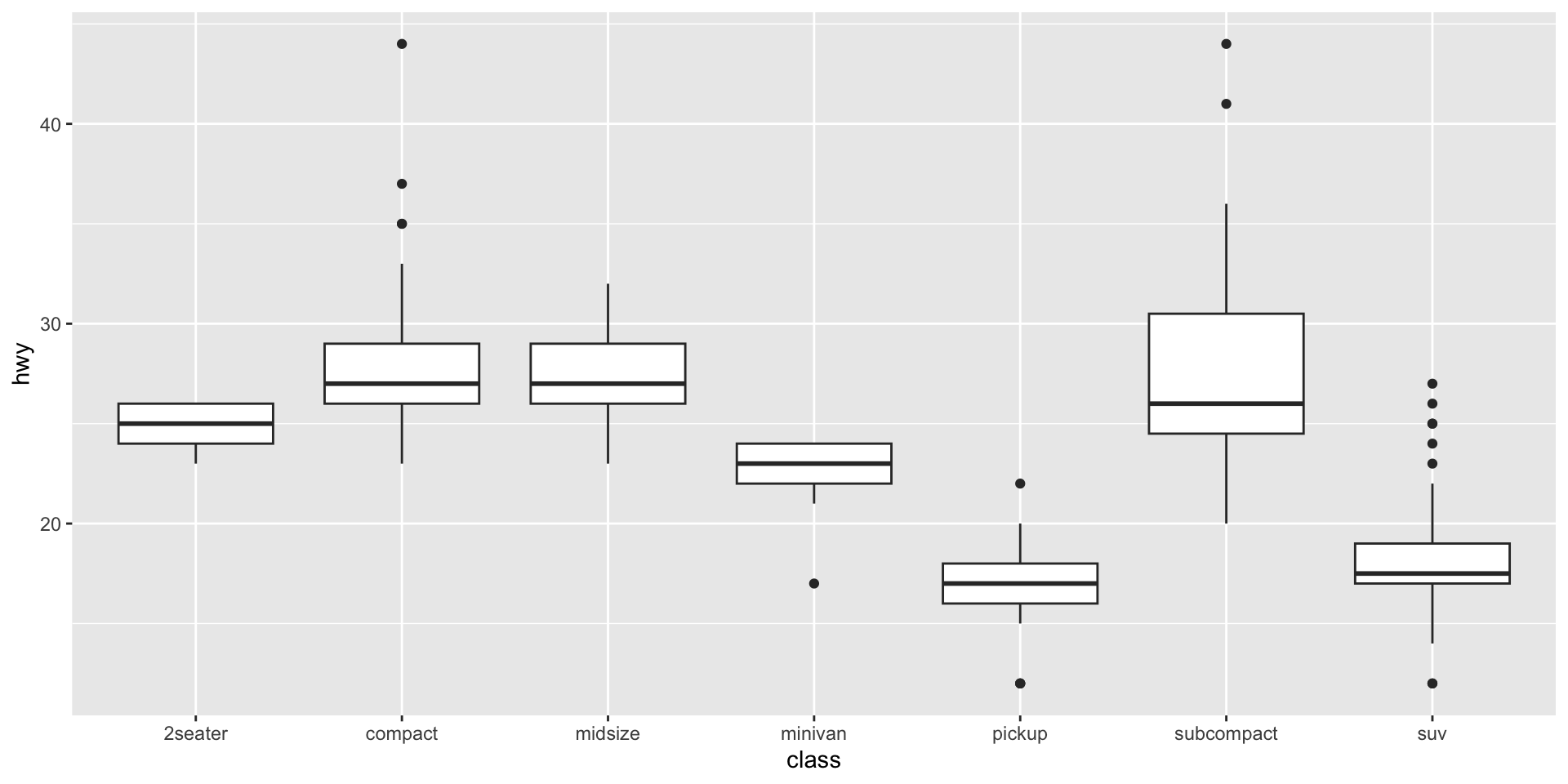
geom_boxplot() — comparing groups

# Highway mpg by car class
ggplot(mpg, aes(x = class, y = hwy)) +
  geom_boxplot()

geom_boxplot() — comparing groups

Boxplots comparing highway mpg across seven vehicle classes — compact and subcompact cars have the highest median highway mpg while pickups and SUVs have the lowest, with several outliers visible.

Facets

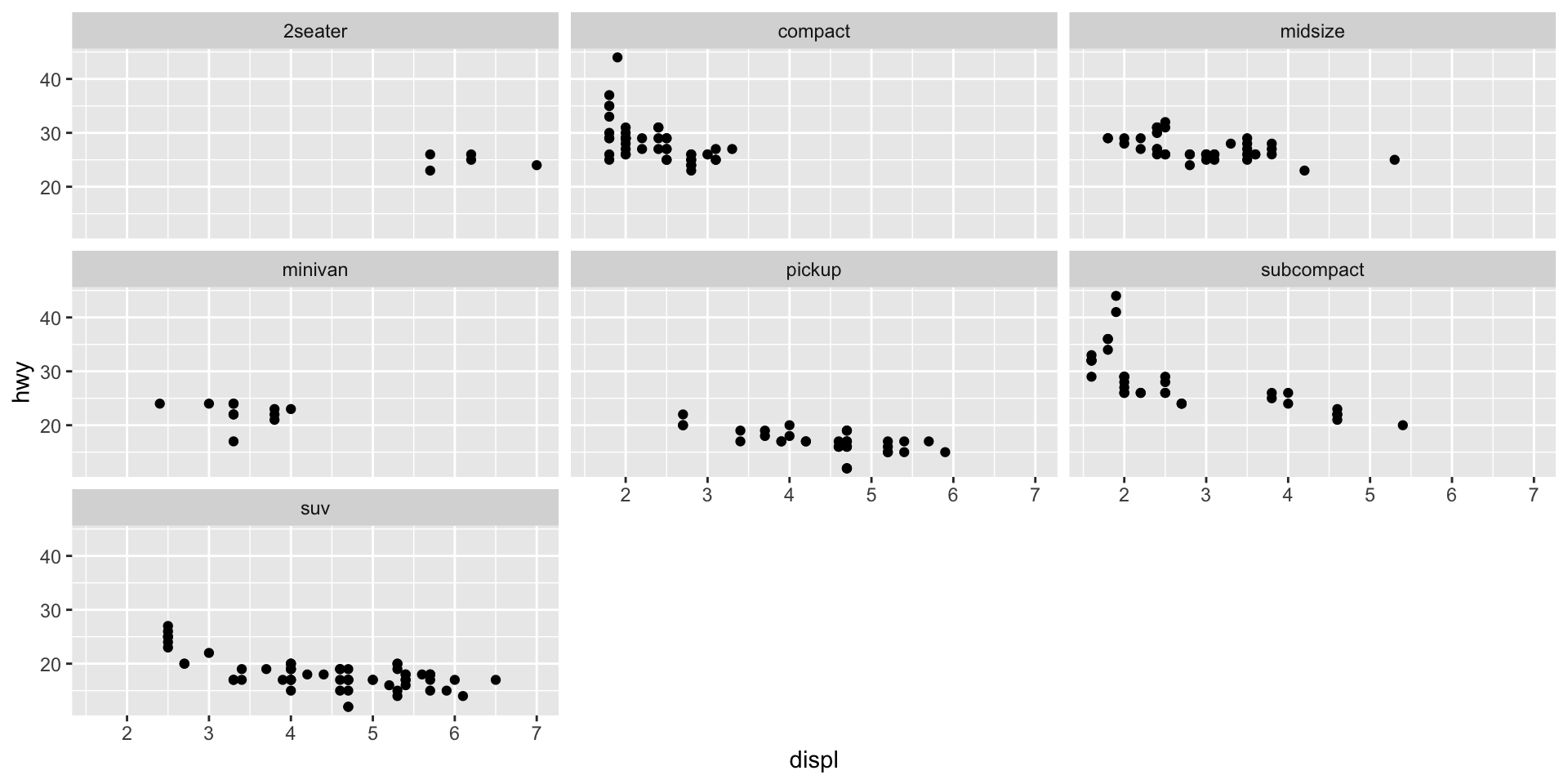
What are facets?

Facets split your plot into small multiples based on a variable.

ggplot(mpg, aes(x = displ, y = hwy)) +
  geom_point() +
  facet_wrap(~class)

What are facets?

Scatterplot of engine displacement versus highway mpg split into seven small panels (one per vehicle class) using facet_wrap, making it easy to see that each class occupies a distinct region of engine size and fuel efficiency.

Making it look good

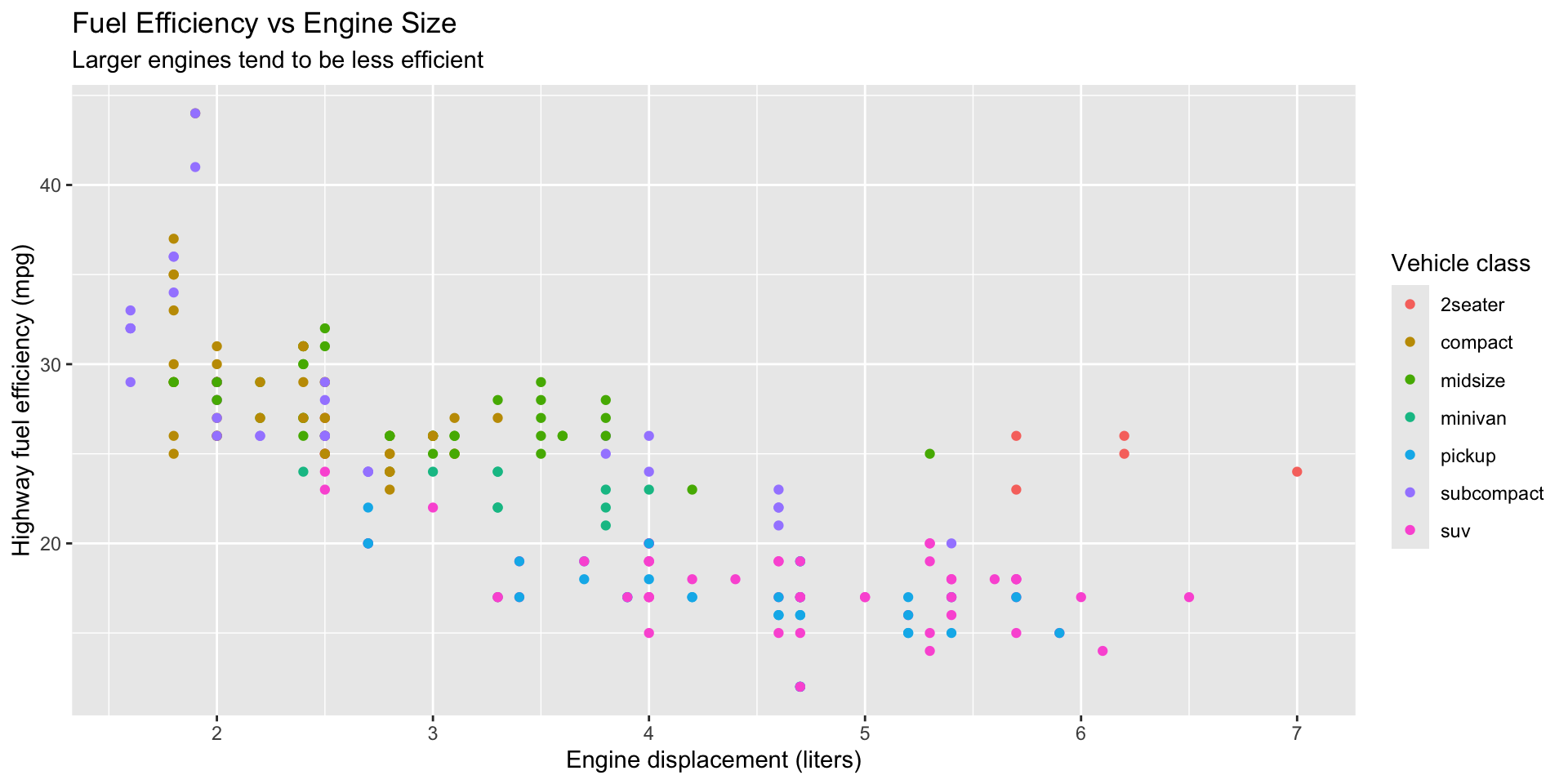
Adding labels

ggplot(mpg, aes(x = displ, y = hwy)) +
  geom_point(aes(color = class)) +
  labs(
    title = "Fuel Efficiency vs Engine Size",
    subtitle = "Larger engines tend to be less efficient",
    x = "Engine displacement (liters)",
    y = "Highway fuel efficiency (mpg)",
    color = "Vehicle class"
  )

Adding labels

Labeled scatterplot titled 'Fuel Efficiency vs Engine Size' with subtitle, descriptive axis labels, and a legend for vehicle class — demonstrating how labs() makes a plot publication-ready.

Themes

Themes control the overall look:

ggplot(mpg, aes(x = displ, y = hwy)) +
  geom_point(aes(color = class)) +
  theme_minimal()  # Clean, minimal theme

Try different ones: theme_bw(), theme_classic(), theme_gray() (default)

Themes
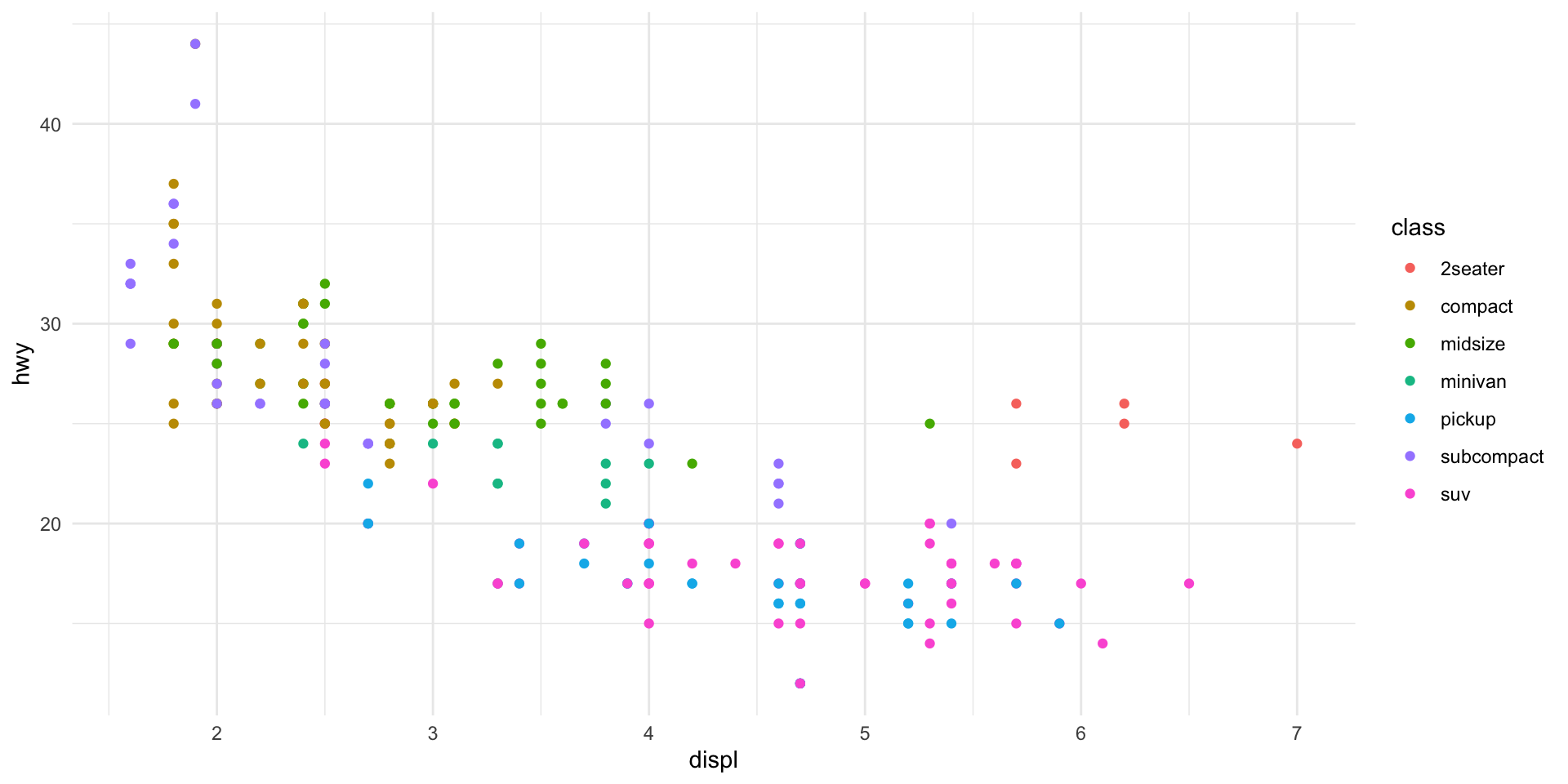
Scatterplot of engine displacement versus highway mpg colored by vehicle class using theme_minimal, which removes the gray background and gives the plot a clean, modern appearance.

Saving plots

Use ggsave() to save your plot:

# Create the plot
my_plot <- ggplot(mpg, aes(x = displ, y = hwy, color = class)) +
  geom_point() +
  theme_minimal()

# Save it
ggsave("my_plot.png", my_plot, width = 8, height = 6)

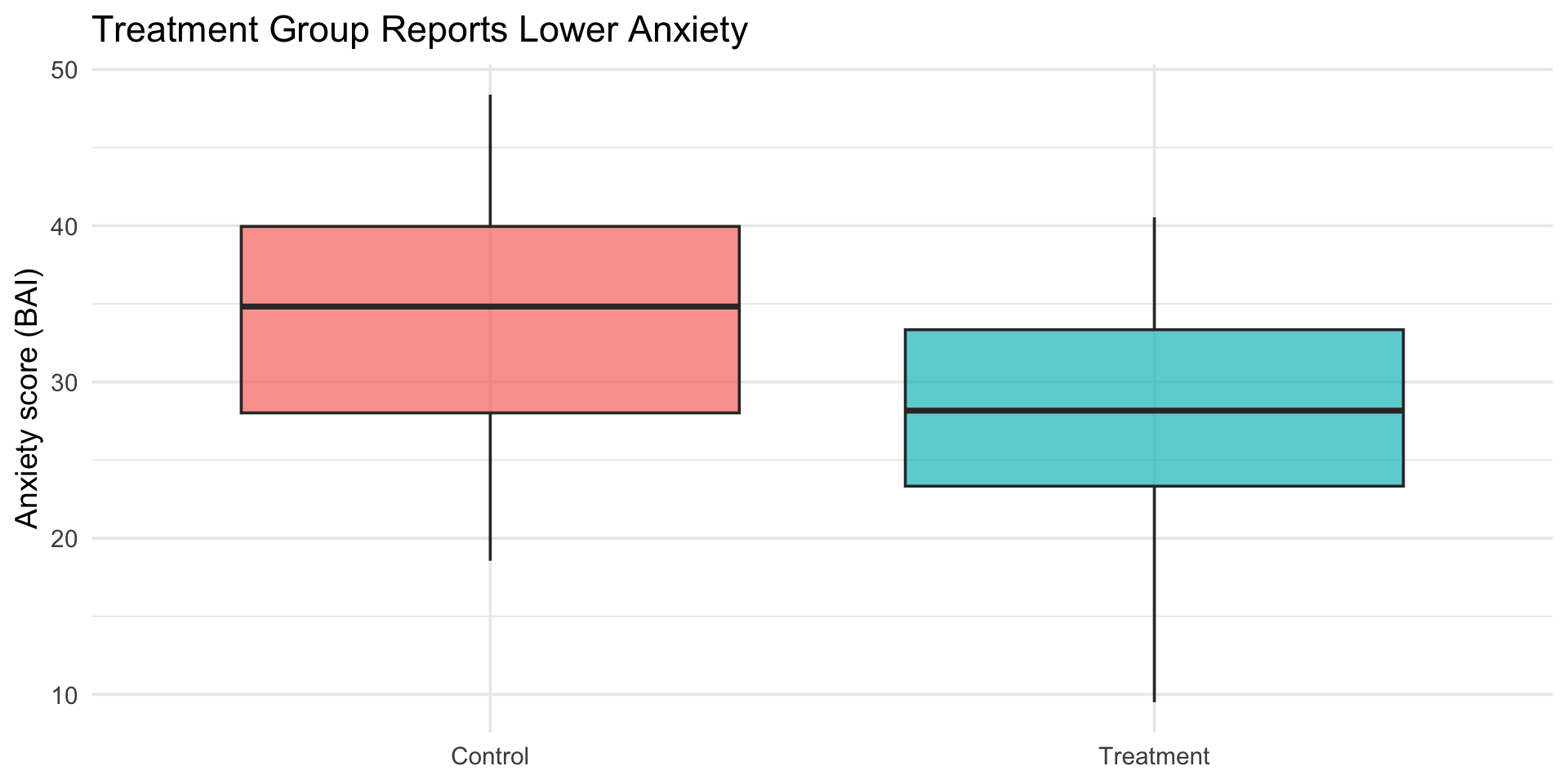
Same template, psychology data

The ggplot template works the same way with any data:

set.seed(410)  # Reproducible results
# Simulated experiment: condition vs. anxiety score
psych_demo <- tibble(
  condition = rep(c("Control", "Treatment"), each = 30),
  anxiety = c(rnorm(30, mean = 35, sd = 8), rnorm(30, mean = 28, sd = 8))
)

ggplot(psych_demo, aes(x = condition, y = anxiety, fill = condition)) +
  geom_boxplot(alpha = 0.7, show.legend = FALSE) +
  labs(
    title = "Treatment Group Reports Lower Anxiety",
    x = NULL,
    y = "Anxiety score (BAI)"
  ) +
  theme_minimal(base_size = 14)

Same template, psychology data

Side-by-side boxplots comparing anxiety scores (BAI) between a Control group and a Treatment group — the Treatment group has a visibly lower median anxiety score, demonstrating the same ggplot template applied to psychology data.

Putting it together

A complete example

ggplot(mpg, aes(x = displ, y = hwy)) +
  geom_point(aes(color = class), size = 2, alpha = 0.7) +
  geom_smooth(method = "lm", color = "black", se = TRUE) +
  labs(
    title = "Fuel Efficiency Decreases with Engine Size",
    subtitle = "Data from 234 vehicles (1999-2008)",
    x = "Engine displacement (liters)",
    y = "Highway MPG",
    color = "Vehicle class",
    caption = "Source: EPA fuel economy data"
  ) +
  theme_minimal(base_size = 14)

A complete example
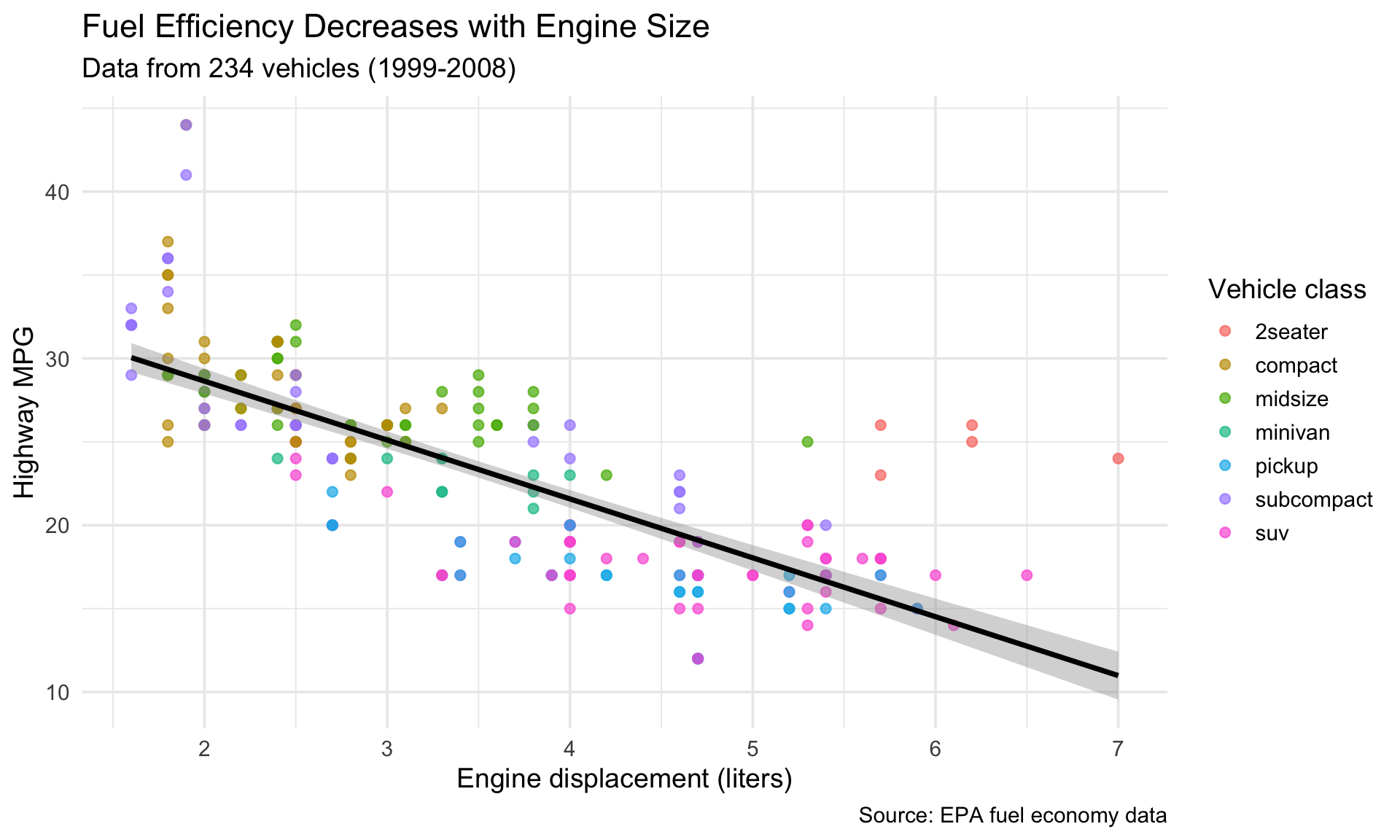
A polished scatterplot showing fuel efficiency decreasing with engine size, with points colored by vehicle class, a black linear trend line with confidence band, descriptive title and subtitle, proper axis labels, a caption citing the EPA data source, and a minimal theme.

Get a head start

Assignment 1 preview

Open a new R script in your project. Try these on your own:

  1. Make a scatterplot of displ vs hwy from mpg
  2. Color it by class
  3. Facet by drv (drive type)
  4. Save it with ggsave()

This is the first part of Assignment 1.

Solution

Wrapping up

Before next class

📖 Read: R4DS Ch 3: Data transformation (sections 3.1–3.4)

📝 Assignment 1 is due Sunday at 11:59 PM

Never trust a summary statistic you haven’t plotted

Today’s template — you’ll use it all quarter:

ggplot(<DATA>, aes(<MAPPINGS>)) +
  <GEOM_FUNCTION>() +
  labs(<LABELS>) +
  theme_<THEME>()

Next time: Data Transformation with dplyr